1
Page 3 of 8
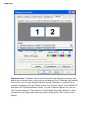
Windows XP ? many laptops and computers with Windows XP support multiple
monitors with a feature called Dualview. Right-click the desktop, and click
"Properties." In the dialog box, click the "Settings" tab. Click the "Display" list, and
you should see the Projector model listed as an alternate display option. Select the
projector, then click the option to "Extend my Windows desktop onto this monitor."
Your desktop should now appear on the projector screen.