1
Inserting a memory card (optional)
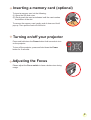
To insert a memory card, do the following:
(1) Open the SD card cover.
(2) Gently push the card as indicated until the card reaches
the bottom of the slot.
To remove the memory card, gently push it down and it will
pop up. Then pull the card out of the slot.
Turning on/off your projector
Press and hold down the Power button for 4 seconds to turn
on the projector.
To turn off the projector, press and hold down the Power
button for 2 seconds.
Adjusting the Focus
Please adjust the Focus switch to have a better view during
usage.