1
Abeje Y. Mersha and Rüesch Andreas
2
Documentation
Overview
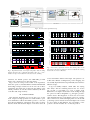
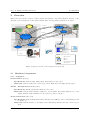
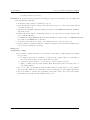
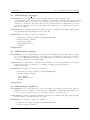
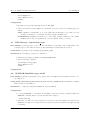
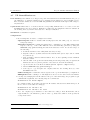
This section provides an overview of all used hard- and software components, illustrated in Fig. 1. Additionaly, a brief description of their functionalities and some important specifications are given.
ROS MASTER
/fcu/control
serial link
/asctec_hl_interface
(UART 0 to HL 0)
FCU
/fcu/debug
/udpServer
UDP (local)
/air_hapticteleop
/teleop/kb_input
/teleop/haptic_state
/air_logger
/omega6
Pose estimation
groundstation.exe
/teleop/haptic_state
RS 232
VZSoft
802.11.n
USB 2.0
Legend
ROS core (master)
ROS node
ROS topic
wired connection (serial, USB)
UDP connection
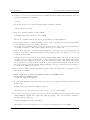
Figure 1: System overview of the aerial test set-up at UT
2.1
2.1.1
Hardware Components
Computers
Ground station (Laptop)
Specifications: Linux Ubuntu 10.04 (32bit), Intel Quad Core Processor
Main task: runs the master side of the teleoperation, furthermore the flight data is logged
Tracker - Ground station (Desktop-PC)
Specifications: WinXp (32bit), Intel Dual Core Processor
Main task: runs the tracker interface (VZsoft) to record marker data, additionally the pose of the
UAV is estimated and transmitted to the vehicle’s position controller
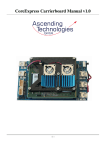
Atom carrierboard (On-board)
Specifications: Linux Ubuntu 10.10 (32bit), Intel Atom 1.6 GHz processor, brief manual provided
by AscTec [3].
Main task: runs the interface to the flight control unit (FCU), thus the slave side of the teleoperation
4
August 26, 2011