1
II. PRELIMINARIES
This section briefly presents some background knowledge
of haptic teleoperation applied on UAV, followed by a brief
introduction of the kinetic scrolling.
A. Haptic Teleoperation for Unmanned Aerial Vehicles
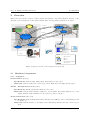
The scheme of a typical haptic teleoperation control loop
is illustrated in Fig. 1. As can be seen, the interaction of
the human operator with the aerial vehicle (slave device),
through the haptic device (master device), is bilateral. The
master and the slave side are equipped with a separate
controller: the master controller’s main tasks are to map
the user’s inputs to the corresponding reference of the slave
device, and to compute and display the force feedback on the
master device. On the other side, the slave controller ensures
that the slave is following the desired trajectory or velocity,
depending on the configuration. The communication channel,
between the master and slave device, is typically unreliable
and usually introduces unknown and probably even timevarying delays into the control loop.
Master Side
Slave Side
FH
FF
FS
FF
Human
Operator
Aerial Vehicle
Haptic Interface
xm
Master
Controller
x∗s
xs
Communication
Channel
xs
x∗s
xs
FE
ui
Environment
Slave
Controller
Fig. 1: Scheme of a haptic teleoperation control loop. Where xm represents
the position of the haptic device, x∗s the reference position of the UAV, xs
its actual position. Furthermore, the applied force by the human operator is
denoted with FH , the feedback force with FF , the interaction forces of the
UAV with the environment are represented with FS and FE , and the input
commands of the slave controller are denoted with ui .
B. Kinetic Scrolling
Computer technology and graphics have dealt with
workspace and display limitation for ages, therefore various
forms of scrolling are common and well established methods
to overcome this limitation. On devices with a touchscreen,
e.g. on smart phones, the so-called kinetic scrolling method
became standard in the recent past. The user is provided with
two different input modes, as long as his finger is in contact
with the touchscreen, its movements are directly mapped to
the displacement of the screen contents. The displacement
of the screen contents, i.e. the scrolling, does not necessarily
stop immediately, when the user releases his finger from
the input device, it is able to move further and decelerates
automatically till it eventually comes to a complete stop. The
amount of this additional scrolling is defined by the speed of
the user’s motion just before he releases the contact. Thus,
for large distances a fast scrolling can be applied without
losing the high accuracy and usability for small, precise
manipulations. Kinetic scrolling is in literature also known as
flicking, releated work can be found in [17], [18]. As stated
above, kinetic scrolling became standard on modern smart
phones, where it allows the user to interact with his gadget
in a natural and intuitive manner. This inspired and motivated
the mapping of the operator’s inputs to the reference signal
of the slave device of the teleoperation control loop proposed
and described in Sec. III.
III. HAPTIC TELEOPERATION WITH A KINETIC
SCROLLING-BASED POSITION MAPPING
A. Kinetic Scrolling-based Position Mapping
This section describes a new approach to overcome the
limitation of the workspace on the master side, based on the
kinetic scrolling described in Sec. II-B.
1) Core Idea: Like the kinetic scrolling, the mapping
algorithm is divided into two modes, namely a direct and
a sliding mode. For the direct mode, a proportional mapping
of the master’s position to the slave’s reference position
is proposed. Whereas in the sliding mode, the operator is
provided with the possibility to “slide” the reference position
away, the sliding is decelerated automatically similar to the
kinetic scrolling on smart phones. The amount of the sliding
is influenced by the user’s speed in the direct mode before
switching to the sliding mode. Note that, in both modes
a reference position is transmitted to the on-board position
controller of the aerial vehicle, thus there is no need to switch
between different slave controllers.
2) Mathematical Description: To realize the sliding of the
reference position, a virtual point mass mv is introduced,
whose position xv is in both modes proportionally mapped
to the reference position of the aerial vehicle x∗s . For the
direct mode the master device is coupled to the virtual mass
by a stiff spring, whereas in the sliding mode, the virtual
mass is uncoupled. Furthermore, a virtual viscous damping
of the virtual mass is introduced as an external force, which
decelerates the mass during the sliding mode. The operator
is provided with a full control over the switching between
the two modes, e.g. through a button on the haptic device.
In Fig. 2 the physical model of the core idea is illustrated
for the one dimensional case.
The viscous damping is modeled to be proportional to the
velocity of the virtual mass. According to the principle of
linear momentum, the following equation of motion holds
for the virtual point-mass:
mv ẍv = −k(λ)(xv − xm ) − dẋv ,
(1)
where xm , xv ∈ R3 represent the positions of the master
device and the virtual mass respectively, mv denotes its mass,
d acts as a viscous damping coefficient, and k(λ) stands for
the spring constant of the coupling, depending on the state
of the switch λ. Note that, for the spring constant k(λ) the
following holds:
kc if λ = 1
k(λ) =
(2)
0 if λ = 0
During the sliding phase the virtual viscous damping
ensures that, the virtual mass eventually comes to a stop.
It can be easily verified from Eq. (1) and (2), that in the