1
CrossSync Control Panel
LeCroy Corporation
Application Overview
The following section introduces you to the application.
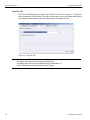
Once the application launches, four tabs are displayed. They are explained below.
Note: The Applications tab is explained in the previous section.
Run Sequence Tab
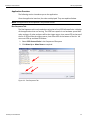
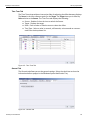
The Run Sequence tab is only used when using the LeCroy IOTA Software Suite. It displays all the applications that are running. The IOTA start capture is not hardware synced with other analyzers. If other analyzers will be the trigger source, then move IOTA to the top of the list. If IOTA will be the trigger source, then move IOTA to the bottom of the list. You can move IOTA up and down as follows:
1. Select IOTA Protocol Suite in the Sequence of Run pane 2. Click Move Up or Move Down as required.
Figure 3.3: Run Sequence Tab
CrossSync User Manual
17