1
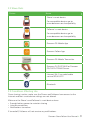
2.2 Share Parts
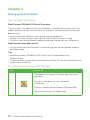
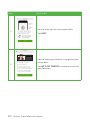
Picture
Name
Sharer’s smart device
For compatible devices go to:
www.dexcom.com/compatibility
Follower’s smart device
For compatible devices go to:
www.dexcom.com/compatibility
Dexcom G5 Mobile App
Dexcom Follow App
Dexcom G5 Mobile Transmitter
Dexcom G4 PLATINUM or Dexcom
G5/G4 PLATINUM Sensor
Internet/ Wi-Fi or mobile data
service/3G/4G/LTE
Bluetooth
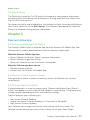
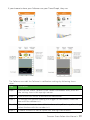
2.3 Conditions Affecting Use
Once sharing is active, make sure the Sharer and Follower have access to the
Internet and their smart device settings are not altered.
Make sure the Sharer’s and Follower’s smart devices have:
• Enough battery power to maintain sharing
• Internet connection
• Notifications turned on
If turned off, Follower will not receive any notifications.
Dexcom Share Follow User Manual •
9