1
1.2. Forgot Password / Generate Password / Reactivate Account
For first time access to new KN Login, should your account have become deactivated or should you
ever forget your password, you can reactivate your account and password online immediately, as
follows:
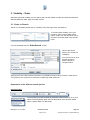
On the SSO screen (Single Sign-on screen), click “Generate
Password” in the upper left corner.
Enter your User name or e-mail address and click
<Submit>.
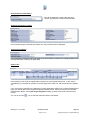
You will receive an e-mail with a system generated password.
Follow the instructions in the e-mail to reset your password and activate -respectively reactivate- your
account.
Important Advice regarding User names and Passwords
Each person who wishes to access KN Login (Shipment and/or Order) needs to have his/her own
User name and Password. For your own security and to enable Kuehne + Nagel to communicate with
each KN Login user, we do not recommend the same User name and Password be used by more
than one person.
1.3. Log out
Please remember to either log out or close your browser to end your session.
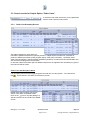
To log out of KN Login, select KN Portal Services from the header menu, then select <Log Out> from
the drop-down menu.
You can also end your session by closing your browser.
button in the top right corner securely logs you out of KN Login.
Clicking on the
KN Login v. 3.1 >> Order
Quick Start Guide
Page 3 of 21
May 2011
Copyright © Kuehne + Nagel 2008-2011