1
MatchMan User’s Manual
Page 2
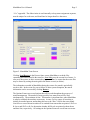
“.Csv” appended. The abbreviation is used internally to keep team assignments separate,
must be unique for each team, and should not be longer than five characters.
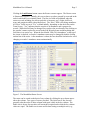
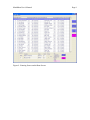
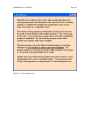
Figure 2. MatchMan Team Screen
Clicking Load Rosters in the Process frame causes MatchMan to read the files
containing the rosters listed in the team list. Save List saves the current list of teams. It
also saves the rosters, in their current order, by team. Thus, be aware that the roster files
may be altered by sorting the main grid in the Roster screen (see below).
The information recorded in MatchMan during the course of a match is periodically
saved to disk. In the event of a power failure of other system disruption, the match
information can be recovered by clicking Restore.
The Options Frame sets several options that will be used throughout the progress of
match management. The number of mats specifies how many mats will be used
simultaneously. The maximum is four. This number is important later when MatchMan
is asked to schedule the matches across mats. Assume Present causes all wrestlers to
initially be marked present; unchecking this leaves the “Here” field in the roster blank.
Omit Absents causes absent wrestlers to be omitted from rosters that are printed. Skills on
B-sheets and Skills on B-lists determine whether skill levels are printed on bout sheets
and bout lists, respectively. All settings in the Options Frame are saved from run to run.