1
MatchMan User’s Manual
Page 3
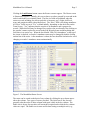
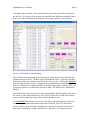
Clicking the Load Rosters button causes the Roster screen to appear. The Roster screen
is illustrated in Figure 3. Initially, this screen shows wrestlers grouped by team and in the
order in which they were initially listed. The first six fields are populated when the
rosters are read, including for each wrestler his or her name, age, weight, skill level,
team, and composite ability (described below). The “Here” field is for taking attendance.
All “Here” fields are set to “Yes” or blank initially, depending on the check box on the
Team Screen. “Yes” indicates that the wrestler is in attendance and is prepared to
wrestle. While this field may be changed for wrestlers who are absent by first clicking on
the wrestler’s name to place the record in the Edit Wrestler frame and then editing that
field, there is an easier way. When the box labeled “Dbl-Click Attendance” at the top of
the screen is checked, a wrestler’s attendance status may be changed by double clicking
on that line of the roster. After attendance is taken, the box should be unchecked to avoid
changing a wrestler’s attendance status unintentionally.
Figure 3. The MatchMan Roster Screen
The roster can be sorted on the basis of any column by clicking the up or down arrows
above the column. Two types of sort are provided. The Quick sort is fast, but will
generally alter the order of other columns with equal values in the key column. The
Stable sort is slower, but wrestlers will retain their original order when the key column
values are equal. The Stable sort is most useful when sorting on multiple rows (e.g.,