1
Contents
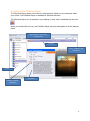
Introducing the ClickView Player ........................................................................................................ 3
How to search for content .................................................................................................................. 4
Searching for videos with subtitles ................................................................................................. 5
Subtitle Font Settings ...................................................................................................................... 5
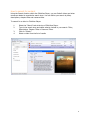
How to play a video ............................................................................................................................ 6
The video control panel .................................................................................................................. 6
Full Screen ....................................................................................................................................... 7
How to play a chapter ..................................................................................................................... 8
Accessing a resource ....................................................................................................................... 9
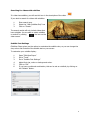
How to access a podcast, image or learning object.......................................................................... 10
To access an image: ...................................................................................................................... 10
To access a podcast:...................................................................................................................... 10
To access a learning object: .......................................................................................................... 10
School Bag ......................................................................................................................................... 11
Adding content to your School Bag .............................................................................................. 11
Open School Bag ........................................................................................................................... 11
Deleting Videos in School Bag ....................................................................................................... 12
Publish to PowerPoint/Intranet ........................................................................................................ 13
Extracting video clips from ClickView ........................................................................................... 13
Inserting video clips into PowerPoint ........................................................................................... 14
Inserting video clips into Word ..................................................................................................... 15
Staff Authentication .......................................................................................................................... 16
Access ClickView Online Links ....................................................................................................... 16
ClickView Wireless ............................................................................................................................ 17
Lessons .............................................................................................................................................. 18
How to create a lesson.................................................................................................................. 18
How to access a lesson.................................................................................................................. 19
How to edit a lesson...................................................................................................................... 19
How to remove a lesson ............................................................................................................... 19
Creating a PDF of video library content ............................................................................................ 20
ClickView Technical Support ............................................................................................................. 21
Copyright Notice ............................................................................................................................... 21
2