1
This is the name of the Document
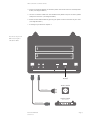
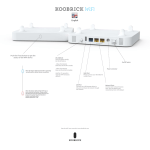
Reset Button
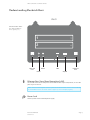
The Release button has two functions: unplug the external USB mass storage1,
reset the configuration of the Jensen eBOX to factory default settings2.
1
Unplug the external USB mass storage:
When you press and hold Release button for 2 seconds, the Jensen eBOX will beep for
0.5 second to hint that your command is detected. At this time, you should release the
Release button immediately if you want to unplug the external USB mass storage device
plugged in USB1 port. The Jensen eBOX will take several seconds to unplug the USB
mass storage. When the LED of the USB1 port goes off, you can safely detach the USB
mass storage device from this Jensen eBOX.
2
Restore factory default settings
If you want to reset the configuration of
the Jensen eBOX to factory default settings, you should press and hold BOTH the Release button and the Copy button at the same time for more than 5 seconds, the Jensen
eBOX will beep for 2 seconds to hint that your command is accepted. The Power LED
will keep flashing during the restore process. After the restore is complete, the Jensen
eBOX will restart itself automatically.
USB
The USB2 port allows you to share your files stored in the USB mass storage
device plugged in.
Note: Please plug the external power of your USB mass storage devices before you
connect them to the Jensen eBOX.
Note: If you have USB mass storage device (like USB external HDD), please plug it to
this Jensen eBOX’s USB 2 port, and plug the USB flash disk you wish to share to the
USB 1 port.
On/Off Button
When the Jensen eBOX is not working, switch the Power switch to “1” will switch on
the power and make the Jensen eBOX start. When the Jensen eBOX has been
shut down, switch the Power switch to “0” will switch off the power.
Boxi User Manual
Version 1.0
Page 4