1
RoverLog User Manual
Tom Mayo, N1MU
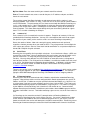
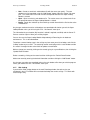
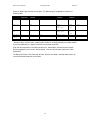
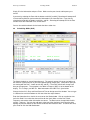
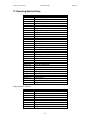
12 RoverLog Shortcut Keys
Keystroke
Fn
F12
Control-F<n>
Alt-Key-F4
Page Down
Page Up
Escape
Alt-Key-<n>
Alt-Key-+/=
Alt-Key-Alt-Key-[
Alt-Key-]
Alt-Key-a/A
Alt-Key-b/B
Alt-Key-c/C
Alt-Key-d/D
Alt-Key-e/E
Alt-Key-f/F
Alt-Key-h/H
Alt-Key-i/I
Alt-Key-j/J
Alt-Key-k/K
Alt-Key-l/L
Alt-Key-m/M
Alt-Key-n/N
Alt-Key-o/O
Alt-Key-p/P
Alt-Key-s/S
Alt-Key-t/T
Alt-Key-v/V
Alt-Key-w/W
Alt-Key-x/X
Alt-Key-y/Y
Alt-Key-z/Z
Return
Spacebar
Shortcut
Play Keyer Message <n> or QSY to Band <n>
Focus to Main Window Call Entry
Net Message to Peer <n>
Hide Current Sub-Window
Decrease CW Speed
Increase CW Speed
Stop Keyer
Play Keyer Message <n>
QSY Up
QSY Down
Toggle to Previous Network Peer
Toggle to Next Network Peer
Accept next WIP
QSY Up/Down
Popup Calculator
Delete Entry from Log
Edit Entry from Log
Popup Station Info
Show Shortcut Help
Key Transmitter via RoverLog Keyer
Move Rotor
Popup Skeds
Lookup Partial/Buds
Popup Map (centered on Sent)
Popup Net
Change to Next Mode
Popup Pass Window
Popup Score
Cancel Edit
Save Settings
Clear Entry
Popup Map (centered on Recd)
Popup Keyer
Pop Callsign Off Stack
Log QSO or perform other default action
Toggle between Call and Recd fields
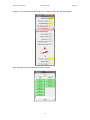
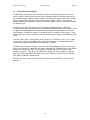
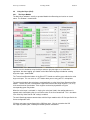
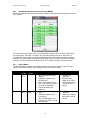
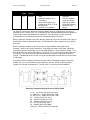
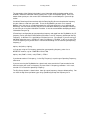
Unique Sked List Shortcuts:
Keystroke
Page-Down
Down-Arrow
Page-Up
Up-Arrow
Alt-Key-d/D
Alt-Key-e/E
Alt-Key-w/W
Alt-Key-[
Alt-Key-]
Shortcut
Move forward in time by one screen
Move forward in time by one sked interval
Move backward in time by one screen
Move backward in time by one sked interval
Delete Sked
Edit Sked
Wipe out Sked Call and Recd
Toggle to Previous Peer, look up his run freq
Toggle to Next Peer, look up his run freq
- 59 -
06/23/14