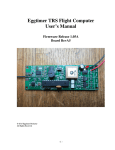
1
Programming Your Eggtimer TRS with the USB Cable
The Eggtimer TRS can be programmed from just about any USB-compatible computer using a
USB-TTL serial data cable. This cable has the interface circuitry imbedded in the USB
connector, so it doesn’t use up any board space or power on the Eggtimer. It uses a Prolific PL2303 serial interface chip, you will need to install the drivers for it before you can connect it to
your Eggtimer TRS. See the Eggtimer Rocketry web site for the appropriate drivers.
The interface is a simple text terminal, VT100/ANSI compatible. No fancy GUI graphics, but
it’s fast and easy to use, and free terminal emulator software is readily available for every OS
known to man. We like TeraTerm and PuTTY, but any emulator will do; however, to download
flight data you need to be able to “capture” the data stream to a file, so make sure your terminal
program supports this. If it doesn’t, you can get around it by doing a Copy of the text that gets
output to your screen, and doing a Paste into a text editor such as Notepad.
If you do not already have a suitable terminal program, or you need the USB-Serial driver for the
cable, go to www.eggtimerrocketry.com, click on the Links tab, and you will be directed to a
suitable download location. Note that we try to support non-Windows operating systems since
the Eggtimer TRS is OS-agnostic, however we’re Windows geeks so we can’t guarantee that
we’ve had a chance to try every possible configuration (especially with Linux!)
Before you try flying your Eggtimer TRS, we recommend that you play around with the
programming screens on your workbench, until you are comfortable with it. You can’t hurt
anything, and if you totally mess up the memory you can always do a Master Reset to clear out
all of your experimental values.
To get to the Eggtimer TRS terminal menu screen, be sure that the power on the Eggtimer TRS
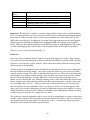
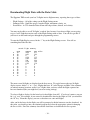
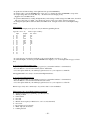
is OFF. Connect the headers of the USB-serial cable to your Eggtimer TRS as follows:
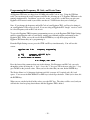
Cable
Black (Ground )
White (TX)
Green (RX)
TRS
GND
RX
TX
Plug the USB end into a USB port on your computer. Launch your terminal emulator program,
configure the serial port for 9600 baud, and connect to the serial port. Power up your Eggtimer
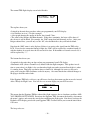
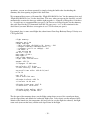
TRS, you will hear 45 seconds of slow beep-beeps as it looks for an Eggfinder LCD receiver.
Since it’s not going to find one, it will start beeping faster for another 30 seconds, while that is
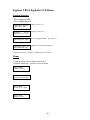
happening you will see this screen. When you do, hit the Enter key a few times, this will let the
Eggtimer TRS know that you have a terminal connected and you’re not ready to start a flight.
Note: Be sure to hit Enter within 30 seconds of the fast beeps, or it will go into flight mode and
you’ll have to reset it again to get to the programming screen.
- 22 -