1
TRENDnet User’s Guide
Table of contents
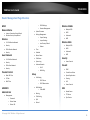
Launching the Utility .................................................................................................... 44
Allow/deny ping requests to your router from the Internet ....................................... 54
Utility Main Window .................................................................................................... 44
Check the router system information ......................................................................... 55
Configure Server .......................................................................................................... 45
Router Management Page Structure ............................................. 59
Connect ........................................................................................................................ 45
Technical Specifications ................................................................ 60
Disconnect ................................................................................................................... 45
Sending a Request to Connect ..................................................................................... 46
Connect to a Printer..................................................................................................... 47
Troubleshooting ........................................................................... 62
Appendix ...................................................................................... 63
Auto-Connect Printer ................................................................................................... 48
Connect to a Scanner ................................................................................................... 48
Router Maintenance & Monitoring................................................ 49
Change your router login password ............................................................................ 49
Change your device name ........................................................................................... 49
Change your device URL .............................................................................................. 50
Identify your network on the Internet......................................................................... 50
Allow remote access to your router management page ............................................. 51
Reset your router to factory defaults .......................................................................... 51
Router Default Settings ............................................................................................... 52
Backup and restore your router configuration settings .............................................. 52
Upgrade your router firmware .................................................................................... 53
Reboot your router ...................................................................................................... 54
© Copyright 2014 TRENDnet. All Rights Reserved.
3