1
GH20SB – User Manual
PAGE 21
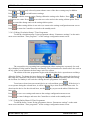
When you select the desired report a list including the date and the average power value for a given
time interval (day, week, month, year) will appear on the screen.
To edit power distribution in a given time interval use
interval and press
Press
or
to select the desired time
.
to go back to the previous menu.
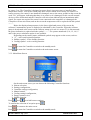
3.3.9. Holiday function
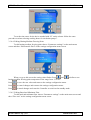
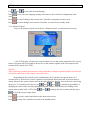
To use the holiday function editing option choose “Holiday settings” on the main menu
screen.
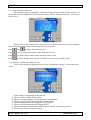
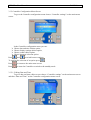
On this screen you can change the status of the holiday function and define holiday start and
end date.
Press
and
to switch between settings and press
to edit the currently
highlighted setting.
During holiday start or end date the value being edited (day, month or year) flashes. Using
and
change the flashing (edited) value and press
to edit the next value. When
editing the year value press this button to save the new date and exit holiday start and end date
to cancel the changes and exit the holiday start or end date edition option. If the
edition. Press
holiday function status is set to “Yes” , a change of the holiday start or end date will automatically
change the status to “No”.