1
General Performance Considerations
Any discussion about simulator performance should begin with two questions: “What Are You
Measuring?” and “How Are You Measuring It?” This section addresses those questions and
discusses a few other general considerations for analyzing and improving performance.
Why is This Document Important?
The difference in optimizing and not optimizing a simulation is very dramatic. Can your environment run 2x, 4x or even 10x faster? The performance improvement possible is not the same
for every environment. By following the flow described in this document you can maximize
ModelSim® performance for your Simulation environment. There are sections in this document
for Verilog RTL and Gate, VHDL RTL and Mixed environments. In addition, optimizing gate
level libraries can make a significant reduction in memory requirements.
What Are You Measuring?
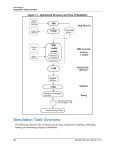
HDL simulation is only part of verification. You must determine the impact of the entire environment when considering simulation performance. The picture below illustrates the various
flows that may affect your simulation:
Any part of your environment may negatively impact simulation performance. The HDL code
may be inefficient; testbench languages and third party debug tools may slow the simulation;
Third party IP may be un-optimized. Consider that third party testbench implementation alone
can account for greater than 80 percent of the overall simulation performance. If this is the case
you should consider investigating the reason 80 percent of the time is being spent on the testbench and it’s interface. ModelSim has a profiler (discussed below) that may help you identify
which part of your environment is impacting simulation performance the most.
2
ModelSim 6.0 SE Performance Guidelines