1
3. Display Description and operation Procedure
15
B) Free Setting Mode
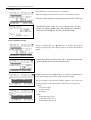
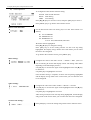
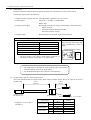
In Free Setting Mode you can set the measurement time in the range of
1~59 sec in increments of one second or in the range of 1 ~ 99 minutes in
increments of one minute.
While a measurement time is highlighted, you can change it by using
[▲] [▼] keys.
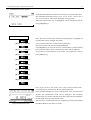
Measurement Time Transition
01sec
Press [▲] key to increase 1 sec ↓ ↑ Press [▼] key to decrease 1 sec
01min
Press [▲] key to increase 1 min ↓ ↑ Press [▼] key to decrease 1 min
99min
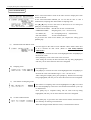
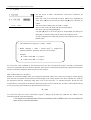
Move the cursor to “FREE SET”, and then press [SET] key to highlight
the measurement time to configure the setting.
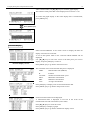
Once a measurement time is set, press [SET] key.
The measurement time will stop being highlighted.
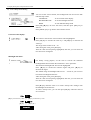
Use [▲] [▼] keys to move the cursor to “SAVE INFO” and press [SET]
key to save the setting. Once the setting is saved, it will go back to the
measurement screen.
To go back to the measurement screen before you complete the setting,
press [MENU] key.
C) Manual Mode
In Manual Mode you can finish a measurement any time by pressing
[START/STOP] key.
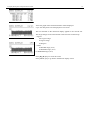
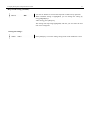
When YES/NO is highlighted, you can select to measure in the Manual
Mode or NOT by using [▲] [▼] keys. To perform a measurement in
Manual Mode, select YES in the setting.
Move the cursor to “MANUAL” and press [SET] key to highlight it to
configure the setting.
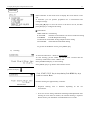
After selecting YES or NO, press [SET] key.
The selected item will stop being highlighted.
Move the cursor to “SAVE INFO” by using [▲] [▼] keys, and then
press [SET] key to save the settings. Then it will go back to the menu
screen.
To go back to the measurement screen before you complete the setting,
press [MENU] key.