1
Configuring Audacity for Mac
Audacity Interface for Mac
Audacity Interface---Settings and controls.
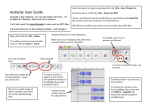
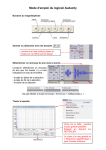
At the top of the main Audacity window, to the right of the play control buttons, you will see the input
and output level meters (labeled L and R). Under the output level meter, is an icon that looks like a
microphone. Next to the microphone is a black arrow that points down. Click this arrow and select
Start Monitor. (If you don't see the input and output level meters, open your Preferences again as
described above.)
30