1
How Windows 2000/XP/Vista Works
45
Applications
2
User
Operating System
User interface tools
Configuration data
Shell
Win32
subsystem
Win32
security
subsystem
The Registry
Configuration files
Other
subsystems
Kernel
Executive Services
Hardware Abstraction Layer (HAL)
Hardware
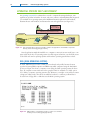
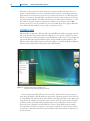
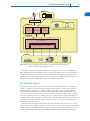
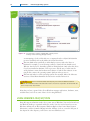
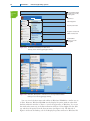
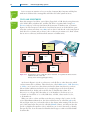
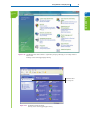
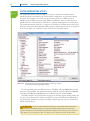
Figure 2-10 Inside an operating system, different components perform various functions
Courtesy: Course Technology/Cengage Learning
The shell is made up of several subsystems that all operate in user mode, which means
these subsystems have only limited access to system information and can access hardware
only through other OS services. One of these subsystems, the Win32 security subsystem,
provides logon to the system and other security functions, including privileges for file access.
All applications relate to Windows by way of the Win32 subsystem.
THE WINDOWS KERNEL
The kernel, or core, of the OS is responsible for interacting with hardware. It has more
power to communicate with hardware devices than the shell has, and operates in kernel
mode. Therefore, applications operating under the OS cannot get to hardware devices
without the shell passing those requests to the kernel. This module approach that says,
“You do your job and I’ll do mine, and we won’t mess with each other’s work,” provides
for a more stable system. If you think of an OS as a restaurant, the shell is like the hosts
and waiters that serve customers, and the kernel is like the chefs and kitchen staff. Hosts
and waiters are responsible for customer interaction but aren’t allowed in the kitchen
where the food is prepared.
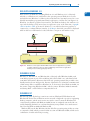
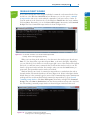
The kernel has two main components. The HAL (hardware abstraction layer) is the
layer closest to the hardware and the executive services interface between the subsystems
in user mode and the HAL. Executive services components manage hardware resources
by way of the HAL and device drivers. When Windows is first installed, it builds the