1
Installation Guide
4 Port Dual-Link DVI KVMP Pro
GCS1204G
1
Part No. M1170
Table of Contents
Conventions
4
Troubleshooting
36
Package Contents
5
Specifications
37
Requirements
6
39
Operating Systems
7
Federal Communications Commission
(FCC) Statement
CE Statement
40
Contact
41
Warranty
42
Hardware Setup
12
Basic Operation
14
Port ID Numbering
17
Advanced Configuration
21
Summary of Hotkey Settings
23
Comparison of Default and Alternate
Manual Port Selection Settings
26
Keyboard Operating Platform
27
The Firmware Upgrade Utility
32
3
Conventions
This manual uses the following conventions:
Monospaced Indicates text that you should key in.
[ ] Indicates keys you should press. For example, [Enter] means to press the Enter key. If keys need to
be chorded, they appear together in the same bracket with a plus sign between them: [Ctrl+Alt].
1. Numbered lists represent procedures with sequential steps.
• Bullet lists provide information, but do not involve sequential steps.
––> Indicates selecting the option (on a menu or dialog box, for example), that comes next.
For example, Start ––> Run means to open the Start menu, and then select Run.
Indicates critical information.
4
Package Contents
1- USB 2.0 DVI KVMP Switch
4- Custom KVM Cable Sets (6 ft)
1- USB-to-PS/2 Converter
1- Power Adapter
1- User Manual
1- Warranty Card
Verify all the components are present and that nothing was damaged in shipping. If you encounter a problem,
contact your dealer, or IOGEAR.
Read this manual thoroughly and follow the installation and operation procedures carefully to prevent any damage
to the unit, and / or any of the devices connected to it.
5
Requirements
USB mouse
USB keyboard
Microphone and speakers (optional)
Monitor with a DVI input.
Computers
A DVI-D port
USB Type A port
Audio ports (optional)
6
Operating Systems
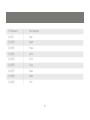
OS
Flavor
Windows
Linux
Unix
Novell
Version
2000 and higher
RedHat
9.0 and higher
SuSE
10.0 / 11.1 and higher
Ubutu
7.04 / 7.10
AIX
4.3 and higher
FreeBSD
5.5 and higher
Sun
Solaris 9 and higher
Netware
6.0 and higher
MAC
OS 9.0 and higher
Note: Supports Linux Kernel 2.6 and higher.
7
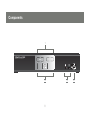
Components
1
4-Port Dual-Link DVI KVMP Switch
2
8
3
4
No.
Component
Description
1
Port Select
Pushbuttons
Press a port button for longer than two seconds to bring the KVM, USB, and audio
focus to the computer attached to its corresponding port.
2
Port LEDs
The Port LEDs are located below the Port selection buttons
The upper ones are the KVM port LEDs and the lower are the USB LEDs
KVM:
Lights Dim Orange to indicate the computer attached to the port is on line. It changes
to bright Orange when the port is selected and flashes to indicate auto scan has been
activated.
USB:
Lights dim green to indicate a USB connection. It changes to bright Green to indicate
to indicate the KVM is focused on the port
3
Console Ports
Audio
The connections for your main console microphone and speakers.
These audio ports have priority over the ports in the rear panel.
4
USB 2.0
Peripheral
Port
One of the two USB 2.0 peripheral ports. It is backwards compatible with USB 1.0
9
4-Port Dual-Link DVI KVMP Switch
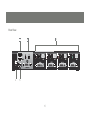
Rear View
1
4
3
2
5
10
No.
Component
Description
1
USB Console Ports
USB Keyboard and mouse connections
2
Console Port Section
Monitor, mic, and speaker connections
3
CPU Port Section
Connections for the cables that link the switch to your computers.
Each CPU port is comprised of a microphone jack, speaker jack,
USB type B socket and a DVI connector
4
Power Jack
Power adapter connection
5
USB Peripheral Port
Connection for USB 2.0 peripherals ( printers, scanners, etc)
11
Hardware Setup
Make sure that power to all the devices you will be installing has been turned off. You must unplug
the power cords of any computers that have the Keyboard Power On function.
Cable Connection
To install your GCS1204, refer to the diagram on the following page. The numbers in the diagrams correspond to
the steps below.
1. Connect your USB keyboard and mouse into the USB Console Ports located on the unit’s rear panel.
2. Connect your microphone, speakers, and monitor into the Console ports located on the unit’s rear panel
3. Using the KVM cables, connect the DVI connector to a DVI socket in the CPU Port section of the switch, then connect the accompanying USB, microphone and speaker connectors to their corresponding USB, microphone, and speaker sockets.
4. At the other end of the cable, connect the USB, video, microphone, and speaker cables to their respective ports on the computer.
5. Connect your USB peripherals to the type A sockets (one is located on the front, the other is located on the
rear of the unit).
6. Connect the power adapter that came with your switch to the jack on the switch then connect the adapter to
an AC power source.
12
7. Verify your connections: ports are correct and
icons match the connection type i.e. mouse
and mouse icon
4-Port Dual-Link DVI KVMP Switch
8. Power on the computers.
5
1
2
3
4-Port Dual-Link DVI KVMP Switch
6
5
2
1
5
2
3
4
13
6
2
5
Basic Operation
There are three convenient methods to access the computers: Manual – which involves pressing the port
selection buttons located on the unit’s front panel; Mouse – which involves double clicking the scroll wheel
of the mouse; and Hotkey – which involves entering key combinations from the keyboard.
Manual port selection
Press and release a port selection button to focus the computer on the corresponding port. The USB and
Audio focus do not change (expect a 2 sec delay).
Press a port selection button twice to focus the audio on the corresponding port (expect a 2 sec delay).
Press and hold a port selection button for more than 2 seconds to change KVM, USB, and Audio focus to
the computer on the selected port.
Press and hold port selection buttons 1 and 2 for more than 2 seconds to start Auto Scan Mode.
14
Mouse Port Switching
The KVM supports the very latest in mouse port-switching – simply double-click the scroll wheel of your
USB mouse to cycle through the ports.
Note: 1. This featured is only supported by USB 3-key scroll wheel mice.
2. The default setting is disabled.
3. This feature is only supported when Mouse Emulation is enabled.
See Mouse Emulation Control for details
Hotkey switching
All port switching begins by tapping the Scroll Lock key twice. The tables below describe the actions that
each combination performs.
Note:
If the Scroll Lock key conflicts with programs running on the computer, or your keyboard does not have a
Scroll Lock, see the section titled Advanced Switching to use the alternate switching method.
15
Cycling though the ports
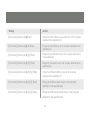
Hotkey
Action
[Scroll Lock] [Scroll Lock] [Enter]
Increments the KVM, USB, and Audio focus to the next
higher port ( port 4 wraps to 1)
[Scroll Lock] [Scroll Lock] [K] [Enter]
Increments only KVM focus to the next port
[Scroll Lock] [Scroll Lock] [U] [Enter]
Increments only the USB hub to the next port
[Scroll Lock] [Scroll Lock] [S] [Enter]
Increments only Audio to the next port
* The USB ports cannot be switched independently of each other.
16
Port ID Numbering
Each CPU port on the GCS1204 is assigned a port number (1, 2, 3, or 4). The port numbers are marked
on the rear panel of the switch and each switch LED has a corresponding number for easy identification
The Port ID of a computer is derived from the CPU port number to which it is connected. For example, a
computer connected to CPU port 2 has a Port ID of 2.
The Port ID is used to specify which computer gets the KVM, USB peripheral, and / or audio focus with
the Hotkey port selection method
Going Directly to a Port
Note: The n stands for the computer’s Port ID number. Replace the n with the appropriate Port ID when
entering hotkey combinations
17
Hotkey
Action
[Scroll Lock] [Scroll Lock][n][Enter]
Brings the KVM, USB hub, and audio focus to the computer
attached to the specified port.
[Scroll Lock] [Scroll Lock][n] [K] Enter]
Brings only the KVM focus to the computer attached to the
specified port.
[Scroll Lock] [Scroll Lock] [n] [U] [Enter]
Brings only the USB hub focus to the computer attached to
the specified port.
[Scroll Lock] [Scroll Lock] [n] [S] [Enter]
Brings only the audio focus to the computer attached to the
specified port.
[Scroll Lock] [Scroll Lock] [n] [K] [U] [Enter]
Brings the KVM and USB hub focus to the computer
attached to the specified port
[Scroll Lock] [Scroll Lock] [n] [K] [S] [Enter]
Brings the KVM and audio focus to the computer
attached to the specified port.
[Scroll Lock] [Scroll Lock] [n] [U] [S] [Enter]
Brings the USB hub and audio focus to the computer
attached to the specified port.
18
Auto Scanning
The GCS1204’s Auto Scan feature automatically cycles KVM focus through the computer ports at regular intervals. This allows you to monitor computer activity without having to switch from port to port manually.
Note:
1. n stands for the number of seconds the GCS1204 will dwell on a port before moving on to the next.
Replace n with a number between 1 and 99 when entering the hotkey combination.
2. While Auto Scan Mode is in effect, ordinary keyboard and mouse functions are suspended – only Auto Scan Mode compliant keystrokes and mouse clicks can be input. You must exit Auto Scan Mode
in order to regain normal control of the console (hit the space bar or the Esc key).
3. Although the video focus switches from port to port, the keyboard, mouse, and USB focus remain on
the port where Auto Scanning began.
19
Hotkey
Action
[Scroll Lock] [Scroll Lock] [A] Enter]
Invokes Auto Scan. The KVM focus cycles from port to port at
5 second intervals (default interval)
[Scroll Lock] [Scroll Lock] [A] [N] Enter]
The KVM focus cycles from port to port at N seconds interval
20
Advanced Configuration
Advanced Switching
Hotkey Setting Mode
In some instances the default hotkey settings conflict with programs running on your computer, and in
some instances the default hotkeys either do not exist on your keyboard (MAC keyboards for instance do
not have a Scroll Lock key), or are inconvenient to use, so The Hotkey Setting Mode allows you to select
alternate configurations for the KVM’s hotkeys.
When HSM is active, the Caps Lock, and Scroll Lock LEDs flash in succession to indicate that HSM is in
effect. They stop flashing and revert to normal status when you exit HSM.
Ordinary keyboard and mouse functions are suspended – only Hotkey compliant keystrokes (described in
the sections that follow), can be input.
At the conclusion of some hotkey operations, you automatically exit hotkey mode. With some operations,
you must exit manually. To exit HSM manually, press the Esc key, or the Spacebar.
21
Invoking Hotkey Setting Mode (Default)
1. Press and hold down [Num Lock] (the Clear key on MAC keyboards).
2. Press and release [-].
3. Release [Num Lock] (the Clear key on MAC keyboards).
To Toggle to the alternate Hotkey Setting Mode (HSM):
1. Press and hold down [Num Lock] (the Clear key on MAC keyboards)
2. Press and release [-].
3. Release [Num Lock] (the Clear key on MAC keyboards)
4. Press and release [H].
Invoking Hotkey Setting Mode (Alternate)
1. Press and hold down [Ctrl].
2. Press and release [F12].
3. Release [Ctrl].
22
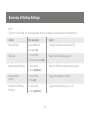
Summary of Hotkey Settings
NOTE:
The term “invoke HSM” in the following table refers to the default or alternate method chosen above
Action
Key sequence
result
Port Switching
Invoke HSM Press
Changes the [Scroll Lock] key to [Ctrl]
and release [T]
USB reset
Resets the USB peripheral ports
1. Invoke HSM.
2. Press and release [F5]
Restore Default Settings
Reset the KVM to its default hotkey settings
1. Invoke HSM.
2. Press [R] [Enter].
Hotkey Beeper
Control
1. Invoke HSM.
Disable Port Switching
Hot Keys
1. Invoke HSM
Toggles the Beeper On and Off
2. Press [B]
Toggles Hotkey Switching on or off
2. Press [X] [Enter]
23
Other OS Mode
1. Invoke HSM
2. Press [F1]
Reset keyboards and mice under some
special OS’s that do not support USB 2.0
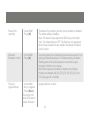
Mouse Emulation
Control
1. Invoke HSM
2. Press [M]
Allows the special programming of multifunction mice to operate
through the KVM
List Hotkey
Settings
1. Open a word
processor
2. Invoke HSM.
3. Press and release
[F4]
Prints a list of the current hotkey settings in
your text editor or word processor
Display
Emulation
Technology
1. Invoke HSM
2. Press and release
[D]
Display Emulation Technology eliminates the problems of your
display reverting to default resolution when switching between
computers, or displaying a default resolution if the KVM is not
focused on the computer while it is booting.
Alternative
Manual Port
Selection
Settings
1. Invoke HSM
2. Press and release
[S]
Toggles between the default and the alternative front panel
pushbutton port selection settings See the table on page 26 for
comparisons
24
Mouse Portswitching
1. Invoke HSM
2. Press [W]
The Mouse Port-switching function can be enabled or disabled.
The default setting is disabled.
Note: This feature only supports the USB 3-key scroll wheel
mice. The default setting is OFF. This feature is only supported
when mouse emulation is also enabled. See Mouse Emulation
Control, above.
Keyboard
Emulation Control
1. Invoke HSM
2. Press [N]
Console keyboard port emulation/bypass feature supports most
gaming/multimedia keyboards. The default setting is enabled.
Disabling allows the special keyboard commands to pass
through the KVM to the computer.
Note: When keyboard emulation is disabled, the following
Hotkeys are disabled. [M], [W], [F2], [F3], [F4], [F5], [F6], and
[F10] See page 28, for details.
Firmware
Upgrade Mode
1. Invoke HSM
2. Key in: upgrade
3. Press [Enter]
The orange front
panel LEDs flash to
indicate Firmware
Upgrade Mode is in effect.
25
Comparison of Default and Alternate Manual Port Selection Settings
Action
Default
Alternate
Press and release a port
selection button
Switches only the KVM
focus to the selected port
KVM, Audio and USB focus switch to the
selected port
Press a port selection
button twice
Audio focus switches to
the selected port
Audio focus switches to the selected port
Press and hold a port
selection button for more
than 2 seconds
KVM focus, USB, and
Audio focus switch to the
selected port
Switches only the KVM focus
to the selected port
Press and hold port
selection buttons 1 and 2
for more than 2 seconds
Starts AutoScan at 5 sec
dwell
Starts AutoScan at 5 sec dwell
26
Keyboard Operating Platform
Keyboard Operating Platform
The KVM’s default port configuration is for a PC compatible keyboard. If you are using a PC compatible
keyboard and you have a Mac or Sun attached to a port, you can change the port’s keyboard operating
platform configuration to emulate a Mac or Sun keyboard.
1. Bring the KVM focus to the port you want to set.
2. Invoke HSM.
3. Press and release the appropriate Function key (see table below).
Function Key
Operation
[F2]
Enables Mac keyboard emulation, see Mac Keyboard Emulation,
[F3]
Enables Sun keyboard emulation, see Sun Keyboard Emulation
[F10]
Disables keyboard emulation. Key presses are passed straight through. When your console
uses a Mac keyboard to access a Mac attached to a port, for example
After completing this procedure, you automatically exit HSM.
The PC compatible (101/104 key) keyboard can emulate the functions of Mac and Sun keyboards when
the Control key [Ctrl] is used in conjunction with other keys. The emulation mappings are listed in the table
on the next page.
27
PC Keyboard
Mac Keyboard
[Shift]
Shift
[Ctrl]
Ctrl
[Ctrl] [1]
[Ctrl] [2]
[Ctrl] [3]
[Ctrl] [4]
[Alt]
Alt
28
PC Keyboard
Mac Keyboard
[Print Screen]
F13
[Scroll Lock]
F14
=
[Enter]
Return
[Backspace]
Delete
[Insert]
Help
[Ctrl]
F15
29
PC Keyboard
Sun Keyboard
[Ctrl] [T]
Stop
[Ctrl] [F2]
Again
[Ctrl] [F3]
Props
[Ctrl] [F4]
Undo
[Ctrl] [F5]
Front
[Ctrl] [F6]
Copy
[Ctrl] [F7]
Open
[Ctrl] [F8]
Paste
[Ctrl] [F9]
Find
30
PC Keyboard
Sun Keyboard
[Ctrl] [F10]
Cut
[Ctrl] [1]
[Ctrl] [2]
[Ctrl] [3]
[Ctrl] [4]
[Ctrl] [H]
Help
Compose
Note: Press and release the first key [Ctrl], then press and release the activation key.
31
The Firmware Upgrade Utility
The Windows-based Firmware Upgrade Utility provides a smooth, automated process for upgrading the
KVM switch’s firmware. The Utility comes as part of a Firmware Upgrade Package that is specific for each
device. Check the web site regularly to find the latest packages and information relating to them: http://
www.iogear.com
Before you Begin
1. From a computer that is not part of your KVM installation go to our website site support section
and choose the model name that relates to your device to get a list of available Firmware Upgrade
Packages.
2. Choose the Firmware Upgrade Package you want to install (usually the most recent), and download it
to your computer.
3. Power off the switch. Unplug the KVM cables from the back of the switch. If you are using a power
adapter, unplug it and remove its connector from the switch’s power jack. Connect one of the USB DVI
KVM cable set’s Type A USB connectors to a USB hub port on your computer.
4. At the other end of the USB DVI KVM cable set, connect the USB Type B connector to the Type A USB
port in the Port 1 KVM section.
Note: The USB DVI KVM cable set’s USB Type B connector can be connected to any USB Type KVM port
section, but the Port selection pushbutton in Step 5, below, must be Port 1.
32
5. Invoke Firmware Upgrade Mode (see Firmware Upgrade Mode, page 25). The front panel orange LEDs
flash to indicate that Firmware Upgrade Mode is in effect.
3
4
33
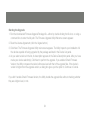
Starting the Upgrade
1. Run the downloaded Firmware Upgrade Package file – either by double clicking the file icon, or using a
command line to enter the full path. The Firmware Upgrade Utility Welcome screen appears:
2. Read the License Agreement (click the I Agree button).
3. Click Next. The Firmware Upgrade Utility main screen appears. The Utility inspects your installation. All
the devices capable of being upgraded by the package are listed in the Device List panel.
4. As you select a device in the list, its description appears in the Device Description panel. After you have
made your device selection(s), Click Next to perform the upgrade. If you enabled Check Firmware
Version, the Utility compares the device’s firmware level with that of the upgrade files. If the device’s
version is higher than the upgrade version, a dialog box gives you the option to Continue or Cancel.
If you didn’t enable Check Firmware Version, the Utility installs the upgrade files without checking whether
they are a higher level, or not.
34
Upgrade Succeeded
After the upgrade has completed, a screen appears to inform you that the procedure was successful:
Click Finish to close the Firmware Upgrade Utility. After a successful completion, the KVM exits Firmware
Upgrade Mode, and resets itself.
Upgrade Failed
If the Upgrade Succeeded screen doesn’t appear, it means that the upgrade failed to complete
successfully, in which case you should do the following:
1. Power off the KVM by removing the power jack.
2. Invoke Firmware Upgrade Mode by holding down the Port 1 button on the front panel and power on
the KVM. The orange LEDs will flash together.
3. Do the firmware upgrade procedure again.
35
Troubleshooting
Symptom
Possible Cause
Action
Mouse / Keyboard not
responding.
Improper mouse
Unplug the cable(s) from the console port(s),
and/or keyboard reset.
then plug it/them back in.
KVM switch
Power off all devices on the installation.
needs to be reset.
Power off the KVM switch; wait five seconds;
then power up
USB devices
USB ports
not responding.
need to reset.
Unplug the device’s USB cable from the USB port
on the switch’s rear panel, then plug it back in.
PC or OS does not support
USB 2.0.
There are ghost
images on the external
monitor.
The GCS1204 has a built-in USB 2.0 hub, so
will not support PCs or OS that do not support
USB 2.0.
The distance between the external console and the GCS1204 is too great. The
maximum VGA cable distance should not exceed 20m and, in some cases, may
need to be shorter. Replace the VGA cable with one of an appropriately short length.
36
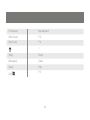
Specifications
Function
GCS1204G
Computer Connections
4
CPU Port Selection
Front Panel Pushbuttons; Hotkey
Console Connectors
Keyboard
1 x USB Type A F (black, rear panel)
Mouse
1 x USB Type A F (black, rear panel)
Video
1 x DVI-I F (white)
Audio*
Line in Port
2x Mini Stereo Jack
(green; 1 x front panel, 1 x rear panel)
Microphone Port 2x Mini Stereo Jack
(pink; 1 x front panel, 1 x rear panel)
Power Consumption
DC 5.3V, 4.8W
Computer Connectors
KB /
USB X 2
37
Mouse
Switches
LEDs
Video
Dual Link DVI
Power
1
USB Hub
2
4 ea
Port Selection
4
Green
4
Orange
38
Federal Communications Commission (FCC) Statement
This equipment has been tested and found to comply with the limits for a Class B digital device, pursuant
to Part 15 of the FCC Rules. These limits are designed to provide reasonable protection against harmful
interference in a residential setting. This product generates, uses, and can radiate radio frequency energy
and, if not installed and used as directed, it may cause harmful interference to radio communications.
Although this product complies with the limits for a Class B digital device, there is no guarantee that
interference will not occur in a particular installation.
39
CE Statement
This device has been tested and found to comply with the following European Union directives:
Electromagnetic Capability (89/336/EMC), Low Voltage (73/23/EEC) and R&TTED (1999/5/EC).
40
Contact
IOGEAR, INC.
19641 Da Vinci
Foothill Ranch, CA 92610
P 949.453.8782
F 949.453.8785
Visit us at: www.iogear.com
© 2011 IOGEAR All Rights reserved. Part No. M1170
IOGEAR, the IOGEAR logo, are trademarks or registered trademarks of IOGEAR, Inc. Microsoft and
Windows are registered trademarks of Microsoft Corporation. All other brand and product names
are trademarks or registered trademarks of their respective holders. IOGEAR makes no warranty of
any kind with regards to the information presented in this document. All information furnished here is
for informational purposes only and is subject to change without notice. IOGEAR, Inc. assumes no
responsibility for any inaccuracies or errors that may appear in this document.
41
Warranty
WE’RE HERE TO HELP YOU!
NEED ASSISTANCE SETTING UP THIS PRODUCT?
Make sure you:
1. Use the live chat at www.iogear.com to try and solve any issues you may be having with the product
2. Visit the Tech Info Library/FAQ on www.iogear.com (under the Support tab)
3. Call the support line at 1(866) 946-4327 (U.S. only) or (949) 453-8782
Warranty Information
This product carries a 3 Year Limited Warranty. For the terms and conditions of this warranty, please go
to http://www.iogear.com/support/warranty or call 1-866-946-4327
Register online at http://www.iogear.com/register
Important Product Information
Product Model _________________
Serial # _______________________
42
About Us
FUN
IOGEAR offers connectivity solutions that are innovative, fun, and stylish,
helping people enjoy daily life using our high technology products.
GREEN
IOGEAR is an environmentally conscious company that emphasizes the
importance of conserving natural resources. The use of our technology
solutions helps reduce electronic waste.
© 2011 IOGEAR