1
Adding and saving a Favourite location.
The unit can store up to 150 locations.
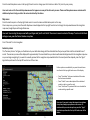
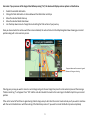
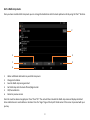
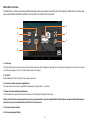
To add a Favourite, press the “+” button displayed at the top right hand corner of the screen. The device will show you the following
methods to find the address:• Find address
• Find by POI
• Find using recent routes
• Save using current location
Select the most appropriate method and follow the on-screen instructions to find and save the address or location you want to store in
your Favourites folder.
Editing or deleting a Favourite
If you would like to edit or delete a Favourite location, press and hold the address until a pop-up window is displayed. The pop-up
window will enable you to rename the Favourite, move the Favourite up or down the list and to delete that particular location from
your Favourites folder.
If you would like to delete all of the Favourites in your list, press the small drop down menu button at the top right hand corner of the
screen and select ‘Delete all’.
21.