1
Contents
3. What’s in the box?
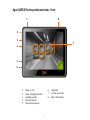
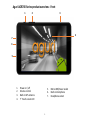
4. AGR520 series product overview – Front
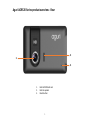
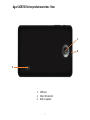
5. AGR520 series product overview - Rear
6. AGR700 series product overview – Front
7. AGR700 series product overview - Rear
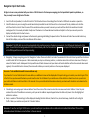
8. Quick start & installation guide
10. Detailed operating instructions
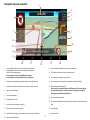
11. Navigation map view explained
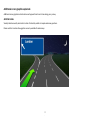
12. Junction view explained
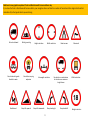
13. Truck and Motorhome & Caravan screen graphics
14. Calculating a route
15. Summary screen explained
16. Setting ‘Home’ and ‘Office’ addresses
16. Last journey & Clear route
17. Multi-stop route generator
21. Using and routing by Favourites
23. Using Recent routes
24. Route by Points of interest
25. Route by nearest Point of interest
27. Route using map
28. Route to junction
28. Route by co-ordinate
28. Recalculate route
29. Recalculate route cont.
30. Environmental settings
31. Setting up your vehicle – Motorhome & Caravan Edition
32. Setting up your vehicle – Truck Edition
33. Tunnel category settings – Truck Edition
35. Brightness
35. Volume
35. Change language
36. Select map view - 2D, 3D or N
36. MPH/KMH – select speed/distance unit type.
36. Location Icon -select an icon to represent your vehicle
36. Lane view
36. Speed trap alert settings
37. Route alarm
37. Alert audio
37. E Speed
37. User speed alert
38. Tight bend alert – Motorhome & Caravan, and Truck Edition
38. Journey history
38. Report mobile speed traps.
38. Live Digital Traffic service
38. Show POI icons on map
39. GPS status
39. Live Digital Traffic
39. Unit version details
40. Mini-drop down menu
41. DVR dash cam operation
44. Connect to and Browsing the internet
45. Updating the mapping
45. Updating the Speedshield speed trap database
46. Registering for Google Play and downloading ‘Apps’
46. Digital Live Traffic services & Mobile speed trap reporting
47. Using Live Digital Traffic services.
48. Using the Mobile speed trap sharing feature.
49. Disposal of Old Electrical & Electronic Equipment
50. Service under warranty
2.