1
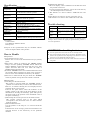
Specification
Items
Reception
Frequency
Sensitivity
Display
Resolution
Measurement
distance
Display device
Battery
Battery life
Operating
temperature
Storage
temperature
Material
Physical
dimension
Weight
Specifications
40kHz ±1kHz
30dB to 90dB
at 2m distance from the product
1dB
1 to 3m
(Distance from the product)
7 segment LED
4 AA batteries
Approx. 20hrs
(No signal, alkaline battery)
0 to 40 °C, Not greater than 85%RH
(non-condensing))
-10 to 50°C, Not greater than 85%RH
(non-condensing)
ABS/PP
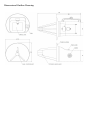
Refer to the dimensional outline drawing
Approx. 700g
(With batteries, Storage case not incl.)
Accessories
4 AA batteries
User Manual (This document)
Storage Case
※A part of the specifications may be modified without
notice for improvement of the product.
How to Handle
●Preparation
①Four AA batteries are used.
Remove the cover at back, and load batteries per polarity
guide.
②The battery voltage is normal, if the “LEVEL” display
lamp is lit after pushing “POWER” button. When the
lamp is blinking, replace batteries with new ones. Also
replace batteries with new ones when the lamp is
blinking during measurement.
③Push the “POWER” button and confirm small noise from
the speaker. Then rub fingers in front of the antenna to
hear its noise and confirm the loudness by the display.
④The laser is emitted from the port when the “POWER”
switch is pushed. It stops when the switch is released.
●Measurement
①Searching for the fault location
The product is powered while the “POWER” switch is
pushed. It is turned off if you release the switch button.
However, it remains showing the level displayed before
switched off for a few seconds.
Look for the point where either the loudness of the
speaker output or the value of the level display is at the
maximum for locating the discharge point. The plot by
the laser beam at the position of the maximum value is
the point of discharge.
②Measuring the acoustic pressure at the fault location
The acoustic pressure level is the value which
corresponds to the measured value at 2 meter distant
from the product.
③Measurement distance
Use the product at the range of 1 to 3 meters from the
product.
If the distance is out of range, precise measurement is not
expected because of the directivity of the parabolic
antenna.
[Calibration by distance]
The level display value is calibrated as the distance from
the product is 2 meters.
If used at the deferent distance, correct the read value by
the following means for reference.
a. The distance is 1 meter: subtract “6”dB from the read
value.
b. The distance is 2 meters: use the read value as it is.
c. The distance is 3 meters: add “5”dB to the read value.
Trouble shooting
Issues
Cause
Solution
No display
appears
No laser
appears
Display lamp
blinks
Batteries have died.
Batteries are not properly loaded
The laser irradiating port is
stained.
Batteries are dying.
Replace batteries
Load batteries properly.
Clean the port by an
absorbent cotton, etc.
Replace batteries
If issues are not fixed yet after above solutions, the product may be
damaged. Please contact the agent you purchased the product or
our sales department.
CAUTIONS in handling batteries
Do not expose batteries to heat or fire nor recharge them.
The waste batteries shall not be treated as household waste.
Follow the regulations when disposing waste batteries or hand
them over to the applicable collection point.
Remove batteries from the product which will not be used for a
long time