1
3.
OVERVIEW
OF
DISPLAY
INDICATORS
AND
KEYBOARD FUNCTIONS
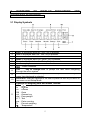
3.1 Display Symbols
1
2
3
4
5
6
7
8
9
10
11
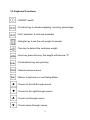
Zero- Is displayed when the “Zero” key is pressed.
Tare-Is displayed when the “Tare” key is pressed.
Stable-Stable indication, scale is in stable condition.
Mode-Is displayed when the “Mode” key is pressed.
Setup-Is displayed when the “Setup” key is pressed.
CAL-Is displayed when the scale in Calibration Mode.
- Power indication.
Use
key to change-Used to prompt the user while navigating
through the menu system.
Press Enter –Used as a prompt to the user to press the Enter key. The
menu item displayed is selected.
Press Esc- Used as a prompt to the user to press the Esc key to return to
last menu or exit Setup Mode.
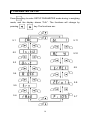
Symbols for weighing units and modes, include:
ct
-Carats
lb
-Pounds
oz -Ounces
GN -Grain
ozt -Ounces troy
dwt -Pennyweight
t1.T -Tael
pcs -Parts counting
% -Percent weighing
℃ -Temperature
5