1
4
MSD600M - Technical Reference Manual
3. External
Synchronisation and the
Sample Rate Converter
(SRC)
The MSD600M have been designed to run on a
fixed internal sample rate at 48 kHz. However the
use of the External Sync Input enables the user to
force the MSD600M to synchronise its internal
sample rate to an external AES signal.
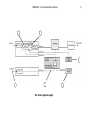
Notes (page 5):
1 All input modules for the MSD600M are fitted with a SRC
between the AES input and the MSD Internal Audio Bus. This
enables several non synchronised AES sources to be synchronised and used as if originated from the same source. When
monitoring the true peak value of an AES input signal it is recommended to bypass the SRC since it can alter the peak value
of the signal.
2 The SRC Bypass switch selects between the Audio Data
before or after the SRC. This data is the feed to the Audio
Matrix. When the SRC is in Bypass mode the System Clock
MUST be synchronised to the incoming AES signal. This can be
done by applying the same input signal (or a signal synchronised
to the input signal) to the external Sync Input.
3 The External Sync is mainly used in two situations.
1) The user will synchronise an AES Output signal from the
MSD600M to an External source.
2) The user will bypass the SRC on one of the Input modules.
This requires that the Internal System Clock is synchronised (set
to the same Sample Rate) as the AES Input signal.
4 The External Sync Input.
From the Info Menu the user can see if the MSD have detected
and selected a valid External sync signal. This block controls the
source of the System Clock. The MSD600M will automatically
switch from the Internal Clock to the External Clock if a Valid
AES signal is connected to the External sync input.
5 Internal 48 kHz Master Clock.
This clock is used when valid External Sync have been detected.
6 The Control Processor is the brain of the MSD. One of many
functions is to control the SRC function. This function will only
happen when a user alters the SRC Bypass setting. To change
this setting enter the Option menu under the Input Matrix Menu.