1
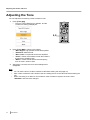
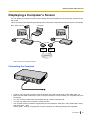
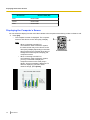
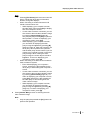
User Manual
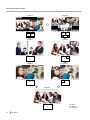
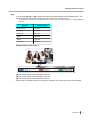
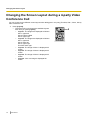
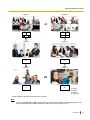
HD Visual Communication Unit
Model No.
KX-VC500
Thank you for purchasing a Panasonic HD Visual Communication Unit.
Please read this manual carefully before using this product and save this manual for future use.
KX-VC500: Software File Version 2.20 or later
In this manual, the suffix of each model number (e.g., KX-VC500XX) is omitted unless necessary.
Introduction
Introduction
Feature Highlights
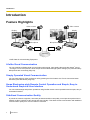
Video camera
Video camera
Display
Display
Microphone
Microphone
DCE *1
DCE *1
Router
Router
Internet
*1
DCE: Data Circuit-terminating Equipment
Lifelike Visual Communication
You can experience lifelike visual communication with smooth, high-quality video and clear stereo*2 sound.
*2
If using 2 or more microphones, stereo output can be enabled through system settings (only when Boundary
Microphones are connected) (Page 79).
Simply Operated Visual Communication
You can easily begin a video conference call by pressing the KX-VC500’s One-Touch Connection button
followed by the Start button (Page 32).
Home Electronics-style Remote Control Operation and Simple, Easy to
Understand Graphical User Interface
You can make settings and perform operations using familiar remote control operations and a simple, easy to
understand interface.
Stabilised Communication Quality
In periods of network congestion, automatic packet transmission rate quality control prevents packet loss to
maintain a video conference call’s image and sound quality. This allows visual communication with stabilised
communication quality even over an internet connection.
2
User Manual
Introduction
Selectable Video Source
By connecting your computer or video camera to the KX-VC500, you can show your computer’s screen or
video camera image to video conference call participants (Page 55, Page 59).
Encrypted Communication
Packets sent for video conference calls can be encrypted to prevent packet leaks, tampering, or
eavesdropping.
Enhanced Features through the Use of Activation Keys
By using an activation key (sold separately), you can enable connection to MCUs (multipoint control units) and
non-Panasonic video conference systems (Page 67). Features enabled through activation keys are available
even after an initialisation (Page 89). For details about the activation key, contact your dealer.
Connection to non-Panasonic Video Conference Systems
You can connect to a non-Panasonic video conference system and have a 2-party video conference call.*3 This
feature must be enabled with an activation key (Page 68, Page 89).*4
*3
For details about the types of non-Panasonic video conference systems you can connect to, contact your
dealer.
*4
Communication cannot be encrypted when you connect to a non-Panasonic video conference system.
Instead, connect over an intranet or via a VPN.
MCU Connection
By connecting to an MCU (multipoint control unit), you can make video conference calls with 5 parties or
more.*5 This feature must be enabled with an activation key (Page 69, Page 89).*6
*5
For details about the types of MCUs you can connect to, contact your dealer.
*6
Communication cannot be encrypted when you connect to an MCU. Instead, connect over an intranet or via
a VPN.
User Manual
3
Introduction
Trademarks
•
•
•
HDMI is a trademark or registered trademark of HDMI Licensing LLC in the United States and other
countries.
This product is licensed under the AVC Patent Portfolio License. This license permits the end user to
perform, for personal and non-commercial use, only the following actions:
– Encode video in compliance with the AVC Standard (below, "AVC Video").
– Decode AVC Video that was encoded by a consumer engaged in both personal and non-commercial
activity.
– Decode AVC Video obtained from a video provider licensed to provide AVC Video.
Additional information may be obtained from MPEG LA, LLC. See http://www.mpegla.com.
All other trademarks identified herein are the property of their respective owners.
Open Source Software
Parts of this product use Open Source Software supplied based on the conditions of the Free Software
Foundation’s GPLs and/or LGPLs and other conditions. Relevant conditions apply to this software. Therefore,
please read license information about GPLs and LGPLs, and information about other Open Source Software
in the included CD-ROM before using this product. Also, some software parts of this product are licensed under
the MOZILLA PUBLIC LICENSE (MPL). At least three (3) years from delivery of products, Panasonic will give
to any third party who contacts us at the contact information provided below, for a charge of no more than the
cost of physically distributing source code, a complete machine-readable copy of the corresponding source
code and the copyright notices covered under GPL, LGPL, and MPL. Please note that software licensed under
GPL, LGPL, and MPL is not under warranty.
Contact Information
http://www.panasonic.net/
4
User Manual
Table of Contents
Table of Contents
For Your Safety ........................................................................................8
For Your Safety .................................................................................................................8
Before Operation ....................................................................................12
Notes about Operation ...................................................................................................12
Data Security ...................................................................................................................13
Privacy and Right of Publicity .......................................................................................13
Precaution ...............................................................................................14
Precaution ........................................................................................................................14
Preparation .............................................................................................16
Part Names and Usage ...................................................................................................16
Main Unit (Front) ............................................................................................................16
Main Unit (Back) .............................................................................................................17
Remote Control ..............................................................................................................18
Boundary Microphone (Optional Accessory) ..................................................................19
LED Patterns ..................................................................................................................20
Screen Standby ..............................................................................................................20
Connecting the KX-VC500 ..............................................................................................22
Turning the Power On/Off ..............................................................................................26
Screen Display ................................................................................................................27
Home Screen (Idle Screen) ............................................................................................27
Menu Screen (Idle Screen) ............................................................................................28
Video Conference Call Screen .......................................................................................29
Starting a Video Conference .................................................................31
Making a Video Conference Call ....................................................................................31
Calling Using Speed Dial (2-party Conference/3-party Conference/4-party
Conference) ....................................................................................................................31
Calling from the Contact List (2-party Conference/3-party Conference/4-party
Conference) ....................................................................................................................34
Calling by Entering an IP Address ..................................................................................36
Calling from the Call History ...........................................................................................38
Answering a Video Conference Call ..............................................................................41
Changing the Screen Layout ................................................................43
Changing the Screen Layout during a 2-party Video Conference Call ......................43
Changing the Screen Layout during a 3-party Video Conference Call ......................45
Changing the Screen Layout during a 4-party Video Conference Call ......................48
Adjusting the Volume and Tone ...........................................................51
Adjusting the Volume .....................................................................................................51
Muting the Microphone ...................................................................................................52
Reducing Microphone Noise ..........................................................................................53
Adjusting the Tone ..........................................................................................................54
Displaying Other Video Sources ..........................................................55
Displaying a Computer’s Screen ...................................................................................55
Displaying the Sub Video Camera’s Image ..................................................................59
Displaying the Connection Status ........................................................64
User Manual
5
Table of Contents
Displaying the Connection Status .................................................................................64
Displaying Unit Information ...........................................................................................65
About Enhanced Features .....................................................................67
Activating Enhanced Features .......................................................................................67
Overview of Activation Keys ...........................................................................................67
Enabling Connection to Non-Panasonic Video Conference Systems ............................68
Enabling Connection to an MCU ....................................................................................69
Contacts and Settings ...........................................................................71
Adding Contacts to the Contact List .............................................................................71
Registering a New Contact .............................................................................................71
Editing Contact Information ............................................................................................72
Deleting a Contact ..........................................................................................................72
Registering a Contact from the Call History ...................................................................73
Changing System Settings .............................................................................................75
Setting the Unit Name ....................................................................................................75
Setting the Date and Time ..............................................................................................75
Making Network Settings ................................................................................................75
Making Sound Settings ..................................................................................................76
Making Connection Settings ...........................................................................................77
Display Unit Information .................................................................................................78
Setting the MIC Position .................................................................................................79
Making Remote Control Settings ....................................................................................81
Performing a Network Test .............................................................................................82
Performing Self Diagnosis ..............................................................................................83
Performing Remote Maintenance ...................................................................................84
Making Administrator Menu Settings ............................................................................84
Logging in to the Administrator Menu .............................................................................84
Making Language Settings .............................................................................................85
Making Encryption Settings ............................................................................................85
Making Software Update Settings ..................................................................................86
Updating Software ..........................................................................................................87
Making Screen Standby Settings ...................................................................................88
Making Administrator Password Settings .......................................................................88
Performing System Initialisation .....................................................................................89
Activating Enhanced Features .......................................................................................89
Making Local Site Settings .............................................................................................91
Registering a Local Site .................................................................................................91
Selecting a Local Site .....................................................................................................92
Editing Local Site Information .........................................................................................93
Deleting Local Site Information ......................................................................................94
Input ........................................................................................................95
Inputting Letters and Numbers ......................................................................................95
Miscellaneous .......................................................................................103
Changing the Remote Control Batteries .....................................................................103
Cleaning the Unit ...........................................................................................................104
Additional Information .........................................................................105
Troubleshooting ............................................................................................................105
Basic Operation ............................................................................................................105
Audio ............................................................................................................................109
System Settings ...........................................................................................................110
6
User Manual
Table of Contents
If These Messages Appear ..........................................................................................111
Miscellaneous ...............................................................................................................116
Specifications .......................................................................................117
System Specifications ..................................................................................................117
Index............................................................................................................118
User Manual
7
For Your Safety
For Your Safety
For Your Safety
To prevent personal injury and/or damage to property,
be sure to observe the following safety precautions.
The following symbols classify and describe the
level of hazard and injury caused when this unit is
operated or handled improperly.
WARNING
Denotes a potential hazard that could result in
serious injury or death.
CAUTION
Denotes a hazard that could result in minor injury or
damage to the unit or other equipment.
The following types of symbols are used to classify
and describe the type of instructions to be
observed. (The following symbols are examples.)
This symbol is used to alert users to a specific
operating procedure that must not be performed.
This symbol is used to alert users to a specific
operating procedure that must be followed in order
to operate the unit safely.
WARNING
General
Follow all warnings and instructions
marked on the unit.
Power and Earth Connection
The power source voltage of this unit is
listed on the nameplate. Only plug the
unit into an AC outlet with the proper
voltage. If you use a cord with an
unspecified current rating, the unit or
plug may emit smoke or become hot to
the touch.
Do not connect the unit to the AC outlet,
AC extension cords, etc., in a way that
exceeds the power rating of, or does not
comply with the instructions provided
with, the AC outlet, AC extension cords,
etc.
To ensure safe operation the power cord
supplied must be inserted into a
standard three-prong AC outlet which is
effectively earthed through the normal
wiring.
The fact that the equipment operates
satisfactorily does not imply that the
power point is earthed and that the
installation is completely safe. For your
safety, if in any doubt about the effective
earthing of the power point, consult a
qualified electrician.
Plug the power cord firmly into an AC
outlet. Otherwise, it can cause fire or
electric shock.
Do not pull, bend, rest objects on, or
chafe the power cord and plug. Damage
to the power cord or plug can cause fire
or electric shock.
8
User Manual
For Your Safety
To prevent fires, electric shock, injury, or
damage to the unit, be sure to follow
these guidelines when performing any
wiring or cabling:
a. Before performing any wiring or
cabling, unplug the unit’s power cord
from the outlet. After completing all
wiring and cabling, plug the power
cord back into the outlet.
b. Do not place any objects on top of
the cables connected to the unit.
c. When running cables along the floor,
use protectors to prevent the cables
from being stepped on.
d. Do not run any cables under
carpeting.
Do not attempt to repair the power cord,
or plug. If the power cord or plug is
damaged or frayed, contact an
authorised service representative for a
replacement.
Ensure that the plug connection is free
of dust. In a damp environment, a
contaminated connector can draw a
significant amount of current that can
generate heat, and eventually cause fire
if left unattended over an extended
period of time.
Stop operation immediately if the unit
emits smoke, excessive heat, abnormal
smell or unusual noise. These conditions
can cause fire or electric shock.
Immediately turn the unit off, and unplug
the power cord, and contact your dealer
for service.
Do not connect or disconnect the AC
plug with wet hands. Danger of electric
shock exists.
Operating Safeguards
Do not disassemble this unit. Only
qualified personnel should service this
unit. Disassembling the unit may expose
you to dangerous voltages or other risks.
Incorrect reassembly can cause electric
shock.
Do not alter the unit or modify any parts.
Alteration or modification can cause fire
or electric shock.
If metal fragments or water gets into the
unit, turn the unit off and unplug the unit
immediately. Contact your dealer for
service. Operating the contaminated unit
can cause fire or electric shock.
Do not insert objects of any kind into this
unit, as they may touch dangerous
voltage points or short out parts that
could result in a fire or electric shock.
Do not use a unit in the vicinity of a gas
leak to report the leak.
Do not place the remote control in
microwave ovens or on induction
cookware.
Clean the AC plug periodically with a
soft, dry cloth to remove dust and other
debris.
Do not use the supplied power cord with
any other device. It may cause fire or
electric shock.
Never open or remove unit covers that
are screwed with screws. A high-voltage
component can cause electric shock.
When disconnecting the unit, grasp the
plug instead of the cord. Pulling on a
cord forcibly can damage it, and cause
fire or electric shock.
During thunderstorms, do not touch the
unit and plug. It may cause an electric
shock.
User Manual
9
For Your Safety
Unplug the unit from the AC outlet and
have it serviced by qualified service
personnel in the following cases:
a. If the unit does not operate
according to the operating
instructions. Adjust only the controls
that are explained in the operating
instructions. Improper adjustment of
other controls may result in damage
and may require service by a
qualified technician to restore the
unit to normal operation.
b. If the unit has been dropped or the
cabinet has been damaged.
c. If unit performance deteriorates.
If damage to the unit exposes any
internal parts, disconnect the power cord
immediately and return the unit to your
dealer.
Installation
Do not install the unit in any other way
than described in relevant manuals.
Do not touch the unit, AC adaptor, AC
adaptor cord, or AC cord during a
lightning storm.
The AC adaptor should be connected to
a vertically oriented or floor-mounted AC
outlet. Do not connect the AC adaptor to
a ceiling-mounted AC outlet, as the
weight of the adaptor may cause it to
become disconnected.
Only connect the unit to the type of
electric power specified on the label
affixed to the unit. Confirm the type of
electric power supplied to the installation
site if necessary.
10
User Manual
Battery
The battery contains diluted sulfuric
acid, a very toxic substance. If the
battery leaks and the liquid inside spills
on the skin or clothing, immediately
wash it off with plenty of clean water. If
the liquid splashes into eyes,
immediately flush the eyes with plenty of
clean water and consult a doctor.
Sulfuric acid in the eyes may cause loss
of eyesight and acid on the skin will
cause burns.
Do not charge, short, heat, break or
throw in a fire, as it may result in the
battery leaking, generating heat, or
bursting.
Do not connect the positive terminal and
the negative terminal of the battery to
each other with any metal object (such
as wire).
Do not carry or store the batteries
together with necklaces, hairpins, or
other metal objects.
Do not mix old and new batteries or
different types of batteries.
Batteries that seem worn down or
damaged should not be used. Using
worn down or damaged batteries may
result in leaking.
Do not use rechargeable batteries.
Take the depleted batteries out of the
remote control. Otherwise, the batteries
may leak.
For Your Safety
CAUTION
Power
When the unit is not used over an
extended period of time, take the
batteries out of the remote control.
Otherwise, the batteries may leak. Do
not use the leaked batteries.
When the unit is not used over an
extended period of time, switch it off and
unplug it. If an unused unit is left
connected to a power source for a long
period, degraded insulation may cause
electric shock, current leakage, or fire.
This product contains batteries. Replace
only with the same or equivalent type.
Improper use or replacement may cause
overheating, rupture or explosion
resulting in injury or fire. Dispose of used
batteries according to the instructions of
your local solid waste officials and local
regulations.
When replace the batteries for the
remote control, use R6 (AA) type dry
cell.
Do not install the battery backwards so
that the polarity is reversed.
The unit should be used only with the
power cord enclosed with the unit.
Installation
The unit should be kept free of dust,
moisture, high temperature (more than
40 °C) and vibration, and should not be
exposed to direct sunlight.
Place this unit on a flat surface. Serious
damage and/or injury may result if the
unit falls.
Allow 10 cm clearance around the unit
for proper ventilation.
Do not place the unit in an area close to
fire. Doing so may cause fire.
Battery
Be sure to use the specified type of
batteries only.
Ensure that batteries are installed with
correct polarity. Incorrectly installed
batteries can burst or leak, resulting in
spillage or injuries.
User Manual
11
Before Operation
Before Operation
Notes about Operation
Please pay attention to the following points when using
this device:
1. Please contact your dealer for installing,
upgrading, or repairing this device.
10. Avoid placing the device in areas with high
humidity, and exposing it to rain.
Neither the main unit nor the power plug is water
resistant.
11. The power outlet should be near the product
and easily accessible.
2. Do not forcefully hit or shake this device.
Dropping or bumping this device can damage or
break this device.
3. Do not place this device in a freezer or other
location where it is exposed to cold
temperatures.
Doing so may result in damage or malfunctions.
4. Place this device at least 2 m away from radios,
office equipment, microwave ovens, air
conditioning units, etc.
Noise from electronic devices can cause static and
interference in other devices.
5. Do not place this device in a location where it is
exposed to hydrogen sulfide, phosphorous,
ammonia, sulfur, carbon, acid, dirt, toxic gas,
etc.
Doing so may result in damage, and the usable
life-span of the device may decrease.
6. Do not apply insecticides or other volatile
liquids to the device, nor leave rubber bands or
vinyl objects on the device for extended periods
of time.
Doing so may result in alterations to the material or
paint peeling off the device.
7. Do not bring cards with magnetic strips, such
as credit cards and telephone cards, near the
microphone.
Cards might become unusable.
8. Do not bring the device near items that emit
electromagnetic waves or that are magnetised
(high-frequency sewing machines, electric
welders, magnets, etc.).
Doing so may result in static noise or damage.
9. Keep the device at least 10 cm away from all
walls.
If placed against a wall, the device may not be able
to ventilate properly, which may lead to a system
malfunction due to overheating.
12
User Manual
About the Operating Environment
This device includes a feature that automatically adjusts
voice transmissions to improve clarity. After beginning
a video conference call, adjustments to the call
environment may not complete immediately, and as a
result voices may cut out or echo. In such cases, at the
beginning of the video conference call, be sure to speak
in turn with other parties.
About Moving the Device
Do not move this device while cords are still connected.
Doing so may result in damage to the cords.
Other
•
•
The unit may not operate in the event of a power
failure.
The illustrations and screenshots in this manual are
for reference only and may vary from the actual
product.
Before Operation
Data Security
We recommend observing the security precautions
described in this section, in order to prevent the
disclosure of sensitive information.
Panasonic is not responsible for any damages
caused by improper use of this device.
Preventing Data Loss
Privacy and Right of
Publicity
By installing and using this device, you are responsible
for maintaining the privacy and usage rights of images
and other data (including sound picked up by the
microphone). Use this device accordingly.
•
Keep a separate record of all information stored in the
contact list.
Preventing Data Disclosure
•
Do not place this device in a location that can be
accessed or removed without authorisation.
• If important information is saved on this device,
store it in an appropriate location.
• Do not store sensitive personal information in the
unit.
• In the following situations, make a record of
information stored in the contact list and return the
unit to the state it was in when purchased. Contact
your dealer for details.
– Before lending or disposing of the unit
– Before handing the unit over to a third party
– Before having the unit serviced
• Make sure the unit is serviced by only a certified
technician.
This device can register and store personal data (the
contact list, connection history, etc.). In order to prevent
the disclosure of data stored on this device, make sure
to delete all data that is registered and stored on this
device prior to disposing of, lending, or returning this
device (Page 89).
•
Privacy is generally said to be, "A legal guarantee
and right not to have the details of one’s personal
life unreasonably publicised, and the right to be able
to control information about oneself. In addition,
right of publicity is a right not to have a likeness of
one’s face or figure photographed and publicised
without consent".
When the Automatic Answer feature is enabled,
transmission begins as soon as a video conference
call is received. The receiver of the video
conference call will begin transmitting as soon as
the video conference call is received at any time,
from any caller. Please be aware when the
Automatic Answer feature is enabled, there is a risk
that due to an unexpected, automatically answered
video conference call, privacy rights may be
violated or sensitive information may be transmitted
to unauthorised parties.
Preventing Data Disclosure over the
Network
•
•
•
•
To ensure the security of private conversations,
only connect the unit to a secure network.
To prevent unauthorised access, only connect the
unit to a network that is properly managed.
Make sure all computers connected to the unit
employ up-to-date security measures.
To prevent illegal access from the Internet, activate
a Firewall.
User Manual
13
Precaution
Precaution
Under no circumstances should either of these wires be
connected to the earth terminal of the three pin plug,
marked with the letter E or the Earth Symbol
.
How to replace the fuse: Open the fuse compartment
with a screwdriver and replace the fuse and fuse cover.
Precaution
For users in the United Kingdom
FOR YOUR SAFETY, PLEASE READ THE
FOLLOWING TEXT CAREFULLY.
This appliance is supplied with a moulded three-pin
mains plug for your safety and convenience. A 5 amp
fuse is fitted in this plug. Should the fuse need to be
replaced, please ensure that the replacement fuse has
a rating of 5 amps and that it is approved by ASTA or
BSI to BS1362.
Check for the ASTA mark
or the BSI mark
on
the body of the fuse.
If the plug contains a removable fuse cover, you must
ensure that it is refitted when the fuse is replaced. If you
lose the fuse cover, the plug must not be used until a
replacement cover is obtained. A replacement fuse
cover can be purchased from your local Panasonic
dealer.
IF THE FITTED MOULDED PLUG IS UNSUITABLE
FOR THE AC OUTLET IN YOUR PREMISES, THEN
THE FUSE SHOULD BE REMOVED AND THE PLUG
CUT OFF AND DISPOSED OF SAFELY. THERE IS A
DANGER OF SEVERE ELECTRICAL SHOCK IF THE
CUT-OFF PLUG IS INSERTED INTO ANY 13 AMP
SOCKET.
If a new plug is to be fitted, please observe the wiring
code as shown below. If in any doubt, please consult a
qualified electrician.
WARNING
This appliance must be earthed.
IMPORTANT: The wires in the mains lead are coloured
as follows:
Blue: Neutral
Brown: Live
As the colours of the wires in the mains lead of this
apparatus may not correspond with the coloured
markings identifying the terminals in your plug, proceed
as follows.
The wire that is coloured BLUE must be connected to
the terminal that is marked with the letter N or coloured
BLACK.
The wire that is coloured BROWN must be connected
to the terminal that is marked with the letter L or
coloured RED.
14
User Manual
For users in the European Union only
Information for Users on Collection and Disposal of
Old Equipment and used Batteries
These symbols on the products, packaging,
and/or accompanying documents mean that
used electrical and electronic products and
batteries should not be mixed with general
household waste.
For proper treatment, recovery and
recycling of old products and used batteries,
please take them to applicable collection
points, in accordance with your national
legislation and the Directives 2002/96/EC
and 2006/66/EC.
By disposing of these products and batteries
correctly, you will help to save valuable
resources and prevent any potential
negative effects on human health and the
environment which could otherwise arise
from inappropriate waste handling.
For more information about collection and
recycling of old products and batteries,
please contact your local municipality, your
waste disposal service or the point of sale
where you purchased the items.
Penalties may be applicable for incorrect
disposal of this waste, in accordance with
national legislation.
For business users in the European
Union
If you wish to discard electrical and
electronic equipment, please contact your
dealer or supplier for further information.
Information on disposal in other
countries outside the European Union
These symbols are only valid in the
European Union. If you wish to discard these
items, please contact your local authorities
or dealer and ask for the correct method of
disposal.
Precaution
Note for the battery symbol (bottom two
symbol examples):
This symbol might be used in combination
with a chemical symbol. In this case it
complies with the requirement set by the
Directive for the chemical involved.
For users in Germany only
• Machine Noise Information Ordinance, 3rd
•
GPSGV: The highest sound pressure level is 70 dB
(A) or less according to EN ISO 7779.
This equipment is not for use at video display work
stations according to BildscharbV.
For users in Taiwan/Korea only
WARNING
•
This is a class A product. In a domestic
environment this product may cause radio
interference in which case the user may be
required to take adequate measures.
For users in Taiwan only
Notice
•
This product contains a CR coin lithium battery.
When disposing of the product, the battery must
be removed. Contact your dealer for details.
User Manual
15
Preparation
Preparation
Part Names and Usage
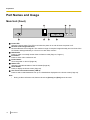
Main Unit (Front)
A
E
B
F
C
G
D
H
Power LED
Shows the power status. The LED is red when the power is on and off when the power is off.
Remote Control Signal Receiver
Receives Remote Control signals. The maximum range of reception is approximately 8 m from front of the
KX-VC500, and approximately 3 m from 20° on each side, total 40°.
Start button
Press to make or manually answer video conference calls (Page 31, Page 41).
End button
Press to end a video conference call.
Power button
Turns the power on and off (Page 26).
Status LED
Shows the operational status of the KX-VC500 (Page 20).
Home button
Press to display the Home screen (Page 27).
One-Touch Connection buttons (LED lit)
Press to select a dial destination from up to 5 destinations displayed on the Home screen (Page 32).
Note
•
16
During a video conference call, buttons other than [Power] and [End] cannot be used.
User Manual
Preparation
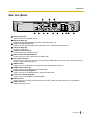
Main Unit (Back)
RS-232C terminal
This terminal is not available for use.
MIC jack (Page 22)
Used to connect the Boundary Microphone (optional) (Page 19).
Audio In L/R jack (Page 22)
Used to connect general-purpose microphones (not for the Boundary Microphone).
LAN jack (Page 22)
Connect a LAN cable.
Camera Control terminal
This terminal is not available for use.
Main Camera terminal (Page 22)
Connect the main video camera with an HDMI cable.
Sub Camera terminal
Used to connect a second, sub video camera with an HDMI cable for sharing video contents apart from
the main video camera (Page 59).
RGB terminal
Used to connect a computer for sending screens to participants (Page 55).
HDMI terminal (Page 22)
Used to connect to the display with an HDMI cable.
Component terminal (Page 25)
Used to connect to the display with a component video cable.
Audio Out L/R jack (Page 25)
Used to connect an amplifier or active speaker.
GND terminal
Used to connect an earthing wire when the power cord’s earth terminal connection is not available.
AC IN (Page 23)
Connect the power cord.
User Manual
17
Preparation
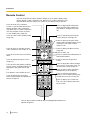
Remote Control
Press to show the sub video camera’s images on your and the other party’s
display during a video conference call. When not on a video conference call,
the sub video camera’s images are shown on your display only (Page 60).
Press to show your computer’s
screen on your and the other party’s
display during a video conference
call. When not on a video conference
call, the computer screen is shown
on your display only (Page 56).
Press to display/hide information
about the other party, guide area
and duration, during a call (Page
30).
Press to enter screen standby mode
(Page 20).
Press to change the layout of the
screen during a call (Page 43).
Press to return to the main video
camera after showing images from a
computer or sub video camera
(Page 57, 61).
Press to make or manually answer
video conference calls (Page 32, 41).
Press to display the Menu screen
(Page 28).
Press to end a call.
Press to move the cursor and select
items.
Press to confirm the selected item or
entered information.
Press to display the Home screen
(Page 27).
Press to return to the previous
screen.
Press to select the feature assigned
to each colour. Available features are
displayed in the guide area (Page
27).
This button is not available for use.
Press to display the connection
status of the network and peripheral
devices (Page 64).
Press to adjust the volume during a
call. Press [+] to increase and [–] to
decrease the volume (Page 51).
Press to select a tone (equaliser)
setting during a call (Page 54).
Press to mute the microphone
during a call, so that the other party
cannot hear your voice (Page 52).
Press to display your contact list.
This can only be pressed from the
Home screen.
Press to dial or perform settings where inputting digits/characters is
required (Page 95).
18
User Manual
Preparation
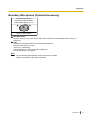
Boundary Microphone (Optional Accessory)
Boundary Microphone
(Proprietary cable included.
Cable length: approx. 8.5 m)
A
B
Part No.: KX-VCA001
MIC Mute button
Press to mute your own voice so that other video conference call participants cannot hear you
(Page 52).
LED
Indicate the operational status of the Boundary Microphone.
Red (on): Microphone is muted.
Green (on): Transmitting
Orange (blinking in 1 second intervals): Starting up
Off: No transmission in progress
Note
•
•
Up to 4 Boundary Microphones can be connected in cascade.
Contact your dealer for purchase information.
User Manual
19
Preparation
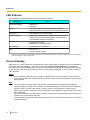
LED Patterns
LEDs indicate the operational status of the KX-VC500, as follows:
LED pattern
*1
Status
Slow blue flashing
•
•
Starting up
Idle state
Blue on
•
In a video conference call (including when dialling,
receiving a video conference call, and being disconnected)
Orange on
•
Self diagnosis is being performed.
Orange flashing
•
Mismatch of field frequency*1 between the KX-VC500 and
display. (After 30 seconds the flashing will stop and the
KX-VC500 will restart in safe mode.)
Red on
•
•
An error has occurred.
Maintenance is being performed.
Red flashing
•
A serious error has occurred.
Off
•
•
Power is off.
In screen standby mode
Devices such as the display or video camera operate with a particular field frequency, depending on their video format. For details
on the field frequency, contact your dealer.
Screen Standby
When there is no video conference call transmission, and the KX-VC500 or remote control is not operated for
more than 10 minutes (default), or when the remote control’s [Video Out On/Off] button is pressed, the
KX-VC500 enters screen standby mode. Video out to the display is suspended and the status LED turns off.
Screen standby mode ends when the KX-VC500 or remote control is operated, or when a video conference
call is received.
Notice
•
If screen standby mode ends and no image is visible, check to see if the display or video camera’s
power saving settings are enabled. Check each device’s manual for more information about its power
saving settings.
Note
•
•
•
•
•
20
You can change the length of time until the KX-VC500 enters screen standby mode (Page 88).
The KX-VC500 will not enter screen standby mode while displaying a computer’s screen or a sub video
camera’s image, even if the KX-VC500 or remote control is not operated for a period of time.
When the KX-VC500 or remote control is operated and screen standby mode ends, the Home screen
will be displayed.
If a button is pressed on the KX-VC500 or remote control to end screen standby mode, that button’s
operation is not performed in that case.
If screen standby mode begins while editing information in the contact list or other screen, any unsaved
changes will be lost.
User Manual
Preparation
•
It takes about 7 seconds to return from screen standby mode. (The length of time may vary depending
on the type of display you are using.)
User Manual
21
Preparation
2. Connect the display.
• Connect the display to the HDMI terminal on the
Connecting the
KX-VC500
back of the KX-VC500 using an HDMI cable
(B).
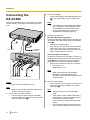
This section describes how to connect the main video
camera, display, microphone, LAN cable and power
cord.
Note
•
If your display is not compatible with HDMI,
use a component cable (Page 25). Since
sound signals are not transmitted when
using a component cable, connect an
amplifier/active speaker (Page 25).
3. Connect a microphone.
E
F
To earthed
AC outlet
To a router
Boundary Microphone (optional)
Connect the Boundary Microphone to the MIC jack
on the back of the KX-VC500 using the proprietary
cable (C).
• Use only the included cable.
• Push and turn the connector of the proprietary
cable until it clicks. If the connector does not
click, try reconnecting the cable with the top and
bottom of the connector reversed.
General-purpose microphone
Connect the microphone to the Audio In L/R jack on
the back of the KX-VC500 using the stereo pin plug
cable (D) after amplifying the signal to line level
using a device such as a microphone amplifier.
• Connect the microphone correctly, as follows:
– Left channel ® L
– Right channel ® R
C
A
D
B
Note
•
To each device
To a display
Notice
•
Use only the included power cord.
Note
•
Make sure to read the instruction manuals for
all devices being connected.
1. Connect the main video camera.
• Connect the main video camera to the Main
Camera terminal on the back of the KX-VC500
using an HDMI cable (A).
4. Connect to the network.
• Connect a router to the LAN jack on the back of
the KX-VC500 using a category 5 or greater
LAN cable (E).
Note
•
•
•
•
22
User Manual
When connecting both the Boundary
Microphone and a general-purpose
microphone, both microphones can be used
simultaneously.
Set the hub/router to Auto Negotiation
mode.
If the system is set to 100M Full Duplex, it
is necessary to change the system setting.
For details, contact your dealer.
Do not connect to a hub/router set to Half
Duplex.
For more details about routers and DCEs,
refer to the documentation for each device.
Preparation
5. Insert the included power cord (F) into the AC IN
Also, Boundary Microphones and general-purpose
microphones can be used simultaneously.
terminal on the back of the KX-VC500.
• Use only the included power cord.
6. Plug in the power cord into the power outlet.
• Choose an outlet that is convenient for
plugging/unplugging.
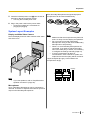
System Layout Examples
Display and Main Video Camera
Place the display and main video camera at the same
side of the room.
Note
•
Make sure that the microphones are placed at
least 1 m away from the display and speakers.
• Do not connect more than 4 Boundary
Microphones. Doing so will cause all Boundary
Microphones to stop working.
• When 2 or more Boundary Microphones are
connected, if you want to change the output
sent to the other party to stereo, it is necessary
to configure the settings manually (Page 79).
• If you are connected to an MCU or
non-Panasonic video conference system, the
output sent to the other party will be monaural.
Layout examples (the grey circle indicates the
microphone’s range):
Display
4m
Microphone
Note
•
If you use speakers, refer to "Amplifier/Active
Speaker Connection" (Page 25).
Microphones
Up to 4 Boundary Microphones can be connected in
cascade. There are no separate terminals for input and
output on the Boundary Microphones.
User Manual
23
Preparation
Display
4m
4m
Microphone
Microphone
4m
4m
Display
Microphone
Microphone
4m
Microphone
4m
Microphone
4m
Display
Microphone
4m
Microphone
4m
Microphone
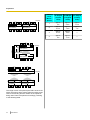
The range of each microphone (the radius of the circle
with a microphone at the centre) varies according to the
level of surrounding and the number of microphones
being used. Place microphones accordingly, referring
to the following table.
24
User Manual
Noise
level/
Micro–
phone
40 dBsplA
(a quiet
room)
45 dBsplA
(a regular
room)
50 dBsplA
(a noisy
room)
1
approx.
3m
approx.
2.2 m
approx.
1.2 m
2
approx.
2.8 m
approx.
1.5 m
approx.
1m
3
approx.
2.3 m
approx.
1.3 m
—
4
approx.
2m
approx.
1.1 m
—
Preparation
Amplifier/Active Speaker
Connection
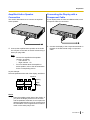
Connecting the Display with a
Component Cable
This section describes how to connect an amplifier/
active speaker.
If your display does not have an HDMI terminal, use a
component cable for connection.
1. Connect the display to the Component terminal on
1. Connect the amplifier/active speaker to the Audio
Out L/R jack on the back of the KX-VC500 using a
stereo pin plug cable.
the back of the KX-VC500 using a component
cable.
Note
•
•
Connect the amplifier/active speaker
correctly, as follows:
– Left channel ® L
– Right channel ® R
For more details about the amplifier or
active speaker, refer to the documentation
for the corresponding device.
Layout example:
Place the speakers either side of the display, as follows:
Speaker
Display
Main
video
camera
Microphone
Speaker
Notice
•
Place the speakers either side of the display. If
you place the display at the front of the room
and the speakers at the back, the microphone’s
left/right spatial direction may be reversed, and
the orientation of the image and sound will not
match on the other party’s side.
User Manual
25
Preparation
Turning the Power On/Off
Note
•
1
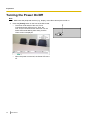
Make sure that peripheral devices (e.g., display, main video camera) are turned on.
Press the [Power] button on the front of the KX-VC500.
• The Power LED and all of the One-Touch
Connection button LEDs turn on. Then, the
One-Touch Connection button LEDs turn off, the
Status LED starts flashing blue slowly, and the
Home screen is displayed.
•
26
When the power is turned off, the Power LED turns
off.
User Manual
1
Preparation
Screen Display
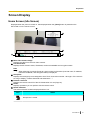
Home Screen (Idle Screen)
Displayed when the power is turned on. Also displayed when the [Home] button is pressed on the
KX-VC500 or on the remote control.
A
B
C
F
D
E
Main Video Camera Image
Displays the video from the main video camera.
Unit Information
Displays the KX-VC500’s name, IP address, maximum bandwidth and encryption status.
Note
•
When selecting a local site (Page 92), that local site’s information (local site name, IP address,
maximum bandwidth, and encryption status) is displayed.
Group/Site
Displays the name/group name assigned to One-Touch Connection number 1 through 5. If the name is
too long to display, it will be shortened and ended with "...".
Remote Control ID
Displays the remote control ID of the KX-VC500 when it is set (Page 81).
Guide
Displays operations you can perform with the remote control.
Status Indication
The status of the KX-VC500 is displayed with an icon.
Icon
Status
Microphone is muted.
User Manual
27
Preparation
Icon
Status
LAN cable or peripheral connection error (no connection, device error, etc.).
Note
•
If the MIC detection setting has been disabled through system settings
(Page 78), the icon will not be displayed even if the Boundary Microphone is
disconnected. However, if there are no connections, or there is a device error in
other devices such as the LAN cable, the icon will be displayed.
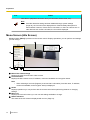
Menu Screen (Idle Screen)
Displayed when [Menu] is pressed on the remote control. Displays operations you can perform and settings
you can change.
A
B
D
E
C
Main Video Camera Image
Displays the video from the main video camera.
Unit Information
Displays the KX-VC500’s name, IP address, maximum bandwidth and encryption status.
Note
•
When selecting a local site (Page 92), that local site’s information (local site name, IP address,
maximum bandwidth, and encryption status) is displayed.
Guide
Displays operations you can perform with the remote control when performing features or changing
settings.
Menu List
Displays the various functions you can use and settings available to change.
Status Indication
The status of the KX-VC500 is displayed with an icon (Page 27).
28
User Manual
Preparation
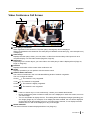
Video Conference Call Screen
A
B
C
F
D
G
E
Other party’s information
When registered in the contact list: The other party’s name/group name is displayed.
When not registered in the contact list: The other party’s IP address or host name (e.g., www.example.com)
is displayed.
Video Image
Displays the other party’s video, your own video, or video from the secondary video input such as a
computer display or a sub video camera (Page 55, Page 59).
Subscreen
Depending on the screen layout, your own video or the other party’s video is displayed here (Page 43,
Page 45, Page 48).
Duration
Displays the duration of the current video conference call.
Guide
Displays operations you can perform with the remote control.
Network Status Indication
The number of antennas in the icon indicates differing levels of network congestion.
The icon changes as follows:
0 bars (
1 bar (
): The network is very congested.
): The network is congested.
2 bars (
): The network is slightly congested.
3 bars (
): The network is not congested.
Note
•
•
If the icon shows only 0–1 bars continuously, contact your network administrator.
During multiple-party video conference calls, the icon is displayed on each site screen, but not on
your own image.
• You can set whether to display the icon. This setting affects all displayed images (excluding your
own image) (Page 78). For example, if icon display has been enabled, the icon will be displayed
on the image of all other parties, but not on your own image. However, if icon display has been
disabled, the icon will not be displayed on any of the images.
Status Indication
The status of the KX-VC500 is displayed with an icon (Page 27).
User Manual
29
Preparation
Note
•
*1
30
Pressing [Full Screen] on the remote control will hide or unhide the other party’s information, duration,
network status indication*1, and guide displays.
If the network status indication has been set to not be displayed, pressing [Full Screen] will not show the icon.
User Manual
Starting a Video Conference
S
t
a
r
Making a Video Conference Call
t
i
You can make a video conference call using one of the following methods.
n
g
a
Note
•
V
i
d
e
•
•
o
C
o
n
f
•
•
•
•
e
r
e
•
n
c
e
•
•
During a video conference call, you cannot perform the following operations:
– Pressing [Menu] to display the Menu screen.
– Pressing [Contact] to display the contact list screen.
Make sure that peripheral devices (e.g., display, main video camera) are turned on.
If a called party does not answer a video conference call within approximately 60 seconds, the call will
be terminated automatically.
2-party/3-party/4-party video conference calls can be made using the outgoing call history.
Only 2-party video conference calls can be made using the incoming call history.
You cannot add parties to an existing video conference call.
During a 3-party/4-party video conference call, even if only one party ends the video conference call,
the rest of the parties will also be disconnected.
A video conference call will start with only the parties that answered the call. For example, if only one
party answers a 4-party video conference call, the video conference call will start as a 2-party video
conference call.
3-party/4-party video conference calls may not be possible depending on bandwidth settings
(Page 77, Page 91).
When connecting to non-Panasonic video conference systems, you can make only 2-party video
conference calls.
Calling Using Speed Dial (2-party Conference/3-party Conference/
4-party Conference)
Note
•
To call using speed dial, you need to have a speed dial number programmed in "Speed Dial" in the
contact list (Page 71).
User Manual
31
Starting a Video Conference
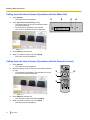
Calling from the Home Screen (Operation with the Main Unit)
1
2
Press [Home].
• The Home screen is displayed.
1
2
3
4
Press [One-Touch Connection] (1 to 5).
The LED for the One-Touch Connection number
you pressed lights up.
• The information registered to the selected
One-Touch Connection number is displayed.
•
3
Press [Start] to start the call.
4
When you want to end the call, press [End].
• The Home screen is displayed.
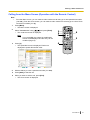
Calling from the Home Screen (Operation with the Remote Control)
1
Press [Home].
• The Home screen is displayed.
2
With the dial keys, enter a One-Touch Connection number
(1 to 5).
• The information registered in the selected One-Touch
Connection number is displayed.
3
1
2
3
4
Press [Start] to start the call.
• You can also start the call pressing [Enter].
When you want to end the call, press [End].
The Home screen is displayed.
•
32
User Manual
4
Starting a Video Conference
Calling from the Menu Screen (Operation with the Remote Control)
Note
•
From the Menu screen, you can make a video conference call using up to 300 speed dial numbers
(1 to 300). (From the Home screen, you can make a video conference call using up to 5 One-Touch
Connection numbers [1 to 5].)
1
Press [Menu].
• The Menu screen is displayed.
2
Select "Contact List" using [ ][ ] and press [Enter].
• The contact list screen is displayed.
Note
•
3
1
5
2
If you press [G], the contact list modification
screen will be displayed and the entry can be
modified (Page 72).
Press [Y].
The speed dial screen is displayed. Entries are
displayed in speed dial number order.
•
4
With the dial keys, enter a speed dial number (1 to 300).
5
Press [Start] to start the call.
6
When you want to end the call, press [End].
• The Home screen is displayed.
6
3
4
User Manual
33
Starting a Video Conference
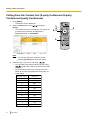
Calling from the Contact List (2-party Conference/3-party
Conference/4-party Conference)
1
Press [Menu].
• The Menu screen is displayed.
2
Select "Contact List" using [ ][ ] and press
[Enter].
• The contact list screen is displayed. The entries are
grouped in the index tabs and displayed in
alphabetical order of "Group/Site".
1
4
2, 3
3
Note
•
3
34
You can also open the contact list screen
pressing [Contact] from the Home screen.
Select the entry you want to call using [ ][ ].
• You can switch the index tab back and forth using
[ ][ ]. (Index tabs in which no entries exist will be
skipped.)
• Press a numeric button on the remote control to
switch to the index tab assigned to that button, as
shown below.
Numeric button
Index Tab
1
–
2
ABC
3
DEF
4
GHI
5
JKL
6
MNO
7
PQRS
8
TUV
9
WXYZ
0
0-9
*
-&;/
#
–
User Manual
5
Starting a Video Conference
4
Press [Start] to start the call.
5
When you want to end the call, press [End].
• The Home screen is displayed.
User Manual
35
Starting a Video Conference
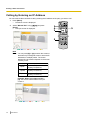
Calling by Entering an IP Address
You can make a video conference call by entering the IP address of the party you want to call.
1
Press [Menu].
• The Menu screen is displayed.
2
Select "Manual Dial" using [ ][ ] and press
[Enter].
• The input screen is displayed.
1
4
2
3
Note
•
You can press [R] or [G] to switch the screen to
that button’s pre-assigned screen to enter the IP
addresses of multiple parties. The screen
displayed by each button depends on the screen
currently in use.
Display
1 point
2 points
3 points
Input Screen
Input screen 1
(2-party Conference)
Input screen 2
(3-party Conference)
Input screen 3
(4-party Conference)
Example: When using Input screen 1
[R]: The screen will be switched to Input
screen 2.
36
User Manual
5
Starting a Video Conference
[G]: The screen will be switched to Input screen 3.
•
•
3
IP addresses will be cleared if you move to another
input screen without pressing [Start].
When connecting to an MCU or non-Panasonic
video conference system, you cannot make 3-party/
4-party video conference calls.
Enter the IP address.
• If the IP address contains 1 or 2 digit numbers, enter
these numbers as they are. Do not enter like [.001].
Example: The IP address is [192.168.0.1].
– Correct entry: [192.168.0.1]
– Wrong entry: [192.168.000.001]
Note
•
•
You can refer to the contact list when entering
the IP address, by following the procedure
below:
1. Press [B].
• The contact list screen is displayed.
2. Use [ ][ ] to select the contact you want
to refer to.
• You can use [ ][ ] to select the
displayed tab (Page 34).
• You can use the numeric buttons of the
remote control to select the displayed
tab (Page 34).
3. Press [Enter].
• The display returns to the input screen.
You cannot enter the IP address using the call
history.
4
Press [Start] to start the call.
• You can also start the call by pressing [Enter].
5
When you want to end the call, press [End].
• The Home screen is displayed.
User Manual
37
Starting a Video Conference
Calling from the Call History
You can make a video conference call from the call history. The call history is divided into outgoing and incoming
calls. The last 30 video conference calls made and received are stored in the outgoing and incoming call history.
Information such as the contact name or IP address (or host name), the date and time, the duration of the call,
and the result of the call is displayed for each call on the outgoing call history screen and incoming call history
screen. If the IP address of an entry in the call history is deleted from or edited in the contact list, the contact
name in the call history entry will be replaced by the IP address.
Note
•
You cannot make a video conference call to a host name displayed in the call history.
Outgoing Call History:
• 2-party/3-party/4-party video conference calls can be made using the outgoing call history.
• When connecting to non-Panasonic video conference systems, you can make only 2-party video
conference calls using the outgoing call history.
• For video conference calls made using the contact list, the contact name is displayed. For video conference
calls made by entering the IP address directly (Page 36), the IP address is displayed. (The IP address is
also displayed even if a matching entry exists in the contact list.)
• If consecutive video conference calls are made to the same destination, only the latest call will appear in
the outgoing call history.
Incoming Call History:
• Only 2-party video conference calls can be made using the incoming call history.
• If the calling party’s IP address is registered in the contact list, the contact name is displayed. Otherwise,
the IP address or host name is displayed.
• If consecutive unanswered video conference calls are received from the same party, only the latest call
will appear in the incoming call history.
38
User Manual
Starting a Video Conference
1
Press [Menu].
• The Menu screen is displayed.
2
Select "Call History" using [ ][ ] and press
[Enter].
• The outgoing call history screen is displayed.
1
4
2, 3
5
Note
•
•
•
•
•
•
The result of the video conference call is
displayed in the "Call result" column as follows:
: The video conference call was
–
established.
–
: The video conference call was not
established.
To move to the incoming call history screen,
press [G]. You can switch between the outgoing
call history screen and the incoming call history
screen by pressing [G].
In the incoming call history, if a party is not
registered in your contact list, their IP address or
host name will be displayed.
In the outgoing call history, if a party is registered
in your contact list, the contact name is
displayed. However, when calling by entering an
IP address (Page 36), even if the party is
registered in your contact list, their IP address is
displayed.
When a contact in the incoming call history is
newly added to your contact list, the incoming
call history will be updated to display the
contact’s information from the contact list.
When a party that is not registered in your
contact list is selected, if you press [B], the
contact list registration screen will be displayed
and a new contact can be registered
(Page 73). If a host name is displayed in the
"Site" column, the party cannot be registered in
your contact list.
User Manual
39
Starting a Video Conference
3
Select the party you want to call using [
][
].
Note
•
If you press [Enter], the call history details
screen is displayed.
•
When not selecting a local site (Page 92),
"Local site name" will be blank.
The lowest bandwidth for the maximum
bandwidth setting among all participating parties
is displayed in "Bandwidth". If the video
conference call was not established, the
maximum bandwidth will be blank.
Depending on the other party, "Device type"
may be blank.
•
•
40
4
Press [Start] to start the call.
5
When you want to end the call, press [End].
• The Home screen is displayed.
User Manual
Starting a Video Conference
Answering a Video Conference Call
Depending on your setting, you can either respond to a request to participate in a video conference call
manually (manual answer) or automatically (automatic answer) (Page 77).
Note
•
Make sure that peripheral devices (e.g., display, main video camera) are turned on.
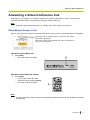
When Manual Answer is Set
When a video conference call is incoming there will be an incoming call ring, and a dialogue box is displayed.
When the caller is registered in the contact list, the caller’s
group/site is displayed.
When the caller is not registered, the caller’s IP address or
host name is displayed.
Operation with the Main Unit
1
Press [Start].
• The video conference begins.
1
Operation with the Remote Control
1
Press [Start].
• You can also answer the video
conference call by pressing [Enter].
• The video conference begins.
1
Note
•
If you do not answer a video conference call within approximately 60 seconds, the call will be terminated
automatically.
User Manual
41
Starting a Video Conference
When Automatic Answer is Set
When a video conference call is incoming the call will be automatically answered after one ring, and
transmission then begins.
42
User Manual
Changing the Screen Layout
C
h
a
n
g
i
Changing the Screen Layout during a 2-party Video
Conference Call
n
g
t
You can choose from 3 different screen layouts when taking part in a 2-party video conference call.
1
Press [Layout].
The screen will cycle through the available layouts
each time you press [Layout].
– Layout 1: The other party’s image is displayed
full screen.
– Layout 2: The other party’s image is displayed
full screen, and your own image is displayed in
the upper right subscreen.
– Layout 3: Your own image is displayed full
screen.
•
h
e
S
c
r
e
e
n
L
a
1
y
Layout 1
Layout 2
o
u
t
B
A
A
Layout 3
B
A: Other Site
B: This Site
Note
•
You can press [B] or [R] to switch the screen layout to that button’s pre-assigned layout.
The layout displayed by each button depends on the screen layout currently in use.
Display
Other Site
Screen Layout
Layout 1
User Manual
43
Changing the Screen Layout
Display
Screen Layout
Both Sites
Layout 2
This Site
Layout 3
Example: When using Layout 2
•
•
•
44
[B]: The screen layout will be switched to Layout 3.
[R]: The screen layout will be switched to Layout 1.
When using a secondary video source (Page 55, Page 59), the screen layout cannot be changed.
(You can change the screen layout when connecting to an MCU or non-Panasonic video conference
system.)
When connecting to an MCU or non-Panasonic video conference system, images received from the
other party may not be displayed in the correct aspect ratio (the ratio of the width of the image to its
height). In this case, perform the following operation during the video conference call. (When the video
conference call ends, the aspect ratio will return to "Auto" [default].)
1. Press [G].
• The aspect ratio dialogue box is displayed.
2. Use [ ][ ] to select "Auto" (default), "16:9", or "4:3".
• A dialogue box showing the selected aspect ratio is displayed for about 3 seconds.
When connecting to an MCU, the MCU’s screen will be displayed as the other party’s image. You can
change the MCU’s screen layout remotely using tone signals (Page 70).
User Manual
Changing the Screen Layout
Changing the Screen Layout during a 3-party Video
Conference Call
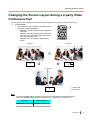
You can choose from 7 different screen layouts when taking part in a 3-party (This Site, Site 1, Site 2) video
conference call.
1
Press [Layout].
The screen will cycle through the available layouts
each time you press [Layout].
– Layout 1: Image of Site 1 on the left and image
of Site 2 on the right.
– Layout 2: The images are displayed as follows:
Site 1: upper left
Site 2: upper right
This Site: bottom middle
– Layout 3: Image of Site 1 is displayed full screen
and image of Site 2 is displayed in the upper right
subscreen.
– Layout 4: Image of Site 2 is displayed full screen
and image of Site 1 is displayed in the upper left
subscreen.
– Layout 5: The image of Site 1 is displayed full
screen.
– Layout 6: The image of Site 2 is displayed full
screen.
– Layout 7: Your own image is displayed full
screen.
•
1
User Manual
45
Changing the Screen Layout
Layout 1
Layout 2
A
A
B
B
C
Layout 7
Layout 3
C
A
Layout 6
Layout 4
B
A
B
B
Layout 5
A
46
User Manual
A: Site 1
B: Site 2
C: This Site
Changing the Screen Layout
Note
•
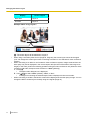
You can press [B], [R], or [G] to switch the screen layout to that button’s pre-assigned layout.*1 The
layout displayed by each button depends on the screen layout currently in use.
*1
You cannot switch the screen layout to Layout 2 directly. However, you can switch to Layout 2 if you press [Layout] first
(Page 45).
Display
Screen Layout
Side by Side
Layout 1
Site 1(2)
Layout 3
(Site 1) 2
Layout 4
Site 1
Layout 5
Site 2
Layout 6
This Site
Layout 7
Example: When using Layout 3
•
[B]: The screen layout will be switched to Layout 5.
[R]: The screen layout will be switched to Layout 6.
[G]: The screen layout will be switched to Layout 7.
When using a secondary video source (Page 55, Page 59), the screen layout cannot be changed.
User Manual
47
Changing the Screen Layout
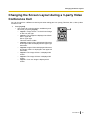
Changing the Screen Layout during a 4-party Video
Conference Call
You can choose from 6 different screen layouts when taking part in a 4-party (This Site, Site 1, Site 2, Site 3)
video conference call.
1
48
Press [Layout].
• The screen will cycle through the available layouts
each time you press [Layout].
– Layout 1: The images are displayed as follows:
Site 1: upper left
Site 2: bottom middle
Site 3: upper right
– Layout 2: The images are displayed as follows:
Site 1: upper left
Site 2: lower left
Site 3: upper right
This Site: lower right
– Layout 3: The image of Site 1 is displayed full
screen.
– Layout 4: The image of Site 2 is displayed full
screen.
– Layout 5: The image of Site 3 is displayed full
screen.
– Layout 6: Your own image is displayed full
screen.
User Manual
1
Changing the Screen Layout
Layout 1
A
C
B
Layout 2*¹
A
C
B
D
Layout 6
Layout 3
D
A
Layout 5
Layout 4
C
B
A: Site 1
B: Site 2
C: Site 3
D: This site
*1
Image edges are trimmed and the image is centred.
Note
•
You can press [B], [R], or [G] to switch the screen layout to that button’s pre-assigned layout. The
layout displayed by each button depends on the screen layout currently in use.
User Manual
49
Changing the Screen Layout
Display
Screen Layout
Remote sites
Layout 1
All Sites
Layout 2
Site 1
Layout 3
Site 2
Layout 4
Site 3
Layout 5
This Site
Layout 6
Example: When using Layout 3
•
50
[B]: The screen layout will be switched to Layout 1.
[R]: The screen layout will be switched to Layout 2.
[G]: The screen layout will be switched to Layout 6.
When using a secondary video source (Page 55, Page 59), the screen layout cannot be changed.
User Manual
Adjusting the Volume and Tone
A
d
j
u
Adjusting the Volume
s
t
i
You can adjust the volume during a video conference call.
1
Press [Volume (+/–)].
• The volume level bar is displayed at the bottom of
the screen.
2
Adjust the volume using [Volume (+/–)].
• Pressing [+] will increase the volume of the other
party’s voice.
• Pressing [–] will decrease the volume of the other
party’s voice.
3
After about 3 seconds, the volume level bar disappears.
n
g
t
h
e
V
o
l
u
1, 2
m
e
a
n
d
T
o
n
Note
•
•
e
•
You can set the volume level of a video conference call before starting the call (Page 76).
After ending a video conference call, the volume level returns to the volume level set before starting
the call.
You cannot adjust the display’s volume.
User Manual
51
Adjusting the Volume and Tone
Muting the Microphone
During a video conference call, you can mute the microphone so that your voice cannot be heard by the other
party. You will be able to hear the other party’s voice, but they will not be able to hear you.
Note
•
You can set the microphone(s) to be mute at the start of a received video conference call (Page 78).
Muting the Microphone (Operation with the Remote Control)
1
Press [MIC Mute].
An icon appears in the status display area of the
screen (Page 27), and the LED light on the Boundary
Microphone (Page 19) becomes red. Make sure the
colour of the LED changes.
• Pressing [MIC Mute] again will unmute the
microphone. The LED light on the Boundary
Microphone (Page 19) becomes green. Make sure
the colour of the LED changes.
•
1
Muting the Microphone (Operation with the Boundary Microphone)
1
Press the MIC Mute button.
• An icon appears in the status display area of the
screen (Page 27), and the LED light on the Boundary
Microphone (Page 19) becomes red. Make sure the
colour of the LED changes.
• Pressing the MIC Mute button again will unmute the
microphone. The LED light on the Boundary
Microphone (Page 19) becomes green. Make sure
the colour of the LED changes.
Note
•
52
User Manual
When multiple Boundary Microphones are
connected, pressing the MIC Mute button of
one Boundary Microphone will mute all
Boundary Microphones.
1
Adjusting the Volume and Tone
Reducing Microphone Noise
You can reduce the amount of ambient noise picked up by the microphone (shuffling of papers, etc.) during a
video conference call. When noise reduction is in effect, the volume level of voices may also be reduced.
1
Press [Y].
• "Whisper Mode [ON]" is displayed, and noise
reduction is enabled.
1
•
Pressing [Y] again will display "Whisper Mode
[OFF]", and noise reduction is disabled.
Note
•
•
You can set whether to enable noise reduction
for a video conference call before starting the
call (Page 78).
After a video conference call is finished, the
noise reduction setting returns to the value set
before starting the call.
User Manual
53
Adjusting the Volume and Tone
Adjusting the Tone
You can adjust the tone during a video conference call.
1
Press [Tone ( / )].
The tone control dialogue box appears, and the
current tone setting is displayed.
•
1, 2
2
Press [Tone ( / )] to select a tone setting.
"More Highs": high-pitched sounds are amplified.
"Standard": default sound.
"More Lows": low-pitched sounds are amplified.
"Voice": makes voices easier to hear when there is
a high level of ambient noise.
• "Music": makes sounds with a broad frequency,
such as music, easier to hear.
•
•
•
•
3
After about 3 seconds, the tone control dialogue box
disappears.
Note
•
•
•
54
You can set the tone of a video conference call before starting the call (Page 76).
After a video conference call is finished, the tone setting returns to the value set before starting the
call.
When connecting to an MCU or non-Panasonic video conference system, the tone is set to
"Standard" and cannot be changed.
User Manual
Displaying Other Video Sources
D
i
s
p
Displaying a Computer’s Screen
l
a
y
i
You can display a computer’s screen on your display and to other parties by connecting the computer to the
KX-VC500.
This is convenient when explaining something on the computer’s screen while showing it to others, for example.
n
g
Main video camera
Computer
O
t
h
e
r
V
i
d
e
Router
o
S
o
u
DCE *1
r
DCE *1
c
e
Internet
s
*1
DCE: Data Circuit-terminating Equipment
Connecting the Computer
•
•
•
•
•
Connect your computer’s monitor output to the back of the KX-VC500 using a VGA cable (Page 17).
Make sure the cable used has the correct connector shapes to connect to both your computer and to the
KX-VC500.
You can connect or disconnect the computer during a video conference call.
You can only display one computer’s screen at a time.
The computer screen resolutions supported by the KX-VC500 are VGA (640 ´ 480), SVGA (800 ´ 600),
and XGA (1024 ´ 768).
SXGA (1280 ´ 1024) is not supported. For each resolution, the following settings are supported:
User Manual
55
Displaying Other Video Sources
Resolution
Refresh Rate (Hz)
VGA
60/72/75/85
SVGA
60/72/75/85
XGA
60/70/75/85
Displaying the Computer’s Screen
You can switch the display from the main video camera to the computer screen during a video conference call.
1
Press [PC].
• The computer’s screen is displayed. The computer
screen is also shown on the other party’s display.
Note
•
•
56
User Manual
When connecting to an MCU or
non-Panasonic video conference system,
the same screen may not be shown on the
other party’s display depending on the other
party’s screen layout. Ask the other party to
change their screen layout to display your
computer’s screen.
When connecting to an MCU or
non-Panasonic video conference system,
you may not be able to display the
computer’s screen on the other party’s
display. An error message is displayed. To
return to displaying your main video
camera’s image, press [Enter].
1
2
Displaying Other Video Sources
Note
•
•
•
2
Pressing [Full Screen] on the remote control will
hide or unhide the other party’s information,
duration, and guide displays.
When connecting to another Panasonic HD
Visual Communication Unit:
– While displaying your computer’s screen,
the other party cannot press [PC] to display
their own computer’s screen.
– If a sub video camera is connected, you can
also switch to the sub video camera’s image
by pressing [Camera Sub] (Page 59).
Only the party that pressed [PC] can perform
this operation. To return to displaying your
computer’s screen, press [PC].
– While displaying your computer’s screen,
you can switch to displaying the other
party’s image in Layout 1 by pressing [B]
(Page 43, Page 45, Page 48). However, the
other party cannot perform this operation,
and the other party cannot confirm if you are
viewing your computer’s screen or the other
party’s image. When viewing the other
party’s image, the screen layout is fixed to
Layout 1. To return to displaying your
computer’s screen, press [B].
When connecting to an MCU or non-Panasonic
video conference system:
– Even while displaying your computer’s
screen, note that it is also possible for the
other party to start sharing their computer’s
screen.
– If a sub video camera is connected, you can
also switch to the sub video camera’s image
by pressing [Camera Sub] (Page 59). To
return to displaying your computer’s screen,
press [PC]. Note that it is also possible for
the other party to start sharing their sub
video camera’s image.
– While displaying your computer’s screen,
you can switch to displaying the other
party’s image in Layout 1 by pressing [B]
(Page 43). To return to displaying your
computer’s screen, press [R].
Press [Camera Main] to return to showing the main
video camera’s image.
Note
•
Only the party that pressed the [PC] button can
perform this operation.
User Manual
57
Displaying Other Video Sources
Note
•
58
On the Home screen, you can also display the
computer’s screen on your display by pressing [PC].
While the computer’s screen is displayed, the
KX-VC500 will not enter screen standby mode. To
return to the Home screen, press [Camera Main].
User Manual
Displaying Other Video Sources
Displaying the Sub Video Camera’s Image
When a sub video camera is connected to the KX-VC500, you can display the sub video camera’s image on
your display and to other parties.
Main video camera
Sub video camera
Router
DCE *1
DCE *1
Internet
*1
DCE: Data Circuit-terminating Equipment
Connecting the Sub Video Camera
•
•
•
•
Connect a video camera to the back of the KX-VC500 using an HDMI cable (Page 17).
You can connect or disconnect the sub video camera during a video conference call.
You can only display the image of one sub video camera at a time.
Only video cameras that can output 1080i resolution using HDMI can be used.
User Manual
59
Displaying Other Video Sources
Displaying the Sub Video Camera’s Image
You can switch the display from the main video camera to a sub video camera during a video conference call.
1
Press [Camera Sub].
• The sub video camera’s image is displayed. The
image is also visible on the other party’s display.
1
Note
•
60
User Manual
When connecting to an MCU or
non-Panasonic video conference system,
the same image may not be shown on the
other party’s display depending on the other
party’s screen layout. Ask the other party to
change their screen layout to display your
sub video camera’s image.
2
Displaying Other Video Sources
Note
•
•
•
2
Pressing [Full Screen] on the remote control will
hide or unhide the other party’s information,
duration, and guide displays.
When connecting to another Panasonic HD
Visual Communication Unit:
– While displaying your sub video camera’s
image, the other party cannot press
[Camera Sub] to display their own sub video
camera’s image.
– If a computer is connected you can also
switch to the computer screen’s image by
pressing [PC] (Page 55). Only the party that
pressed [Camera Sub] can perform this
operation. To return to displaying your sub
video camera’s image, press [Camera
Sub].
– While displaying your sub video camera’s
image, you can switch to displaying the other
party’s image in Layout 1 by pressing [B]
(Page 43, Page 45, Page 48). However, the
other party cannot perform this operation,
and the other party cannot confirm if you are
viewing your sub video camera’s image or
the other party’s image. When viewing the
other party’s image, the screen layout is
fixed to Layout 1. To return to displaying
your sub video camera’s image, press [B].
When connecting to an MCU or non-Panasonic
video conference system:
– Even while displaying your sub video
camera’s image, note that it is also possible
for the other party to start sharing their sub
video camera’s image.
– If a computer is connected, you can also
switch to the computer screen’s image by
pressing [PC] (Page 55). To return to
displaying your sub video camera’s image,
press [Camera Sub]. Note that it is also
possible for the other party to start sharing
their computer’s screen.
– While displaying your sub video camera’s
image, you can switch to displaying the other
party’s image in Layout 1 by pressing [B]
(Page 43). To return to displaying your sub
video camera’s image, press [R].
Press [Camera Main] to return to showing the main
video camera’s image.
Note
•
Only the party that pressed [Camera Sub] can
perform this operation.
User Manual
61
Displaying Other Video Sources
Note
•
62
On the Home screen, you can also display the sub
video camera’s image on your display by pressing
[Camera Sub]. While the sub video camera’s image
is displayed, the KX-VC500 will not enter screen
standby mode. To return to the Home screen, press
[Camera Main].
User Manual
Displaying Other Video Sources
Displaying a Still Image from the Sub Video Camera
You can display a still image from the sub video camera during a video conference call.
Note
•
•
1
Fix your sub video camera and the object so that the image is not blurred.
You cannot perform this operation when connecting to an MCU or non-Panasonic video conference
system.
Press [Camera Sub].
The sub video camera’s image is displayed.
•
2
Press [R].
• The still image from your sub video camera is
displayed on your display and the other party’s
display.
Note
•
•
•
3
1
4
2
3
The image becomes gradually clear after a black
screen is displayed for about 1 second.
If you press [R] while the still image is being sent,
the image taken when you pressed [R] the
second time is sent to other party’s display
again.
If the network has low bandwidth and a high rate
of packet loss, either it will take a long time to
display a clear image, or a blurred image will be
displayed.
Press [G].
• The display switches from the still image back to the
normal sub video camera image.
Note
•
4
A black screen is displayed for about 1 second
after you press [G].
Press [Camera Main].
• The screen returns to the main video camera’s
image.
User Manual
63
Displaying the Connection Status
D
i
s
p
Displaying the Connection Status
l
You can confirm the connection status of the network and peripheral devices.
a
1
y
i
n
g
t
Press [Status].
• The connections status screen is displayed. An
"X" mark is displayed next to any network or
peripheral devices connection that is not in normal
operation or not connected.
h
Example: The Boundary Microphone connection is
not normally operating.
e
C
2
o
n
n
e
1
c
t
i
o
n
S
t
a
t
•
u
s
•
2
"MIC" displays the connection status of the
Boundary Microphone only. The connection status
of general-purpose microphones is not displayed.
If the MIC detection setting has been disabled
through system settings, the connection status of the
Boundary Microphone will not be displayed
(Page 78).
Press [Back].
The display returns to the screen in use before the
connections status screen was viewed.
•
64
User Manual
Displaying the Connection Status
Displaying Unit Information
1
Press [Status] twice.
• The unit information screen is displayed.
2
1
•
•
The status of communication encryption is displayed
under "Encryption" and the resolution for sending
images is displayed under "Resolution (send)".
This information is not displayed when
communication is not occurring.
Features activated due to software enhancement
(Page 89) are displayed in "Software version".
The details are as follows:
"(CE)": Connection to MCUs and non-Panasonic
video conference systems is available.
User Manual
65
Displaying the Connection Status
•
If [Status] is pressed twice during a video
conference call, you can press [R] to switch to the
next screen. That screen displays the unit name, IP
address, packet loss rate, connection bandwidth,
resolution, frame rate and field frequency for the 3
parties displayed under "Site 1", "Site 2" and "Site
3".*1*2
*1
*2
2
66
"Frequency" is not displayed when connecting to an MCU
or non-Panasonic video conference system.
Depending on the other party, "Name" may be blank.
Press [Back].
• The display returns to the screen in use before the
step 1 was performed.
User Manual
About Enhanced Features
A
b
o
u
Activating Enhanced Features
t
E
n
h
a
n
Overview of Activation Keys
You can enhance the available features by purchasing an activation key card and configuring the necessary
settings (Page 89).
c
e
Model No.
Activation Key Type
Description
d
F
KX-VCS101
e
Connection Enhancement
Enables the connection to MCUs and non-Panasonic
video conference systems
a
t
u
Note
•
r
e
s
•
Once you have activated new features (Page 89), they remain activated even after software updates
or a system initialisation.
If the hardware changes, for example if you exchange the unit, you must reacquire the registration key
code and activate the features again. In this case, the registration key code can be reacquired free of
charge.
User Manual
67
About Enhanced Features
Enabling Connection to Non-Panasonic Video Conference
Systems
You can connect to a non-Panasonic video conference system and have a 2-party video conference call.
Intranet
Note
•
•
•
•
•
•
•
•
•
•
•
•
68
To connect to non-Panasonic video conference systems, you must purchase an activation key card
(KX-VCS101) and activate this feature beforehand (Page 89). For details about the activation key,
contact your dealer.
Non-Panasonic video conference systems you want to connect to must meet the following criteria.
Confirm the settings of the non-Panasonic video conference system.
– Supports SIP communication
– Supports communication with the H.264 Baseline Profile
– Supports communication with the G.722 voice codec
For details about the types of non-Panasonic video conference systems you can connect to, contact
your dealer.
The connection specifications (e.g., resolution) and available functions (e.g., content sharing) differ
depending on the model type you connect to. For details, contact your dealer.
When connecting to non-Panasonic video conference systems, only 2-party video conference calls are
possible.
You cannot adjust the tone during a video conference call.
Audio sent to the other party is monaural.
While you are displaying a sub video camera’s image, you cannot send a still image from the sub video
camera.
Encrypted communication is not supported. When connecting to a non-Panasonic video conference
system, both you and the other party must have encryption disabled (Page 77, Page 85,
Page 86).
Communication cannot be encrypted when you connect to a non-Panasonic video conference system.
Instead, connect over an intranet or via a VPN.
The maximum bandwidth specified in the settings at the beginning of the connection is applied for the
duration of the connection to a non-Panasonic video conference system. Depending on the network
conditions, you must specify an appropriate bandwidth setting (Page 77, Page 91).
It may be necessary to change your maximum bandwidth depending on the non-Panasonic video
conference system you are connecting to. If this is necessary, you can register a maximum bandwidth
in local site settings (Page 91).
User Manual
About Enhanced Features
Enabling Connection to an MCU
Connecting to an MCU allows you to have a video conference call with 5 or more parties.
Intranet
MCU
Note
•
•
•
•
•
•
•
•
•
•
•
To connect to an MCU, you must purchase an activation key card (KX-VCS101) and activate this
feature beforehand (Page 89). For details about the activation key, contact your dealer.
MCUs you want to connect to must meet the following criteria. Confirm the settings of the MCU.
– Supports SIP communication
– Supports communication with the H.264 Baseline Profile
– Supports communication with the G.722 voice codec
For details about the types of MCUs you can connect to, contact your dealer.
The connection specifications (e.g., resolution) and available functions (e.g., content sharing) differ
depending on the MCU you connect to. For details, contact your dealer.
The procedure for connecting to an MCU differs depending on the MCU. For details, contact your
dealer.
You cannot adjust the tone during a video conference call.
Audio sent to the other party is monaural.
While you are displaying a sub video camera’s image, you cannot send a still image from the sub video
camera.
Encrypted communication is not supported. When connecting to an MCU, encryption must be disabled
on both sides (Page 77, Page 85, Page 86).
Communication cannot be encrypted when you connect to an MCU. Instead, connect over an intranet
or via a VPN.
The maximum bandwidth specified in the settings at the beginning of the connection is applied for the
duration of the connection to an MCU. Depending on the network conditions, you must specify an
appropriate bandwidth setting (Page 77, Page 91).
User Manual
69
About Enhanced Features
Operating an MCU Remotely using Tone Signals
When connecting to an MCU, you can send tone signals by pressing buttons (0–9, #, or *) on the remote
control. Doing so allows you to operate (e.g., change the screen layout) the MCU remotely.
Note
•
•
•
•
1
Tone signals can only be sent when connecting to an
MCU. They cannot be sent between Panasonic HD
Visual Communication Units.
Features and operations that can be performed
remotely will vary depending on the MCU.
If the MCU you are connecting to does not support
tone signals, an error message is displayed.
If the other party sends tone signals to you, sound
may be interrupted or a ringing noise may occur.
Enter a tone signal (0–9, #, or *).
• The input field (A) is displayed.
A
Note
•
•
•
•
70
User Manual
The input field can only contain up to 16
characters. If you input 17 characters, the first
character input will not be displayed in the input
field but all tone signals will be sent.
The input field is not displayed until a tone signal
is entered.
If a tone signal is not entered for about 3
seconds, the input field disappears.
If you enter further tone signals after the input
field has disappeared, the tone signals entered
the previous time are also displayed.
1
Contacts and Settings
Contacts and Settings
Adding Contacts to the
Contact List
You can register the information of up to 300 contacts
in the contact list.
Note
•
If a video conference call is received while data
is being entered, a dialogue box to confirm if you
answer a video conference call is displayed.
Use [ ][ ] to select "Yes" or "No" and press
[Enter].
• When "Yes" is selected, you can answer a
video conference call while any unsaved
data is lost.
• When "No" is selected, you can continue
entering the data.
Registering a New Contact
Registering a Single-party Contact
1. Press [Menu].
• The Menu screen is displayed.
3. Use [
][ ] to select the following items for input:
"Group/Site": Enter a name for the contact (up to
24 characters) (Page 95).
"Speed Dial": Enter a speed dial number (1–300).
"Multi-Point": Use [ ][ ] to select "No".
"IP Address": Enter an IP address.
• If the IP address contains 1 or 2 digit numbers,
enter these numbers as they are. Do not enter
like [.001].
Example: The IP address is [192.168.0.1].
– Correct entry: [192.168.0.1]
– Wrong entry: [192.168.000.001]
4. Press [G].
• A dialogue box to confirm the saving of settings
is displayed.
5. Use [ ][ ] to select "Yes" and press [Enter].
• The contact list screen is displayed.
Note
•
To continue entering another contact, press
[B] and repeat steps 3–5.
6. Press [Home].
• The Home screen is displayed.
2. Use [
][ ] to select "New Contact" and press
[Enter].
• The contact list registration screen is displayed.
Registering a Multiple-party Contact
1. Press [Menu].
• The Menu screen is displayed.
2. Use [
][ ] to select "New Contact" and press
[Enter].
• The contact list registration screen is displayed.
User Manual
71
Contacts and Settings
3. Use [
][ ] to select the following items for input:
"Group/Site": Enter a name for the video
conference call (up to 24 characters) (Page 95).
"Speed Dial": Enter a speed dial number (1–300).
"Multi-Point": Use [ ][ ] to select "2 sites" or
"3 sites".
For "Site 1"/"Site 2"/"Site 3": Use the following
procedure to select these from the contact list
screen.
1. Use [ ][ ] to select "Site 1", "Site 2" or
"Site 3".
2. Press [Enter].
• The contact list screen is displayed.
3. Select a contact using [ ][ ].
• You can use [ ][ ] to select the
displayed tab (Page 34).
• You can use the numeric buttons of the
remote control to select the displayed tab
(Page 34).
4. Press [Enter].
• The contact list registration screen is
displayed.
4. Press [G].
• A dialogue box to confirm the saving of settings
is displayed.
5. Use [ ][ ] to select "Yes" and press [Enter].
• The contact list screen is displayed.
Note
•
To continue entering another contact, press
[B] and repeat steps 3–5.
4. Press [Enter].
• The contact list details screen is displayed.
5. Press [G].
• The contact list edit screen is displayed.
6. Use [
][ ] to select the item you want to edit and
make any changes (Page 95).
Note
•
•
When editing a single-party contact, you
cannot edit "Multi-Point".
When editing a multiple-party contact, you
cannot edit "Multi-Point" or "IP Address".
7. Press [G].
• A dialogue box to confirm the saving of settings
is displayed.
6. Press [Home].
• The Home screen is displayed.
8. Use [ ][ ] to select "Yes" and press [Enter].
• The contact list screen is displayed.
Editing Contact Information
9. Press [Home].
• The Home screen is displayed.
1. Press [Menu].
• The Menu screen is displayed.
Deleting a Contact
2. Use [
][
] to select "Contact List" and press
[Enter].
• The contact list screen is displayed.
3. Use [ ][ ] to select the contact you want to edit.
• You can use [ ][ ] to select the displayed tab
•
72
(Page 34).
You can use the numeric buttons of the remote
control to select the displayed tab (Page 34).
User Manual
1. Press [Menu].
• The Menu screen is displayed.
Contacts and Settings
2. Use [
][ ] to select "Contact List" and press
[Enter].
• The contact list screen is displayed.
2. Use [
][ ] to select "Call History" and press
[Enter].
• The outgoing call history screen is displayed.
Note
•
To refer to the incoming call history,
press [G].
3. Use [
][ ] to select the single-party entry you
want to add as a contact, and press [B].
• The contact list registration screen is displayed.
3. Use [
][ ] to select the contact you want to
delete.
• You can use [ ][ ] to select the displayed tab
(Page 34).
• You can use the numeric buttons of the remote
control to select the displayed tab (Page 34).
4. Press [R].
• A dialogue box to confirm the deletion is
displayed.
5. Use [ ][ ] to select "Yes" and press [Enter].
• The contact list screen is displayed.
6. Press [Home].
• The Home screen is displayed.
Registering a Contact from the
Call History
Registering a Single-party Contact
You can register a contact to the contact list from the
call history.
Note
•
If a host name is displayed in the "Site" column
of the call history, the party cannot be registered
in your contact list.
1. Press [Menu].
• The Menu screen is displayed.
4. Use [
][ ] to select the necessary items and
input information (Page 95).
Note
•
You cannot edit "Multi-Point" or "IP
Address".
5. Press [G].
• A dialogue box to confirm the saving of settings
is displayed.
6. Use [ ][ ] to select "Yes" and press [Enter].
• The outgoing or incoming call history screen is
displayed, depending on which of the screens
you displayed in step 2.
7. Press [Home].
• The Home screen is displayed.
Registering a Multiple-party Contact
You can register a multiple-party contact to the contact
list from the outgoing call history.
User Manual
73
Contacts and Settings
Note
•
•
When you register a multiple-party contact to
the contact list from the call history, each party
is also registered automatically as a
single-party contact and each IP address is
registered in "Group/Site".
If a host name is displayed in the "Site" column
of the call history, the party cannot be registered
in your contact list.
1. Press [Menu].
• The Menu screen is displayed.
2. Use [
][ ] to select "Call History" and press
[Enter].
• The outgoing call history screen is displayed.
3. Use [
][ ] to select the multiple-party entry you
want to add as a multiple-party contact, and press
[B].
• The contact list registration screen is displayed.
4. Use [
][ ] to select the necessary items and
input information (Page 95).
Note
•
You cannot edit "Multi-Point" or "IP
Address".
5. Press [G].
• A dialogue box to confirm the saving of settings
is displayed.
6. Use [ ][ ] to select "Yes" and press [Enter].
• The call history screen is displayed.
7. Press [Home].
• The Home screen is displayed.
74
User Manual
Contacts and Settings
Changing System
Settings
Note
•
If a video conference call is received while data
is being entered, the data entry is interrupted
and any unsaved data is lost.
Setting the Date and Time
1. Press [Menu].
• The Menu screen is displayed.
2. Use [
][ ] to select "Settings" and press
[Enter].
• The system settings screen is displayed.
3. Use [
Setting the Unit Name
][ ] to select "Set Date/Time" and press
[Enter].
• The date/time settings screen is displayed.
1. Press [Menu].
• The Menu screen is displayed.
2. Use [
][ ] to select "Settings" and press
[Enter].
• The system settings screen is displayed.
3. Use [
][ ] to select "System Settings" and
press [Enter].
• The unit name setting screen is displayed.
4. Use [
][ ] to select the item and input
information.
• Enter the year (4 digits), month (1–2 digits), day
(1–2 digits), time (24 hour display), and select
the date format (Month/Day/Year, Day/Month/
Year, Year/Month/Day) and hour display format
(12h/24h).
5. Press [G].
• A dialogue box to confirm the saving of settings
4. Enter a unit name (up to 24 characters)
(Page 95).
5. Press [G].
• A dialogue box to confirm the saving of settings
and system restart after saving is displayed.
6. Use [ ][ ] to select "Yes" and press [Enter].
• The system will automatically restart to reflect
changes to system settings.
is displayed.
6. Use [ ][ ] to select "Yes" and press [Enter].
• The system settings screen is displayed.
7. Press [Home].
• The Home screen is displayed.
Making Network Settings
1. Press [Menu].
• The Menu screen is displayed.
User Manual
75
Contacts and Settings
2. Use [
][ ] to select "Settings" and press
[Enter].
• The system settings screen is displayed.
3. Use [
][ ] to select "Sound Settings" and press
[Enter].
• The sound settings screen is displayed.
3. Use [
][ ] to select "Network Settings" and
press [Enter].
• The network settings screen is displayed.
4. Use [
4. Use [
][ ] to select the items you want to set,
and input the relevant data.
• If the IP address contains 1 or 2 digit numbers,
enter these numbers as they are. Do not enter
like [.001].
Example: The IP address is [192.168.0.1].
– Correct entry: [192.168.0.1]
– Wrong entry: [192.168.000.001]
5. Press [G].
• A dialogue box to confirm the saving of settings
is displayed.
6. Use [ ][ ] to select "Yes" and press [Enter].
• The system settings screen is displayed.
7. Press [Home].
• The Home screen is displayed.
Making Sound Settings
1. Press [Menu].
• The Menu screen is displayed.
2. Use [
][ ] to select "Settings" and press
[Enter].
• The system settings screen is displayed.
76
User Manual
][ ] to select the following items for input:
"Welcome Screen Vol.": Press [Enter] and use
[ ][ ] to select the volume level ("Low",
"Medium" [default] or "High") played at the
start-up.
"Ringback Tone Vol.": Press [Enter] and use
[ ][ ] to select the volume level ("Low",
"Medium" [default] or "High") of an outgoing call
ring.
Note
•
The volume level of the busy tone will be the
same level as the ring back tone.
"Ring Tone Vol.": Press [Enter] and use [ ]
[ ] to select the volume level ("Low",
"Medium" [default] or "High") of an incoming call
ring.
"Default Sound Lev.": Use [ ][ ] to select the
volume level (0–20) at the start of a video
conference call (default: 16).
"Sound Pre-sets": Press [Enter] and use [ ]
[ ] to select the tone ("More Highs",
"Standard" [default], "More Lows", "Voice" or
"Music") at the start of a video conference call
(Page 54).
Note
•
You can listen to a sample of the following
items by pressing [R].
– "Welcome Screen Vol."
– "Ringback Tone Vol."
– "Ring Tone Vol."
Contacts and Settings
5. Press [G].
• A dialogue box to confirm the saving of settings
is displayed.
6. Use [ ][ ] to select "Yes" and press [Enter].
• The system settings screen is displayed.
1.2 Mbps, 2.0 Mbps, 3.0 Mbps, 4.0 Mbps,
5.0 Mbps, 6.0 Mbps, 7.0 Mbps, 8.0 Mbps,
9.0 Mbps [default], 10.0 Mbps).
Note
•
7. Press [Home].
• The Home screen is displayed.
•
Making Connection Settings
1. Press [Menu].
• The Menu screen is displayed.
2. Use [
][ ] to select "Settings" and press
[Enter].
• The system settings screen is displayed.
3. Use [
][ ] to select "Call set up" and press
[Enter].
• The connection settings screen is displayed.
•
•
The maximum bandwidth during a video
conference call adjusts to that of the party
that has set the lowest bandwidth for the
maximum bandwidth setting among all
participating parties.
You cannot select a value that is higher than
the maximum bandwidth set by the dealer.
For details, contact your dealer.
When you make a 3-party video conference
call, select a value of "1.0 Mbps" or higher.
Otherwise, the image quality and the sound
quality cannot be guaranteed.
When you make a 4-party video conference
call, select a value of "2.0 Mbps" or higher.
Otherwise, the image quality and the sound
quality cannot be guaranteed.
"Encryption": Use [ ][ ] to select whether to
enable encryption.
– "ON": Encryption is enabled.
– "OFF" (default): Encryption is disabled.
Note
•
•
•
4. Use [ ][ ] to select the following items for input:
• The following items are displayed over 2 pages.
To view all the items, press [R] to move to the
next page, and press [B] to move to the
previous page.
• You must save the settings separately for each
screen on which you changed the settings.
"Answer Mode": Use [ ][ ] to select how to
answer video conference calls ("Manual" [default]
or "Auto") (Page 41).
"Max. Bandwidth": Press [Enter] and use [ ]
[ ] to select the maximum allowed bandwidth to
be used (512 kbps, 768 kbps, 1.0 Mbps,
•
Be careful when changing encryption
settings because doing so may cause you
to become unable to communicate with
other parties.
Be aware that if encryption is disabled,
eavesdropping might be possible on
networks that are not secured against such
actions.
If you cannot specify a value for
"Encryption" because the setting is
unavailable, contact your network
administrator.
When connecting to an MCU or
non-Panasonic video conference system,
set "Encryption" to "OFF" because
encryption is not available. Encryption must
be disabled on both sides.
"Max Resolution": Use [ ][ ] to select the
maximum display resolution of the main video
camera and sub video camera used during a video
conference call.
– "Full HD": Maximum resolution: 1920 ´ 1080i
(This mode switches the display resolution
according to the condition of the network.)
– "HD": Maximum resolution: 1280 ´ 720p
User Manual
77
Contacts and Settings
–
(This mode switches the display resolution
according to the condition of the network.)
"Auto" (default): This mode selects either "Full
HD" or "HD" according to the available
bandwidth.
Note
•
•
•
•
•
Selecting "Auto" or "HD" is recommended.
When "Full HD" is selected, if the other
party has a low bandwidth, the display
resolution may be lower than when "HD" or
"Auto" is selected.
If the field frequency is different between
parties in a video conference call, the
maximum resolution will be "HD", even if
you have specified "Full HD".
When making a 3-party video conference
call, the main video camera will be
automatically set to "HD", even if you have
specified "Full HD".
When making a 4-party video conference
call, the main video camera and sub video
camera will be automatically set to "HD",
even if you have specified "Full HD".
"Default MIC Mute set": Use [ ][ ] to select
whether to mute the microphone(s) at the start of a
received video conference call.
– "ON": Mutes the microphone(s).
– "OFF" (default): Does not mute the
microphone(s).
"Active call Menu": Use [ ][ ] to select whether
to display the guide when a video conference call
begins.
– "ON" (default): Displays the guide.
– "OFF": Hides the guide.
"Noise reduction": Use [ ][ ] to select whether
to enable noise reduction when a video conference
call begins.
– "ON": Enables noise reduction.
– "OFF" (default): Disables noise reduction.
"Call Limit time": Enter the maximum length of
time for the duration of a video conference call (in
hours and minutes).
Note
•
•
If you set 0 hours 0 minutes (default), the
call time is unlimited.
If the duration of a video conference call
exceeds the specified length of time, the call
will be automatically disconnected.
"MIC detection": Use [ ][ ] to select whether to
enable the detection of the connection status of the
Boundary Microphones.
– "ON" (default): Enables the detection of
Boundary Microphones.
– "OFF": Disables the detection of Boundary
Microphones.
Note
•
When not using Boundary
Microphones, set this to "OFF".
"Network Connection Status": Use [ ][ ] to
select whether to display the network status
indication.
– "ON" (default): Displays the network status
indication.
– "OFF": Hides the network status indication.
"Still image quality": Use [ ][ ] to select the
display resolution to use when you send still images
from the sub video camera to other parties.
– "Full HD" (default): The resolution of still
images is Full HD.
– "HD": The resolution of still images is HD.
Note
•
•
•
If the network has low bandwidth and a
high rate of packet loss, selecting
"HD" is recommended. For details,
contact your dealer.
If the field frequency is different
between parties in a video conference
call, the display resolution will be "HD",
even if you have specified "Full HD".
During a 4-party video conference call,
the display resolution will be "HD", even
if you have specified "Full HD".
5. Press [G].
• A dialogue box to confirm the saving of settings
is displayed.
6. Use [ ][ ] to select "Yes" and press [Enter].
• The system settings screen is displayed.
7. Press [Home].
• The Home screen is displayed.
Display Unit Information
You can view the setting information for the
KX-VC500.
78
User Manual
Contacts and Settings
1. Press [Menu].
• The Menu screen is displayed.
3. Press [ ].
• The second page is displayed.
2. Use [
4. Use [
][
] to select "Settings" and press
[Enter].
• The system settings screen is displayed.
3. Press [ ].
• The second page is displayed.
][ ] to select "MIC Setting" and press
[Enter].
• The auto settings screen is displayed.
Note
•
4. Use [
][ ] to select "System Info." and press
[Enter].
• The unit information screen is displayed
(Page 65).
If the manual settings screen is displayed,
press [B] to return to the auto settings
screen.
5. Press [G].
• A dialogue box to confirm the saving of settings
5. Press [Home].
• The Home screen is displayed.
Setting the MIC Position
You can specify where a Boundary Microphone is
conceptually positioned relative to the display. When
sounds are transmitted to another party, they are played
in accordance with the specified positions, which
creates a stereo environment.
Setting the MIC Position
automatically
1. Press [Menu].
• The Menu screen is displayed.
2. Use [
][ ] to select "Settings" and press
[Enter].
• The system settings screen is displayed.
is displayed.
6. Use [ ][ ] to select "Yes" and press [Enter].
• The system settings screen is displayed.
Note
•
Depending on how many Boundary
Microphones are connected, the output
settings differ as follows:
– 2 or more Boundary Microphones:
Monaural output
– 1 Boundary Microphone: Stereo output
7. Press [Home].
• The Home screen is displayed.
Setting the MIC Position manually
1. Press [Menu].
• The Menu screen is displayed.
User Manual
79
Contacts and Settings
2. Use [
][ ] to select "Settings" and press
[Enter].
• The system settings screen is displayed.
3. Press [ ].
• The second page is displayed.
4. Use [
][
displayed as viewed from the side of the
main video camera.
Here are examples of the relative position of
Boundary Microphones.
When setting Boundary Microphones in a row
perpendicular to the display:
Main video camera
Display
] to select "MIC Setting" and press
[Enter].
• The auto settings screen is displayed.
Speaker
Speaker
R ch
L ch
Note
•
MIC 1
If the manual settings screen is displayed,
proceed to step 6.
R ch
L ch
MIC 2
5. Press [B].
• The manual settings screen is displayed.
R ch
L ch
MIC 3
Connector
MIC 1: "Center stereo"
MIC 2: "Center stereo"
MIC 3: "Center stereo"
When setting Boundary Microphones parallel
with the display:
Display
Main video camera
Speaker
6. Use [
][ ] to select the Boundary Microphone
you want to configure and press [Enter].
Speaker
R ch
L ch
MIC 1
MIC 2
Connector
7. Use [
][ ] to select the Boundary Microphone’s
relative position.
"Left side": Sounds on left side are played.
"Right side": Sounds on right side are played.
"Center Mono": All sounds are played through
both the left and right speakers at the same volume.
"Center stereo": Sounds centred on the
microphone are played through both the left and
right speakers at the same volume.
Note
•
•
80
When a Boundary Microphone is set to
"Center stereo", make sure that it is placed
with its connector facing the display.
For the settings shown in the following
diagrams, the left/right channels are
User Manual
MIC 1: "Right side"
MIC 2: "Center Mono"
MIC 3: "Left side"
MIC 3
Contacts and Settings
When setting Boundary Microphones as
follows:
Display
Main video camera
Speaker
Speaker
MIC 1
MIC 3
R ch
L ch
Making Remote Control
Settings
You can specify a remote control ID from 1, 2, or 3 for
both the remote control and the KX-VC500. The
KX-VC500 responds to signals from any remote control
with the same remote control ID as itself. If you do not
specify an ID, the KX-VC500 responds to signals from
all remote controls. You can confirm the remote control
ID for the KX-VC500 on the Home screen (Page 27).
1. Press [Menu].
• The Menu screen is displayed.
2. Use [
Connector
MIC 2
MIC 1: "Right side"
MIC 2: "Center Mono"
MIC 3: "Left side"
Note
•
•
•
•
Make some noise near the Boundary
Microphone. " " is displayed to indicate
which Boundary Microphone picks up the
noise.
" " is not displayed when the Boundary
Microphone is mute.
" " is not displayed when multiple
Boundary Microphones pick up the sound at
the same time.
" " might be displayed by pressing the
MIC Mute button when the Boundary
Microphone is mute.
][ ] to select "Settings" and press
[Enter].
• The system settings screen is displayed.
3. Press [ ].
• The second page is displayed.
4. Use [
][
] to select "Remote Ctrl ID" and press
[Enter].
• The remote control settings screen is displayed.
8. Press [G].
• A dialogue box to confirm the saving of settings
is displayed.
9. Use [ ][ ] to select "Yes" and press [Enter].
• The system settings screen is displayed.
10. Press [Home].
• The Home screen is displayed.
Note
•
Do not move Boundary Microphones after
completing settings. Otherwise the settings will
not match the location of the Boundary
Microphone.
5. Use [
][ ] to select the following items for input:
"Remote ID enable": Use [ ][ ] to select
"ON" or "OFF" (default).
• When "ON" is selected, you can set a specific
remote control ID for the KX-VC500.
• When "OFF" is selected, the KX-VC500 will
respond to all remote controls.
"Remote control ID": Use [ ][ ] to select a
remote control ID ("ID1" [default]/"ID2"/"ID3") for
the KX-VC500.
"Check ID mismatch": Use [ ][ ] to select
"ON" (default) or "OFF".
User Manual
81
Contacts and Settings
•
•
When "ON" is selected, if the KX-VC500
receives a signal from a remote control that has
an ID different from the one specified on the
Home screen, a warning is displayed. Follow
the procedures on the screen to change the
remote control ID.
When "OFF" is selected, even if the
KX-VC500 receives a signal from a remote
control that has an ID different from the one
specified, no warning is displayed on the Home
screen.
Note
•
If multiple remote controls with assigned
IDs are being used close together, it is
recommended that you select "OFF" for
"Check ID mismatch".
9. Use the following procedure to change the ID of the
remote control.
1. Press and hold [·] and [#] at the same time.
2. Within 2 seconds after you release the buttons,
press the number (1 to 3) corresponding to the
ID that you specified for "Remote control ID"
in step 4.
– 1: ID1
– 2: ID2
– 3: ID3
10. Press [Enter].
• The dialogue box disappears and the remote
control ID of the KX-VC500 will be saved.
Note
•
6. Press [G].
• A dialogue box to confirm the saving of settings
is displayed.
7. Use [
][
If the dialogue box does not disappear,
repeat the procedure above, several times
if necessary. If the dialogue box still does
not disappear, turn the power off and then
back on to cancel the settings. For details,
contact your dealer.
] to select "Yes" and press [Enter].
8. When "Remote ID enable" is set to
"ON" (Page 81):
The dialogue box for changing the ID of the remote
control is displayed. Proceed to step 9.
11. Press [Home].
• The Home screen is displayed.
Performing a Network Test
You can confirm whether a network connection can be
established with a particular IP address.
Note
•
You cannot perform a network test from the
contact list screen or the call history screen.
1. Press [Menu].
• The Menu screen is displayed.
2. Use [
][
] to select "Settings" and press
[Enter].
• The system settings screen is displayed.
3. Press [ ].
• The second page is displayed.
Note
•
While the dialogue box is displayed, video
conference calls cannot be received.
When "Remote ID enable" is set to
"OFF" (Page 81):
The system settings screen is displayed. Press
[Home] to return to the Home screen.
82
User Manual
Contacts and Settings
4. Use [
][ ] to select "Network Test" and press
[Enter].
• The network test screen is displayed.
3. Press [ ].
• The second page is displayed.
4. Use [
][ ] to select "Self Diag." and press
[Enter].
• The self diagnosis screen is displayed with the
dialogue box.
5. Enter an IP address.
• If the IP address contains 1 or 2 digit numbers,
enter these numbers as they are. Do not enter
like [.001].
Example: The IP address is [192.168.0.1].
– Correct entry: [192.168.0.1]
– Wrong entry: [192.168.000.001]
Note
•
•
6. Press [R].
• The network test starts. After the network test is
finished, if the network test was successful or
timed out, the details of the results are
displayed. If the network test failed, a message
indicating the failure is displayed.
7. Press [Home].
• The Home screen is displayed.
Performing Self Diagnosis
You can check how your image will be displayed and
how your voice will be heard to the other party before
starting a video conference call, using your own display
and speakers.
1. Press [Menu].
• The Menu screen is displayed.
2. Use [
][
] to select "Settings" and press
[Enter].
• The system settings screen is displayed.
You can hide or display the dialogue box by
pressing [B].
Set the microphone at least 1 m away from
the speakers.
5. Press [R].
• The self diagnosis starts.
Note
•
•
•
•
•
Check the image that is displayed from the
main video camera.
To avoid feedback, slowly raise the volume
using the remote control’s [+] button.
When someone speaks into the
microphone, confirm whether the sound
plays back through the speakers.
During self diagnosis, all Boundary
Microphones will be set to "Center
stereo".
During self diagnosis, the tone will be set to
"Standard".
6. Press [R].
• The self diagnosis ends.
User Manual
83
Contacts and Settings
Note
•
If you do not press [R], the self diagnosis
will automatically end after about 10
minutes.
Making Administrator
Menu Settings
Note
7. Press [Home].
• The Home screen is displayed.
Performing Remote
Maintenance
The following operation is for performing remote
maintenance by your dealer. After performing the
operation, you cannot use the KX-VC500 until remote
maintenance is finished. However, turning the power off
and then back on cancels remote maintenance, and you
can use the KX-VC500. For details, contact your dealer.
1. Press [Menu].
• The Menu screen is displayed.
2. Use [
][
] to select "Settings" and press
[Enter].
• The system settings screen is displayed.
3. Press [ ] twice.
• The third page is displayed.
•
If a video conference call is received while data
is being entered, data entry is interrupted and
any unsaved data is lost.
Logging in to the Administrator
Menu
1. Press [Menu].
• The Menu screen is displayed.
2. Use [
][ ] to select "Settings" and press
[Enter].
• The system settings screen is displayed.
3. Press [ ] twice.
• The third page is displayed.
4. Use [
][
] to select "Admin login" and press
[Enter].
The login screen is displayed.
•
4. Use [
][ ] to select "Remote access" and press
[Enter].
• The dialogue box to confirm the start of remote
maintenance is displayed.
5. Use [ ][ ] to select "Yes" and press [Enter].
• The remote maintenance screen is displayed.
5. Use [
][ ] to select "Password", then enter the
administrator password (4–10 digits).
Note
•
•
84
User Manual
Please enter the administrator password
that was set during installation.
If you forget the administrator password,
please contact your dealer.
Contacts and Settings
6. Use [ ][ ] to select "Login" and press [Enter].
• The admin menu screen is displayed.
4. Press [Enter].
5. Press [G].
• A dialogue box to confirm the saving of settings
is displayed.
6. Use [ ][ ] to select "Yes" and press [Enter].
• The admin menu screen is displayed in the
selected language.
7. Press [Home].
• The Home screen is displayed.
Making Language Settings
1. Login to the administrator menu (Page 84).
• The admin menu screen is displayed.
2. Use [
][ ] to select "Language Setting" and
press [Enter].
• The language settings screen is displayed.
Making Encryption Settings
Note
•
•
•
•
Be careful when changing encryption settings
because doing so may cause you to become
unable to communicate with other parties.
There is a danger that encryption settings will
be changed by a third party. Therefore, be
careful when managing the administrator
password and giving users the authority to
change encryption settings.
If an encryption password is not set, you cannot
make encryption settings. For details, contact
your dealer.
Be aware that if encryption is disabled,
eavesdropping might be possible on networks
that are not secured against such actions.
1. Login to the administrator menu (Page 84).
• The admin menu screen is displayed.
3. Press [Enter] and use [
][
] to select the desired
language.
Note
•
According to the model, the language you
can select is different as follows:
For KX-VC500BX: English(UK) (default),
English(US)
For KX-VC500CX: English
For KX-VC500EX: English (default),
Deutsch, Français, Italiano, Español,
Nederlands
User Manual
85
Contacts and Settings
2. Use [
][ ] to select "Encryption" and press
[Enter].
• The encryption settings screen is displayed.
6. Press [Home].
• The Home screen is displayed.
Making Software Update
Settings
Preparation settings for updating the software can be
made here.
1. Login to the administrator menu (Page 84).
• The admin menu screen is displayed.
2. Use [
][ ] to select "Update Settings" and
press [Enter].
• The update settings screen is displayed.
3. Use [
][ ] to select the following items for input:
"Access mode": Use [ ][ ] to select
"Admin" (default) or "User".
• When "Admin" is selected, only the network
administrator can change the encryption
setting.
• When "User" is selected, any users can
change the encryption setting (Page 77,
Page 92).
"Encryption": Use [ ][ ] to select whether to
enable encryption.
– "ON": Encryption is enabled.
– "OFF" (default): Encryption is disabled.
3. Use [
Note
•
•
•
If the "Encryption" setting does not match
that of the other party in a video conference
call, the video conference call will not start.
This setting is available only when
"Admin" is selected for "Access mode".
When connecting to an MCU or
non-Panasonic video conference system,
set "Encryption" to "OFF" because
encryption is not available. Encryption must
be disabled on both sides.
4. Press [G].
• A dialogue box to confirm the saving of settings
is displayed.
5. Use [ ][ ] to select "Yes" and press [Enter].
• The admin menu screen is displayed.
86
User Manual
][ ] to select the following items for input:
"DNS Server Addr.": Enter the IP address of the
DNS server.
• If the IP address contains 1 or 2 digit numbers,
enter these numbers as they are. Do not enter
like [.001].
Example: The IP address is [192.168.0.1].
– Correct entry: [192.168.0.1]
– Wrong entry: [192.168.000.001]
"Proxy Server Addr.": Enter the IP address of the
proxy server.
• If the IP address contains 1 or 2 digit numbers,
enter these numbers as they are. Do not enter
like [.001].
Example: The IP address is [192.168.0.1].
– Correct entry: [192.168.0.1]
– Wrong entry: [192.168.000.001]
"Proxy Server Port": Enter the proxy server port
number (1–65535).
Contacts and Settings
"Automatic Version Check": Use [ ][ ] to
select "ON" or "OFF" (default).
• When "ON" is selected, the KX-VC500 will
automatically look up the DNS server or proxy
server to see if there are updates for your
software on start-up. If updates are available, a
dialogue box is displayed on the Home screen.
• When "OFF" is selected, the KX-VC500 will not
automatically look up the DNS server or proxy
server to see if there are updates for your
software on start-up.
4. Press [G].
• A dialogue box to confirm the saving of settings
is displayed.
When "Automatic Version Check" is set to
"OFF" (Page 87):
Use [ ][ ] to select "Software updates" and
press [Enter].
• The system checks for version updates. The
latest software version will be displayed next to
"Available Software version :". Proceed to
step 4 if there is an update available.
4. Use [
][ ] to select "Update Software Now"
and press [Enter].
• A dialogue box to confirm the updating of your
software is displayed.
Note
•
5. Use [ ][ ] to select "Yes" and press [Enter].
• The admin menu screen is displayed.
6. Press [Home].
• The Home screen is displayed.
Updating Software
1. Login to the administrator menu (Page 84).
• The admin menu screen is displayed.
Please carefully read and confirm the
cautions in the dialogue box before
proceeding to the next step.
5. Use [ ][ ] to select "Yes" and press [Enter].
• The update is automatically downloaded and
•
installed.
To complete the update, the system will
automatically restart twice. Before each restart,
a message will be displayed as detailed below.
The message displayed before the first restart
2. Use [
][ ] to select "Software update" and
press [Enter].
• The software update screen is displayed.
3. When "Automatic Version Check" is set to
"ON" (Page 87):
The latest software version is displayed next to
"Available Software version :". Proceed to step
4 if there is an update available.
User Manual
87
Contacts and Settings
The message displayed before the second restart
3. Use [
][ ] to select "Standby Setting" and
press [Enter].
• The screen standby settings screen is
displayed.
After the second restart, the system will start up with
the latest software.
Note
•
•
Contact your dealer for more information on
obtaining the latest firmware and User
Manual.
If the checking, downloading, or installing of
a software update fails, an error message is
displayed. Press [Enter] to restart the
system.
Please try the following:
a. Check that the DNS server’s IP address
or the proxy server’s IP address and
proxy port are correct, and then try
updating the software again.
b. If the above step is unsuccessful, try
updating the software again later. The
network may be currently very busy.
If the retry fails several times, there might
be a problem with your communication
lines. Please contact your dealer.
Making Screen Standby
Settings
When the KX-VC500 or remote control are not operated
or a video conference call is not received for a specified
length of time, the KX-VC500 enters standby mode.
You can set the length of time here.
1. Login to the administrator menu (Page 84).
• The admin menu screen is displayed.
2. Press [ ].
• The second page is displayed.
4. Enter the length of time (0–99) in minutes until the
KX-VC500 enters screen standby mode (default:
10).
Note
•
If you set "0", the KX-VC500 will not enter
screen standby mode automatically.
However, if you press the remote control’s
[Video Out On/Off] button, the KX-VC500
will enter screen standby mode even if "0"
is set.
5. Press [G].
• A dialogue box to confirm the saving of settings
is displayed.
6. Use [ ][ ] to select "Yes" and press [Enter].
• The admin menu screen is displayed.
7. Press [Home].
• The Home screen is displayed.
Making Administrator
Password Settings
1. Login to the administrator menu (Page 84).
• The admin menu screen is displayed.
2. Press [ ].
• The second page is displayed.
88
User Manual
Contacts and Settings
3. Use [
][ ] to select "Password Settings" and
press [Enter].
• The password settings screen is displayed.
2. Press [ ].
• The second page is displayed.
3. Use [
][ ] to select "System Initialize" and
press [Enter].
• A dialogue box to confirm the start of system
initialisation is displayed.
4. Use [
][ ] to select the following items and enter
a password (4–10 digits):
"Current password": Enter the current password
(default: 00000000).
"New password": Enter the new password.
"Retype new password": Enter the new password
again.
•
complete the system initialisation.
Note
Note
•
4. Use [ ][ ] to select "Yes" and press [Enter].
• The system will automatically restart to
Please change the default login password
the first time the KX-VC500 is installed.
Be sure to keep the password safe.
•
•
After initialisation, all system settings
previously made and information stored in
the contact list and call history are cleared.
Features activated due to software
enhancement (Page 89) are not cleared.
5. Press [G].
• A dialogue box to confirm the changing of
settings is displayed.
6. Use [ ][ ] to select "Yes" and press [Enter].
• The admin menu screen is displayed.
7. Press [Home].
• The Home screen is displayed.
Performing System
Initialisation
1. Login to the administrator menu (Page 84).
• The admin menu screen is displayed.
Activating Enhanced Features
You can activate features by enhancing the
KX-VC500’s software. To activate the feature, you must
obtain a registration key code from your dealer. First,
provide your dealer with the activation key number and
registration ID written on the activation key card, and
the unit’s MPR ID. The dealer will enter this information
into the Key Management System and then issue you
with the registration key code.
To Confirm the MPR ID
1. Login to the administrator menu (Page 84).
• The admin menu screen is displayed.
User Manual
89
Contacts and Settings
2. Press [ ].
• The second page is displayed.
3. Use [
][ ] to select "Enhancement" and press
[Enter].
• The software enhancement screen is
displayed. Check the field "MPR ID" (A).
3. Use [
][ ] to select "Enhancement" and press
[Enter].
• The software enhancement screen is
displayed.
A
Note
•
To Register the Registration Key Code
Registering the registration key code you acquired
activates the enhanced features.
1. Login to the administrator menu (Page 84).
• The admin menu screen is displayed.
2. Press [ ].
• The second page is displayed.
–
–
Features that have already been activated
are displayed in "Activated Features", as
follows:
"Connection Enhancement": Connection
to MCUs and non-Panasonic video
conference systems is available.
"None": No features have been activated.
4. Press [G].
• The registration key code input screen is
displayed.
5. Enter the 16-digit registration key code.
90
User Manual
Contacts and Settings
6. Press [G].
• A dialogue box to confirm the saving of settings
and system restart after saving is displayed.
7. Use [ ][ ] to select "Yes" and press [Enter].
• The system will automatically restart to reflect
changes to system settings.
Note
•
•
•
If the registration key code you entered is
invalid, "Failed Registration Key code
authentication." is displayed. Repeat the
procedure from step 5. If this message is
displayed even when you have correctly
input the registration key code that was
issued, contact your dealer.
Registration is possible only one
registration key code can be registered at
once.
Activated features can also be checked on
the unit information screen (Page 65).
Making Local Site
Settings
You can register up to 5 temporary local sites. One
KX-VC500 can be used in multiple meeting rooms
without the need to change certain basic network
settings.
Registering a Local Site
1. Press [Menu].
• The Menu screen is displayed.
2. Use [
][ ] to select "Select local site" and
press [Enter].
• The select local site screen is displayed.
3. Use [
][
] to select "Not Registered" and press
[B].
•
The local site settings screen is displayed.
4. Use [
][ ] to select the following items for input:
"Local site name": Enter a name for the local site.
"IP Address": Enter an IP address.
• If the IP address contains 1 or 2 digit numbers,
enter these numbers as they are. Do not enter
like [.001].
Example: The IP address is [192.168.0.1].
– Correct entry: [192.168.0.1]
– Wrong entry: [192.168.000.001]
"Subnet mask": Enter the subnet mask.
"Default Gateway": Enter the IP address of the
default gateway.
"Max. Bandwidth": Press [Enter] and use [ ]
[ ] to select the maximum allowed bandwidth to
User Manual
91
Contacts and Settings
be used (512 kbps, 768 kbps, 1.0 Mbps,
1.2 Mbps, 2.0 Mbps, 3.0 Mbps, 4.0 Mbps,
5.0 Mbps, 6.0 Mbps, 7.0 Mbps, 8.0 Mbps,
9.0 Mbps [default], 10.0 Mbps).
Note
•
•
•
•
The maximum bandwidth during a video
conference call adjusts to that of the party
that has set the lowest bandwidth for the
maximum bandwidth setting among all
participating parties.
You cannot select a value that is higher than
the maximum bandwidth set by the dealer.
For details, contact your dealer.
When you make a 3-party video conference
call, select a value of "1.0 Mbps" or higher.
Otherwise, the image quality and the sound
quality cannot be guaranteed.
When you make a 4-party video conference
call, select a value of "2.0 Mbps" or higher.
Otherwise, the image quality and the sound
quality cannot be guaranteed.
"Encryption": Use [ ][ ] to select whether to
enable encryption.
– "ON": Encryption is enabled.
– "OFF" (default): Encryption is disabled.
Note
•
•
•
•
Note
•
•
•
•
•
Selecting "Auto" or "HD" is recommended.
When "Full HD" is selected, if the other
party has a low bandwidth, the display
resolution may be lower than when "HD" or
"Auto" is selected.
If the field frequency is different between
parties in a video conference call, the
maximum resolution will be "HD", even if
you have specified "Full HD".
When making a 3-party video conference
call, the main video camera will be
automatically set to "HD", even if you have
specified "Full HD".
When making a 4-party video conference
call, the main video camera and sub video
camera will be automatically set to "HD",
even if you have specified "Full HD".
5. Press [G].
• A dialogue box to confirm the saving of settings
is displayed.
Be careful when changing encryption
settings because doing so may cause you
to become unable to communicate with
other parties.
Be aware that if encryption is disabled,
eavesdropping might be possible on
networks that are not secured against such
actions.
If you cannot specify a value for
"Encryption" because the setting is
unavailable, contact your network
administrator.
When connecting to an MCU or
non-Panasonic video conference system,
set "Encryption" to "OFF" because
encryption is not available. Encryption must
be disabled on both sides.
"Max Resolution": Use [ ][ ] to select the
maximum display resolution of the main video
camera and sub video camera used during a video
conference call.
– "Full HD": Maximum resolution: 1920 ´ 1080i
(This mode switches the display resolution
according to the condition of the network.)
– "HD": Maximum resolution: 1280 ´ 720p
92
–
(This mode switches the display resolution
according to the condition of the network.)
"Auto" (default): This mode selects either "Full
HD" or "HD" according to the available
bandwidth.
User Manual
6. Use [ ][ ] to select "Yes" and press [Enter].
• The select local site screen is displayed.
7. Press [Home].
• The Home screen is displayed.
Selecting a Local Site
1. Press [Menu].
• The Menu screen is displayed.
Contacts and Settings
2. Use [
][ ] to select "Select local site" and
press [Enter].
• The select local site screen is displayed.
4. Use [
][ ] to select "Yes" and press
[Enter].
• The Home screen is displayed.
Editing Local Site Information
1. Press [Menu].
• The Menu screen is displayed.
2. Use [
][ ] to select "Select local site" and
press [Enter].
• The select local site screen is displayed.
3. Use [
3. Use [
][
] to select the local site you want to use.
][
] to select the local site you want to edit.
4. Press [B].
• The local site edit screen is displayed.
Note
•
•
For the currently selected local site,
" is displayed in "Selected".
"
"Not Registered" is displayed for sites that
have not been registered.
4. Press [G].
• A dialogue box to confirm the saving of settings
is displayed.
5. Use [ ][ ] to select "Yes" and press [Enter].
• The Home screen is displayed.
Note
•
•
•
When you select a local site, the name entered
in "Local site name" is displayed instead of the
unit name in the unit information.
If you turn the power off and then back on, the
local site is returned to the site set on the system
settings screen.
To return to the site set on the system settings
screen, turn off the power and then turn it back
on, or use the following procedure:
1. Repeat steps 1–2.
2. Use [ ][ ] to select the currently
selected local site.
3. Press [Y].
• A dialogue box to confirm whether you
want to return to the site set on the
system settings screen is displayed.
5. Use [
][ ] to select the item you want to edit, and
then make any changes.
6. Press [G].
• A dialogue box to confirm the saving of settings
is displayed.
7. Use [ ][ ] to select "Yes" and press [Enter].
• The select local site screen is displayed.
8. Press [Home].
• The Home screen is displayed.
User Manual
93
Contacts and Settings
Deleting Local Site Information
1. Press [Menu].
• The Menu screen is displayed.
2. Use [
][ ] to select "Select local site" and
press [Enter].
• The select local site screen is displayed.
3. Use [
][
] to select the local site you want to
delete.
4. Press [R].
• A dialogue box to confirm deletion is displayed.
5. Use [ ][ ] to select "Yes" and press [Enter].
• The select local site screen is displayed.
6. Press [Home].
• The Home screen is displayed.
94
User Manual
Input
I
n
p
u
Inputting Letters and Numbers
t
You can use the remote control to input letters and numbers.
The following tables detail the characters and numbers that can be input. The language that can be input
depends on which language is selected through system settings.
Press the indicated button repeatedly to cycle through the characters and numbers assigned to that button
until the character you want to input is displayed. If you want to input another character using the same button,
press [ ] to move the input cursor to the right.
User Manual
95
Input
Table 1 English (For KX-VC500BX/KX-VC500CX/KX-VC500EX)
Letter Mode
Button
Uppercase
-preferred
Mode
Lowercase
-preferred
Mode
1
1
Extended Character 1
(Western Europe) Mode
Uppercase Lowercase
-preferred
-preferred
Mode
Mode
Extended Character 2
(Eastern Europe) Mode
Uppercase Lowercase
-preferred
-preferred
Mode
Mode
1
1
1
1
1
aàáâãäåæ
bcçAÀÁÂ
ÃÄÅÆBC
Ç2
GHIÍghií4
ghiíGHIÍ4
Number
Mode
ABCabc2
abcABC2
2
AÀÁÂÃÄÅ
ÆBCÇaàá
âãäåæbcç
2
DEFdef 3
defDEF3
3
DEÈÉÊËF deèéêëfD
deèéêëf3 EÈÉÊËF3
GHIghi4
ghiGHI4
4
JKLjkl5
jklJKL5
5
MNOmno6 mnoMNO6 6
PQRSpqr
s7
pqrsPQR
S7
7
TUVtuv8
tuvTUV8
8
WXYZwxy wxyzWXY
Z9
z9
96
JKLjkl5
jklJKL5
MNÑOÒÓ
ÔÕÖØŒ
mnñoòóô
õöøœ6
mnñoòóôõ
öøœMNÑ
OÒÓÔÕÖ
،6
9
0 Space
0 Space
0
0 Space
0 Space
0 Space
0 Space
.@:;"= +
<>
#_-&$\%
~^!?/`(),
[]{|}'
.@:;"= +
<>
#_-&$\%
~^!?/`(),
[]{|}'
.@:;"= +
<>
#_-&$\%
~^!?/`(),
[]{|}'
.@:;"= +
<>
#_-&$\%
~^!?/`(),
[]{|}'
.@:;"= +
<>
#_-&$\%
~^!?/`(),
[]{|}'
.@:;"= +
<>
#_-&$\%
~^!?/`(),
[]{|}'
.@:;"= +
<>
#_-&$\%
~^!?/`(),
[]{|}'
User Manual
Input
Table 2 German (For KX-VC500EX only)
Letter Mode
Button
Uppercase
-preferred
Mode
Lowercase
-preferred
Mode
1
1
Extended Character 1
(Western Europe) Mode
Uppercase Lowercase
-preferred
-preferred
Mode
Mode
Extended Character 2
(Eastern Europe) Mode
Uppercase Lowercase
-preferred
-preferred
Mode
Mode
1
1
1
1
1
aàáâãäåæ
bcçAÀÁÂ
ÃÄÅÆBC
Ç2
GHIÍghií4
ghiíGHIÍ4
Number
Mode
AÄBCaäb
c2
aäbcAÄB
C2
2
AÀÁÂÃÄÅ
ÆBCÇaàá
âãäåæbcç
2
DEFdef 3
defDEF3
3
DEÈÉÊËF deèéêëfD
deèéêëf3 EÈÉÊËF3
GHIghi4
ghiGHI4
4
JKLjkl5
jklJKL5
5
MNOÖmn
oö6
mnoöMNO 6
Ö6
JKLjkl5
jklJKL5
MNÑOÒÓ
ÔÕÖØŒ
mnñoòóô
õöøœ6
mnñoòóôõ
öøœMNÑ
OÒÓÔÕÖ
،6
PQRSßpq pqrsßPQR
7
Sß7
rsß7
TUÜVtuüv tuüvTUÜV
8
8
8
WXYZwxy wxyzWXY
Z9
z9
9
0 Space
0 Space
0
0 Space
0 Space
0 Space
0 Space
.@:;"= +
<>
#_-&$\%
~^!?/`(),
[]{|}'
.@:;"= +
<>
#_-&$\%
~^!?/`(),
[]{|}'
.@:;"= +
<>
#_-&$\%
~^!?/`(),
[]{|}'
.@:;"= +
<>
#_-&$\%
~^!?/`(),
[]{|}'
.@:;"= +
<>
#_-&$\%
~^!?/`(),
[]{|}'
.@:;"= +
<>
#_-&$\%
~^!?/`(),
[]{|}'
.@:;"= +
<>
#_-&$\%
~^!?/`(),
[]{|}'
User Manual
97
Input
Table 3 French (For KX-VC500EX only)
Letter Mode
Button
Uppercase
-preferred
Mode
1
1
AÀÂÆBC
Çaàâæbc
ç2
aàâæbcçA
ÀÂÆBCÇ2 2
1
DEÈÉÊËF deèéêëfD
deèéêëf 3 EÈÉÊËF3
3
GHIÎÏghiîï ghiîïGHIÎÏ
4
4
4
JKLjkl5
98
Number
Mode
Lowercase
-preferred
Mode
jklJKL5
Extended Character 1
(Western Europe) Mode
Uppercase Lowercase
-preferred
-preferred
Mode
Mode
Extended Character 2
(Eastern Europe) Mode
Uppercase Lowercase
-preferred
-preferred
Mode
Mode
1
1
1
1
AÀÁÂÃÄÅ
ÆBCÇaàá
âãäåæbcç
2
aàáâãäåæ
bcçAÀÁÂ
ÃÄÅÆBC
Ç2
GHIÍghií4
ghiíGHIÍ4
DEÈÉÊËF deèéêëfD
deèéêëf3 EÈÉÊËF3
5
JKLjkl5
jklJKL5
MNÑOÒÓ
ÔÕÖØŒ
mnñoòóô
õöøœ6
mnñoòóôõ
öøœMNÑ
OÒÓÔÕÖ
،6
MNOԌ
mnoôœ6
mnoôœM
NOԌ6
6
PQRSpqr
s7
pqrsPQR
S7
7
TUÙÛÜVt
uùûüv8
tuùûüvTU
ÙÛÜV8
8
WXYZwxy wxyzWXY
Z9
z9
9
0 Space
0 Space
0
0 Space
0 Space
0 Space
0 Space
.@:;"= +
<>
#_-&$\%
~^!?/`(),
[]{|}'
.@:;"= +
<>
#_-&$\%
~^!?/`(),
[]{|}'
.@:;"= +
<>
#_-&$\%
~^!?/`(),
[]{|}'
.@:;"= +
<>
#_-&$\%
~^!?/`(),
[]{|}'
.@:;"= +
<>
#_-&$\%
~^!?/`(),
[]{|}'
.@:;"= +
<>
#_-&$\%
~^!?/`(),
[]{|}'
.@:;"= +
<>
#_-&$\%
~^!?/`(),
[]{|}'
User Manual
Input
Table 4 Italian (For KX-VC500EX only)
Letter Mode
Button
Extended Character 1
(Western Europe) Mode
Uppercase Lowercase
-preferred
-preferred
Mode
Mode
Extended Character 2
(Eastern Europe) Mode
Uppercase Lowercase
-preferred
-preferred
Mode
Mode
1
1
1
1
1
2
AÀÁÂÃÄÅ
ÆBCÇaàá
âãäåæbcç
2
aàáâãäåæ
bcçAÀÁÂ
ÃÄÅÆBC
Ç2
GHIÍghií4
ghiíGHIÍ4
Number
Mode
Uppercase
-preferred
Mode
Lowercase
-preferred
Mode
1
1
AÀBCaàb
c2
aàbcAÀB
C2
DEÈÉFde
èéf 3
deèéfDEÈ 3
ÉF3
GHIÌghiì4
ghiìGHIÌ4
4
JKLjkl5
jklJKL5
5
MNOÒÓm
noòó6
mnoòóMN
6
OÒÓ6
PQRSpqr
s7
pqrsPQR
S7
DEÈÉÊËF deèéêëfD
deèéêëf3 EÈÉÊËF3
JKLjkl5
jklJKL5
MNÑOÒÓ
ÔÕÖØŒ
mnñoòóô
õöøœ6
mnñoòóôõ
öøœMNÑ
OÒÓÔÕÖ
،6
7
TUÙVtuùv tuùvTUÙV
8
8
8
WXYZwxy wxyzWXY
Z9
z9
9
0 Space
0 Space
0
0 Space
0 Space
0 Space
0 Space
.@:;"= +
<>
#_-&$\%
~^!?/`(),
[]{|}'
.@:;"= +
<>
#_-&$\%
~^!?/`(),
[]{|}'
.@:;"= +
<>
#_-&$\%
~^!?/`(),
[]{|}'
.@:;"= +
<>
#_-&$\%
~^!?/`(),
[]{|}'
.@:;"= +
<>
#_-&$\%
~^!?/`(),
[]{|}'
.@:;"= +
<>
#_-&$\%
~^!?/`(),
[]{|}'
.@:;"= +
<>
#_-&$\%
~^!?/`(),
[]{|}'
User Manual
99
Input
Table 5 Spanish (For KX-VC500EX only)
Letter Mode
Button
Extended Character 2
(Eastern Europe) Mode
Uppercase Lowercase
-preferred
-preferred
Mode
Mode
1
1
1
1
1
aàáâãäåæ
bcçAÀÁÂ
ÃÄÅÆBC
Ç2
GHIÍghií4
ghiíGHIÍ4
Number
Mode
Uppercase
-preferred
Mode
Lowercase
-preferred
Mode
1
1
AÁBCaáb
c2
aábcAÁB
C2
2
AÀÁÂÃÄÅ
ÆBCÇaàá
âãäåæbcç
2
DEÉFdeé
f3
deéfDEÉ
F3
3
DEÈÉÊËF deèéêëfD
deèéêëf3 EÈÉÊËF3
GHIÍghií4
ghiíGHIÍ4
4
JKLjkl5
jklJKL5
5
MNÑOÓm
nñoó6
mnñoóMN
6
ÑOÓ6
PQRSpqr
s7
pqrsPQR
S7
TUÚÜVtu
úüv8
tuúüvTUÚ
8
ÜV8
WXYZwxy wxyzWXY
Z9
z9
100
Extended Character 1
(Western Europe) Mode
Uppercase Lowercase
-preferred
-preferred
Mode
Mode
JKLjkl5
jklJKL5
MNÑOÒÓ
ÔÕÖØŒ
mnñoòóô
õöøœ6
mnñoòóôõ
öøœMNÑ
OÒÓÔÕÖ
،6
7
9
0 Space
0 Space
0
0 Space
0 Space
0 Space
0 Space
.@:;"= +
<>
#_-&$\%
~^!?/`(),
[]{|}'
.@:;"= +
<>
#_-&$\%
~^!?/`(),
[]{|}'
.@:;"= +
<>
#_-&$\%
~^!?/`(),
[]{|}'
.@:;"= +
<>
#_-&$\%
~^!?/`(),
[]{|}'
.@:;"= +
<>
#_-&$\%
~^!?/`(),
[]{|}'
.@:;"= +
<>
#_-&$\%
~^!?/`(),
[]{|}'
.@:;"= +
<>
#_-&$\%
~^!?/`(),
[]{|}'
User Manual
Input
Table 6 Dutch (For KX-VC500EX only)
Letter Mode
Button
Uppercase
-preferred
Mode
Lowercase
-preferred
Mode
1
1
Number
Mode
1
Extended Character 1
(Western Europe) Mode
Uppercase Lowercase
-preferred
-preferred
Mode
Mode
Extended Character 2
(Eastern Europe) Mode
Uppercase Lowercase
-preferred
-preferred
Mode
Mode
1
1
1
1
aàáâãäåæ
bcçAÀÁÂ
ÃÄÅÆBC
Ç2
GHIÍghií4
ghiíGHIÍ4
AÁÄBCaá
äbc2
aáäbcAÁÄ 2
BC2
AÀÁÂÃÄÅ
ÆBCÇaàá
âãäåæbcç
2
DEÈÉËFd
eèéëf 3
deèéëfDE
ÈÉËF3
3
DEÈÉÊËF deèéêëfD
deèéêëf3 EÈÉÊËF3
GHIÍÏghiíï
4
ghiíïGHIÍÏ
4
4
JKLjkl5
jklJKL5
5
JKLjkl5
jklJKL5
MNOÓÖm
noóö6
mnoóöMN
OÓÖ6
6
MNÑOÒÓ
ÔÕÖØŒ
mnñoòóô
õöøœ6
mnñoòóôõ
öøœMNÑ
OÒÓÔÕÖ
،6
PQRSpqr
s7
pqrsPQR
S7
7
TUÚÜVtuú tuúüvTUÚ
ÜV8
üv8
8
W X IJ Y Z w
x ij y z 9
w x ij y z W X
IJ Y Z 9
9
0 Space
0 Space
0
0 Space
0 Space
0 Space
0 Space
.@:;"= +
<>
#_-&$\%
~^!?/`(),
[]{|}'
.@:;"= +
<>
#_-&$\%
~^!?/`(),
[]{|}'
.@:;"= +
<>
#_-&$\%
~^!?/`(),
[]{|}'
.@:;"= +
<>
#_-&$\%
~^!?/`(),
[]{|}'
.@:;"= +
<>
#_-&$\%
~^!?/`(),
[]{|}'
.@:;"= +
<>
#_-&$\%
~^!?/`(),
[]{|}'
.@:;"= +
<>
#_-&$\%
~^!?/`(),
[]{|}'
User Manual
101
Input
Switching the Input Mode
Each time [B] or [R] is pressed, the input mode will be switched in the following cycle:
• [B]: letter mode ® number mode ® extended character 1 mode ® extended character 2 mode
• [R]: lowercase-preferred mode ® uppercase-preferred mode
The current input mode is displayed in the guide area.
Example: letter mode and lowercase-preferred mode currently selected
Deleting an Input Character
Press [Y] to delete an input character. The character deleted depends on the position of the cursor:
• If the cursor is to the right of the last character in the line, the last character will be deleted.
• If the cursor is within a line of characters, the character to the right of the cursor will be deleted.
Inserting Characters
Use [ ][ ] to move the cursor to the position where you want to insert characters, and then begin input. The
characters will be inserted at the location of the cursor.
102
User Manual
Miscellaneous
M
i
s
c
Changing the Remote Control Batteries
e
l
For users in Taiwan only
l
a
n
e
o
u
s
1. Open the cover.
2. Take out the R6 (AA) batteries.
3. Insert new batteries (R6 [AA] dry cell), minus side first, then close the cover.
User Manual
103
Miscellaneous
Cleaning the Unit
When cleaning the unit, make sure the power is off and all cables are unplugged. Cleaning the unit while the
power is on may cause a malfunction.
•
•
•
104
Wipe the unit with a dry, soft cloth.
When the unit is very dirty, first clean it with a neutral, household cleaning agent using a well-wrung, damp
cloth. Then, wipe down the unit with a dry, soft cloth.
Do not use the following when cleaning the unit. They may cause unit discolouration or damage.
– Petroleum
– Scouring powder
– Alcohol
– Thinner
– Benzene
– Wax
– Hot water
– Powder soap
If using a chemically treated cleaning cloth, be sure to follow all accompanying directions and warnings.
User Manual
Additional Information
A
d
d
i
Troubleshooting
t
i
o
n
If a problem is occurring with the operation of the device, check here for possible solutions. Before proceeding
check all connections to make sure they are secure, and that power is flowing from the outlet that the
KX-VC500 is plugged into.
a
l
I
Basic Operation
n
f
Problem
Cause and Solution
o
r
The power does not turn on.
• The power cord is not plugged into the outlet.
→ Plug the power cord into the outlet.
There is no display.
• A cable or cord is not properly connected.
→ Check that all cables to the KX-VC500 are connected properly
m
a
t
i
(Page 17). Perform self diagnosis, and check the performance of the
video camera and the display that are connected to the KX-VC500
(Page 83).
• The main video camera is not turned on.
→ Turn on the main video camera.
• The display is not turned on, or the input that the KX-VC500 is
connected to is not selected.
→ Turn on the display, and select the input that the KX-VC500 is
connected to.
• The KX-VC500 is in screen standby mode.
→ Pushing a button on the KX-VC500 or the remote control, or receiving
a video conference call will end standby mode and the display will
return.
o
n
Note
•
The network administrator can set the length of time until the
KX-VC500 enters screen standby mode (Page 88).
•
When connecting a device equipped with HDCP (High-bandwidth
Digital Content Protection), only a blue or blue/black screen may be
displayed.
→ If an image is not correctly displayed, do not connect an
HDCP-equipped device.
The area at the edges of the
screen is not displaying
properly.
• The display is not set to show the full image.
→ Set the display to show images at full screen.
• When connecting to an MCU or non-Panasonic video conference
system, the other party’s image may be trimmed, depending on the
device used by the other party.
→ Contact your dealer.
Note
•
In Layout 1 during a 3-party video conference call, the left and right
edges of the image are trimmed (Page 45). In Layout 2 during a
4-party video conference call, the edges of the image are trimmed
and only the centre of the image is displayed (Page 48).
User Manual
105
Additional Information
Problem
Cause and Solution
The aspect ratio of the image
is not correct.
•
Operation is unresponsive or
incorrect.
• Cables or cords may not be connected properly.
→ Check that all cables to the KX-VC500 are connected properly
When connecting to an MCU or non-Panasonic video conference
system, the aspect ratio of the image displayed on the other party’s
device may not be displayed correctly, depending on the device used.
→ Adjust the aspect ratio accordingly (Page 44).
•
→
•
→
The remote control is
unresponsive.
(Page 17).
An error has occurred.
Turn off the KX-VC500 and restart it.
There may be a problem with your communication lines.
Contact your dealer.
•
→
•
→
The batteries are depleted.
Replace with new batteries.
The remote control is being used out of the signal reception range.
Make sure to use the remote control within the signal reception range
(Page 16).
• The remote control ID differs between the KX-VC500 and the remote
control.
→ Change the settings so that the remote control ID of the KX-VC500 and
the remote control match. Perform the following procedure:
1. Press [Home] on the KX-VC500.
• The Home screen is displayed. Check the remote control ID of
the KX-VC500 (Page 27).
Note
•
If the remote control ID is not displayed on the Home
screen, contact your dealer.
2. Press and hold [·] and [#] at the same time.
3. Within 2 seconds after you release the buttons, press the number
(1 to 3) corresponding to the ID displayed on the Home screen.
Note
•
106
User Manual
If the remote control is still unresponsive after performing
the procedure above, contact your dealer.
Additional Information
Problem
Cause and Solution
Cannot connect with another
party.
• The LAN cable is not connected properly.
→ Check that it is connected to the KX-VC500 properly (Page 17). Perform
•
→
→
•
→
•
→
•
→
•
→
•
→
•
→
•
→
→
a network test by entering the IP address of the other party, and then
confirm the connection to the other party (Page 82).
The maximum bandwidth setting is incorrect.
3-party video conference calls are not possible if 512 kbps is selected.
4-party video conference calls are not possible if 512 kbps or 768 kbps
is selected. Check your maximum bandwidth setting, and select a value
that is appropriate for your network environment.
If you are trying to connect to a non-Panasonic video conference
system, a connection might not be possible depending on either your
or the other party’s bandwidth settings. Either check your settings and
change them, or have the other party do the same (Page 77, Page 91).
If you change your own settings, you should register the new
information as a local site (Page 91).
The local site settings are incorrect.
Confirm the local site settings. Specify the settings that are appropriate
for your usage environment (Page 91).
The IP address is not entered correctly.
Confirm that the other party’s IP address is correctly entered.
The internet connection is not established.
Some hubs, routers, etc. can take 10 seconds or more to establish an
internet connection.
A video conference call to a KX-VC500 with an incompatible software
version was attempted.
Check the software version of all parties. Update the KX-VC500 with
the older software version so that the versions match.
There may be a problem with your communication lines.
Contact your dealer.
If you are trying to connect to an MCU or non-Panasonic video
conference system, encryption is enabled on either your or the other
party’s side.
Make sure that all parties have encryption disabled (Page 77,
Page 85, Page 92).
You are trying to connect to an MCU or non-Panasonic video
conference system that is not compatible.
Depending on the other party’s model, such connections can be
enabled with an activation key (KX-VCS101, sold separately). For
details about supported models, contact your dealer.
Use the outgoing call history to confirm the name of the device, and
then contact your dealer.
User Manual
107
Additional Information
Problem
The image is distorted.
Cause and Solution
•
→
•
→
•
→
→
→
•
→
108
The settings of the hub or router are different to those of the
KX-VC500.
Contact your dealer.
Packet loss is occurring. (The network is congested.)
Check the display of the network status indication (Page 29). If the icon
shows only 0–1 bars continuously, press [Status] twice and check the
fields "Loss" and "Bandwidth", then contact your network
administrator or dealer (Page 65).
The maximum bandwidth setting is incorrect.
During a 3-party video conference call, at least 1 Mbps of bandwidth is
required. Change the "Max. Bandwidth" setting to a value of
"1.0 Mbps" or higher (Page 77, Page 91).
During a 4-party video conference call, at least 1.5 Mbps of bandwidth
is required. Change the "Max. Bandwidth" setting to a value of
"2.0 Mbps" or higher (Page 77, Page 91).
If you are trying to connect to an MCU or non-Panasonic video
conference system, depending on the other party’s device, the image
may be distorted due to lack of bandwidth. In this case, contact your
dealer.
There may be a problem with your communication lines.
Contact your dealer.
The maximum bandwidth
changes during a video
conference call.
•
The computer or sub video
camera’s video is not
displayed.
• Cables or cords may not be connected properly.
→ Make sure all connections to the KX-VC500 are correct (Page 55,
It takes a long time to display
a clear image when displaying
a still image from the sub
video camera.
• Sending a still image requires time. Packet loss is occurring.
→ Change the "Still image quality" setting to "HD" (Page 78).
User Manual
The maximum bandwidth during a video conference call adjusts to that
of the party that has set the lowest bandwidth for the maximum
bandwidth setting among all participating parties.
→ If there is a problem with your communication lines, contact your dealer.
Page 59). On the Home screen, press [PC] or [Camera Sub] and then
check the computer’s screen or sub video camera’s image (Page 56,
Page 60).
• The computer’s display resolution or refresh rate is incompatible with
the KX-VC500.
→ Set your computer’s resolution and refresh rate to a setting compatible
with the KX-VC500 (Page 55).
Additional Information
Audio
Problem
The other party cannot hear
your voice.
Cause and Solution
• The microphone cable is not properly connected.
→ Check that the microphone is properly connected to the KX-VC500
•
→
•
→
•
→
•
→
•
→
•
→
The sound cuts out.
(Page 17). Perform self diagnosis, and check the performance of the
microphones that are connected to the KX-VC500 (Page 83).
The microphone is muted.
Press [MIC Mute] on the remote control, or press the MIC Mute button
on the Boundary Microphone to unmute the microphone (Page 52).
"Default MIC Mute set" is set to "ON".
The microphones are muted at the start of a received video conference
call. Confirm the settings (Page 78).
The microphone is being obstructed.
During the video conference call, do not block the microphone with your
hand or other object.
You are too far from a microphone.
Speak close to a microphone.
More than 5 Boundary Microphones are connected in cascade.
Connect no more than 4 Boundary Microphones at a time.
There may be a problem with your communication lines.
Contact your dealer.
• You are too far from a microphone.
→ Speak close to a microphone.
• The microphone or KX-VC500 is being moved during a video
conference call.
→ Do not move the KX-VC500 or the microphone during a video
conference call.
• The microphone is being obstructed.
→ During the video conference call, do not block the microphone with your
hand or other object.
• There may be a problem with your communication lines.
→ Contact your dealer.
The sound volume is low or
cannot be heard at all.
• The KX-VC500’s volume settings are too low.
→ Increase the volume level (Page 51).
Note
•
You hear audio feedback.
You can set the volume level of a video conference call before
starting the call. Confirm the settings (Page 76).
•
→
•
→
The other party’s microphone has been muted.
Have the other party unmute their microphone.
The display’s volume settings are too low.
Increase the volume level of the display.
•
→
•
→
The microphone is too close to the display or to speakers.
Keep microphones at least 1 m away from any display or speaker.
The display’s volume settings are too high.
Decrease the volume level of the display.
User Manual
109
Additional Information
Problem
Cause and Solution
Sound cuts out or echoes.
•
The other party hears noise.
• The Boundary Microphone cable is not properly connected.
→ Make sure that the cable connecting the Boundary Microphone with the
Adjustments to the environment immediately after a video conference
call has begun may not yet have completed.
→ Immediately after a video conference call has begun, be sure to speak
in turn with other parties. The KX-VC500 will automatically adjust audio
levels so that all parties can easily be heard.
KX-VC500 is fully and securely inserted on either end.
The orientation of the image
and sound do not match (the
voice of a person on a side of
the screen comes from the
opposite side’s speaker, etc.).
• The speakers are not properly positioned.
→ Position speakers on either side of the display and check that the left/
right wiring is correct. If you place the display at the front of the room
and the speakers at the back, the microphone’s left/right spatial
direction may be reversed, and the orientation of the image and sound
will not match.
• The speakers of the other party are not properly positioned.
→ Ask the other party to position speakers on either side of the display.
When the MIC position is set automatically, if the other party places the
display at the front of the room and the speakers at the back, the
microphone’s left/right spatial direction may be reversed, and the
orientation of the image and sound will not match.
• The MIC positions set manually by the other party are incorrect.
→ Ask the other party to confirm the manual settings of their MIC positions.
When setting the MIC position manually, the left/right orientation should
match the left/right channels as viewed from the side of the main video
camera. When the MIC position is set to "Center stereo", make sure
that it is placed with its connector facing the display (Page 79).
System Settings
Problem
The settings of the
KX-VC500 cannot be
changed.
110
User Manual
Cause and Solution
•
→
•
→
A video conference call is in progress.
Make settings after ending the current video conference call.
A video conference call is incoming.
If a video conference call is received when editing contact list settings,
a dialogue box will be displayed asking whether to answer the call
without saving the settings. Settings other than contact list settings will
be lost when a video conference call is received. In that case, change
the settings again after the video conference call has finished.
Additional Information
If These Messages Appear
Message
Cause and Solution
Call FAILED. Encryption
settings (On/Off) must match.
Please change the encryption
setting on one side and try
again.
•
Call Failed due to wrong
encryption password. Please
contact your installer.
•
Check the Main Camera
connection.
• A cable or cord is not properly connected.
→ Check that all cables to the KX-VC500 are connected properly
The encryption settings do not match those of the other party in a video
conference call.
→ Change the encryption settings to match those of the other party
(Page 77, Page 85).
The encryption password settings do not match those of the other party
in a video conference call.
→ Contact your dealer.
(Page 17).
• The signal input from the main video camera is invalid.
→ A valid signal cannot be received from the connected main video
camera. Contact your dealer.
Unable to register, the contact
list is full.
• The contact list has reached its maximum capacity.
→ Delete unneeded contacts (Page 72).
Invalid IP Address.
• The format of the entered IP address is invalid.
→ Enter the IP address correctly, in the format XXX.XXX.XXX.XXX
(decimal values separated by periods). For values of only 1 or 2 digits,
enter these numbers as they are. Do not enter like [.001].
Example: The IP address is [192.168.0.1].
– Correct entry: [192.168.0.1]
– Wrong entry: [192.168.000.001]
Multicast or broadcast addresses cannot be used.
Invalid Subnet mask.
• The input subnet mask is invalid.
→ Enter a valid subnet mask.
Invalid Default Gateway.
• The input default gateway is invalid.
→ Enter a valid default gateway.
Invalid Date/Time.
• Enter a date within the valid parameters.
→ Enter a date between January 1, 2011, and December 31, 2035.
PC is not connected.
Check connection.
• A cable or cord is not properly connected.
→ Check that all cables to the KX-VC500 are connected properly
(Page 55).
• The computer is not turned on.
→ Turn on the computer.
• The computer is not set to output from its external monitor video out
port.
→ Change the computer’s settings so that video is output from the external
monitor port.
User Manual
111
Additional Information
Message
Sub-Camera is not
connected.
Check the connection.
Cause and Solution
• A cable or cord is not properly connected.
→ Check that all cables to the KX-VC500 are connected properly
(Page 59).
• The sub video camera is not turned on.
→ Turn on the sub video camera.
Sub-Camera source is not
compatible.
• A cable or cord is not properly connected.
→ Check that all cables to the KX-VC500 are connected properly
(Page 17).
• The signal input from the sub video camera is invalid.
→ A valid signal cannot be received from the connected sub video camera.
Contact your dealer.
Check the display resolution.
•
This IP Address is already in
use.
•
Cooling Fan Malfunction.
Please turn off the system
and call for service.
• The CPU cooling fan within the device has stopped.
→ Quickly turn off the power. Contact your dealer.
Check main camera setting
<Check camera>
Set the main camera
HDMI output to 1080i.
<Safe mode>
If [#] is pressed, the system
enters safe mode after restart.
•
Check main camera setting
<Check camera>
Set camera operating
frequency to nHz.
<Safe mode>
If [#] is pressed, the system
enters safe mode after restart.
•
Note
•
112
The field frequency
setting of the
KX-VC500 (50 or 60)
is represented by n.
User Manual
The computer’s display resolution or refresh rate is incompatible with
the KX-VC500.
→ Set your computer’s resolution and refresh rate to a setting compatible
with the KX-VC500 (Page 55).
On the network you are using, another device is already using the IP
address you have input for the KX-VC500.
→ Make sure that all devices on the network have unique IP addresses
assigned.
A standard definition (640 ´ 480p, 720 ´ 480p) video camera signal has
been detected.
→ Change the video camera’s resolution to HD (1920 ´ 1080i).
Note
•
If you enter Safe Mode during a video conference call, the call will
be disconnected.
A video camera with a different field frequency to the KX-VC500 has
been detected.
→ Use a video camera with the same field frequency as the KX-VC500.
Note
•
If you enter Safe Mode during a video conference call, the call will
be disconnected.
Additional Information
Message
Cause and Solution
A standard definition (640 ´ 480p, 720 ´ 480p) video camera signal has
been detected.
→ Change the video camera’s resolution to HD (1920 ´ 1080i).
Check sub camera setting
<Check camera>
Set the sub camera HDMI
output to 1080i.
<Safe mode>
If [#] is pressed, the system
enters safe mode after restart.
•
Check sub camera setting
<Check camera>
Set sub camera operating
frequency to nHz.
<Safe mode>
If [#] is pressed, the system
enters safe mode after restart.
•
Note
•
If you enter Safe Mode during a video conference call, the call will
be disconnected.
A video camera with a different field frequency to the KX-VC500 has
been detected.
→ Use a video camera with the same field frequency as the KX-VC500.
Note
•
If you enter Safe Mode during a video conference call, the call will
be disconnected.
Note
•
The field frequency
setting of the
KX-VC500 (50 or 60)
is represented by n.
Call failed due to software
version mismatch.
•
Call FAILED. "Connection
Enhancement" feature must
be activated before
attempting to call to this site.
•
A connection is trying to be established with an MCU or non-Panasonic
video conference system even though the feature for connecting to
MCUs or non-Panasonic systems has not been activated.
→ By using an activation key (KX-VCS101) to activate the feature for
connecting to MCUs and non-Panasonic systems (Page 89), you can
connect to devices other than Panasonic HD Visual Communication
Units. For details about activation keys or about the types of MCUs and
non-Panasonic video conference systems you can connect to, contact
your dealer.
Call Failed due to
combination mismatch.
•
Call Failed due to
unsupported product or other
error.
• An unsupported feature was used.
→ Check the software version of all parties. Update the KX-VC500 with
Call disconnected due to
incompatible device or
unexpected error.
A video conference call to a KX-VC500 with an incompatible software
version was attempted.
→ Check the software version of all parties. Update the KX-VC500 with
the older software version so that the versions match.
In a multiple-party video conference call, one or more of the parties is
incompatible.
→ Check the software version of all parties. Update the KX-VC500 with
the older software version so that the versions match.
the older software version so that the versions match.
For details about supported versions and features, contact your dealer.
• Connection to an unsupported MCU or non-Panasonic video
conference system was attempted.
→ For details about supported MCUs and non-Panasonic video
conference systems, contact your dealer.
• The other party’s device uses an unsupported codec.
→ Have the other party check their settings.
User Manual
113
Additional Information
Message
Received remote control ID
(n1). VC500 current setting is
(n2).
Press [Home] button using
the correct remote control, or
setup remote control as
follows.
1. Press [.] and [#] at the same
time
2. Within 2 seconds, press
[n2]
3. Press [Home] to finish, this
message will disappear.
Cause and Solution
•
The remote control IDs of the KX-VC500 and remote control do not
match.
→ Follow the on-screen instructions to change the remote control ID of the
remote control to match that of the KX-VC500.
→ If you cannot change the remote control ID of the remote control,
contact your dealer.
→ If multiple remote controls with assigned IDs will be used close together
or if you do not want this message to be displayed, select "OFF" for
"Check ID mismatch" (Page 81).
If this message will not
disappear, please check the
batteries in your remote
control and try again.
Note
•
•
The remote control ID
of the remote control
(1/2/3) is represented
by n1.
The remote control ID
of the KX-VC500 (1/2/
3) is represented by
n2.
The IP Address is invalid.
Please enter a valid IP
Address.
• The IP address contains an invalid value.
→ Enter the IP address correctly. The correct format is
Check the IP Address.
• The IP address of the other party is the same as your own IP address.
→ Register the correct IP address.
Invalid DNS Server Address.
• The IP address contains an invalid value.
→ Enter the IP address correctly. The correct format is
XXX.XXX.XXX.XXX (dotted format decimal notation).
If the IP address contains 1 or 2 digit numbers, enter these numbers as
they are. Do not enter like [.001].
Example: The IP address is [192.168.0.1].
– Correct entry: [192.168.0.1]
– Wrong entry: [192.168.000.001]
Multicast or broadcast addresses cannot be used.
XXX.XXX.XXX.XXX (dotted format decimal notation).
If the IP address contains 1 or 2 digit numbers, enter these numbers as
they are. Do not enter like [.001].
Example: The IP address is [192.168.0.1].
– Correct entry: [192.168.0.1]
– Wrong entry: [192.168.000.001]
Multicast or broadcast addresses cannot be used.
114
User Manual
Additional Information
Message
Connection will be closed in
n seconds.
Press "YES" to continue.
Note
•
Cause and Solution
•
The time set for "Call Limit time" has one minute remaining
(Page 78).
→ If you select "Yes", you can extend the call limit time for the amount
set for "Call Limit time". If you select "No", the call is disconnected.
The message first
appears when one
minute remains and
"60" is displayed for
n. Then, the
remaining time starts
to decrease.
•
Disconnected.
When connecting to an MCU or non-Panasonic video conference
system, the video conference call was disconnected because
encryption settings were enabled.
→ Disable encryption settings on both sides.
• When connecting to an MCU or non-Panasonic video conference
system, the video conference call was disconnected for an unknown
reason.
→ Wait a while and then try making the video conference call again. If
video conference calls get disconnected repeatedly, contact your
dealer.
Call failed due to insufficient
bandwidth setting on called
site.
•
Feature is not available with
current connection.
•
The other party’s maximum bandwidth is set to a value that cannot
support 3-party/4-party video conference calls.
→ Ask the other party to change their maximum bandwidth setting.
The other party cannot display the computer’s screen because their
display does not support the selected resolution.
→ Change the resolution setting to a resolution that is supported by the
other party.
→ Contact your network administrator.
• Tone signals could not be sent because the other party’s device does
not support tone signals.
→ Ask the other party to check their configuration.
User Manual
115
Additional Information
Miscellaneous
Problem
"Safe Mode" is displayed on
the screen.
116
User Manual
Cause and Solution
A standard definition (640 ´ 480p, 720 ´ 480p) video camera signal has
been detected.
→ Disconnect the video camera from the KX-VC500, and reset the
KX-VC500 by turning off its power, then turning it back on. Check to
make sure the video camera’s resolution is set to HD (1920 ´ 1080i),
and then connect the video camera to the KX-VC500 again.
• A standard definition (640 ´ 480p, 720 ´ 480p) display signal has been
detected.
→ Disconnect the display from the KX-VC500, and reset the KX-VC500
by turning off its power, then turning it back on. Make sure to connect
a HD (1920 ´ 1080i) display to the KX-VC500.
• The field frequency of the video camera or display you are using is
different from the field frequency setting of the KX-VC500.
→ Use a video camera or display that has the same field frequency as the
KX-VC500. For details, contact your dealer.
•
Specifications
S
p
e
c
System Specifications
i
f
Video
Compression Method
H.264
i
Compatible
Resolutions
c
a
t
i
•
•
•
1920 ´ 1080i
1280 ´ 720p
704 ´ 480p
Camera Input Resolution
1920 ´ 1080i
PC Input Resolutions
XGA, SVGA, VGA
Compression Method
MPEG-4 AAC LD
o
n
s
Audio
Transmission
External
Interface
Misc.
*1
Frequency Range
20 kHz
No. of Channels
2
Bitrate
64 kbit/s, 96 kbit/s (per channel)
Sound Processing Function
Stereo Echo Canceller
Microphone
Boundary Microphone KX-VCA001 (Option)
Pickup Range
2 m radius, 360° coverage
Cascade
Connections
Up to 4 Boundary Microphones
Sound Pickup
Method
Stereo/Monaural*1
Call Control
SIP
Other
AV QoS Call Control, Encrypted Transmission (AES)
Video Inputs
HDMI (Camera) ´ 2, RGB (PC) ´ 1 (Switchable 3 inputs)
Video Output
HDMI ´ 1, RCA (Component) ´ 1
Audio Input
Boundary Microphone port ´ 1, RCA (Stereo) ´ 1
Audio Output
RCA (Stereo) ´ 1 (Audio output to display is via HDMI)
Network
RJ45 port ´ 1
Other
•
•
Camera Control RS-232C Serial Port ´ 1
Maintenance RS-232C Serial Port ´ 1
Dimensions
(width ´ depth ´ height)
Approx. 430 mm ´ approx. 280 mm ´ approx. 80 mm
Weight
Approx. 4 kg
Power Consumption
Standby: approx. 30 W
Maximum: approx. 32 W
Either output can be set through system settings (Page 79); only monaural is available when connecting to MCUs and non-Panasonic
video conference systems.
User Manual
117
Index
Index
K
KX-VCS101 (Activation Key for Connection to MCUs/
Non-Panasonic Video Conference Systems) 67
A
Activating Enhanced Features 67, 89
Enabling Connection to an MCU 69
Enabling Connection to Non-Panasonic Video Conference
Systems 68
Activation Key 67
Activation Key for Connection to MCUs/Non-Panasonic Video
Conference Systems (KX-VCS101) 67
Administrator Password, setting 88
Amplifier/Speaker 25
Answering a Video Conference Call 41
Answering, Automatic 42
Answering, Manual 41
Language, setting 85
LED Patterns 20
Local Site, setting 91
M
Making a Video Conference Call
MIC Position, setting 79
Microphones 23
Muting the Microphone 52
31
N
B
Batteries, changing (remote control)
Boundary Microphone 19
Buttons, Main Unit 16
Buttons, Remote Control 18
103
Network Test, performing
Network, setting 75
Noise reduction 53
Optional Accessory
Calling by Entering an IP Address
Calling from the Call History 38
Calling from the Contact List 34
Calling using Speed Dial 31
Cleaning the unit 104
Computer Screen, viewing 55
Confirming the MPR ID 89
Connection
Amplifier/Active Speaker 25
Connection Status, viewing 64
Connection, setting 77
Contacts, adding 71
Contacts, deleting 72
Contacts, editing 72
36
D
Date and Time, setting
75
E
Enabling Connection to an MCU 69
Enabling Connection to Non-Panasonic Video Conference
Systems 68
Encryption, setting 85
F
For Your Safety
8
19
P
Part Names and Usage 16
Ports, Main Unit 17
Privacy 13
Protecting Information 13
R
Registering the Registration Key Code
Remote Control, setting 81
Remote Maintenance, performing 84
Right of Publicity 13
Inputting Letters and Numbers
User Manual
95
90
S
Screen Display 27
Screen Layout, changing (2-party call)
Screen Layout, changing (3-party call)
Screen Layout, changing (4-party call)
Screen Standby Mode 20
Screen Standby, setting 88
Security 13
Self Diagnosis, performing 83
Software Update, setting 86
Sound, setting 76
Specifications, system 117
Sub Video Camera, viewing 59
System Initialisation, performing 89
T
I
82
O
C
118
L
Tone, Adjusting 54
Troubleshooting 105
43
45
48
Index
U
Unit Information, viewing
Unit Name, setting 75
65, 78
V
Volume, adjusting
51
User Manual
119
1-62, 4-chome, Minoshima, Hakata-ku, Fukuoka 812-8531, Japan
Hagenauer Strasse 43, 65203 Wiesbaden, Germany
For information of Compliance with EU relevant Regulatory
Directives, Contact:
Panasonic Testing Centre, Panasonic Services Europe
a Division of Panasonic Marketing Europe GmbH
Winsbergring 15, 22525 Hamburg, Germany
(For EU only)
Copyright:
This material is copyrighted by Panasonic System Networks Co., Ltd., and may be reproduced for internal use
only. All other reproduction, in whole or in part, is prohibited without the written consent of Panasonic System
Networks Co., Ltd.
Panasonic System Networks Co., Ltd. 2010
PNQX2746YA KK1010KU1021