1
for each Source. This function may be helpful in Texas where the process rate unit of
measure is not downloaded by the agency (i.e., only the SCC is contained in the “data
download” in Texas).
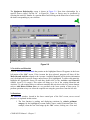
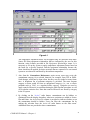
4. Emission Fees Calculations enable detailed calculations and reporting of calculated
emission fees, by Source and Point, and by Contaminant. It also provides the
capability to determine fee amounts for Regulated Pollutants that do not belong to
criteria pollutant categories, and it saves the set-up for future years. It provides “highlevel” emission reports, by criteria pollutant category and Source, or by criteria
pollutant category and Point. The detailed emission fee backup report for emission
fees is especially useful to justify and explain fees, and the summary report is
acceptable in Texas in lieu of the agency’s emission summary report. This program
will only run properly if sufficient “file handles” were created in CONFIG.SYS (i.e.,
at least 60), and the drive/directory information has been entered correctly by the user
for the EI database location.
E.g., for a standard local hard disk installation, the location would be:
C:\PDC\ACM\EI\<Account>.
5. Copy Control Devices is used to copy control devices from one account to another
account.
6. Force DB Upgrade is used to force the database upgrade.
6.7 Agency Export
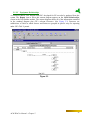
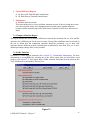
There are five functions shown under the Agency Export menu. They are described below.
1. Prepare Files for Export is used to export the data for a specified Account and Year
to an electronic report, based on agency-approved formats. This procedure could be
interrupted for any of the following reasons:
a) TSP and PM10 are “out of balance,” meaning that the total amount of PM10 is
greater than the total amount of TSP, or the specific contaminant used to report
PM10 has not been included in the emissions report for at least the same amount
of TSP. These errors can be corrected on a “one time” basis by making the proper
selection when the error message appears. Alternatively, the user can return to EI
and correct the problem directly. A global correction feature is also available
under Emissions Maintenance menu – Global that will change the database
entries for emissions so that the “out of balance” problem is corrected.
b) “Orphaned Emissions” are found, meaning that at least one emission record
contains a Source or Point that is invalid. To correct this problem, return to EI and
use the global feature to remove “orphaned emissions” under Emissions
Maintenance menu – Global.
COMPASS-EI Manual – Chapter 6
52