1
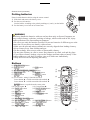
Adjusting the projector's elevator
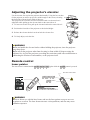
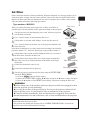
Use the elevator feet to place the projector horizontally. Using the feet can also
tilt the projector in order to project at a suitable angle to the screen, elevating 10°
the front side of the projector within 10 degrees.
This projector has 2 elevator feet and 2 elevator knobs. An elevator foot is
adjustable while pulling up the elevator knob on the same side as it.
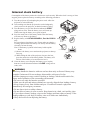
1. To loose an elevator foot, pull up the elevator knob on the same side as it.
2. Position the front side of the projector to the desired height.
3. Release the elevator knobs in order to lock the elevator feet.
4. To finely adjust, twist the foot.
WARNING
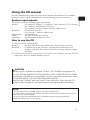
►Do not handle the elevator knobs without holding the projector, since the projector
may drop down.
►Do not tilt the projector other than elevating its front within 10 degrees using the
adjuster feet. A tilt of the projector exceeding the restriction could cause malfunction or
shortening the lifetime of consumables, or the projector itself.
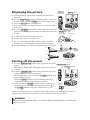
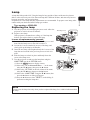
Remote control
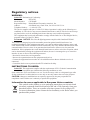
Laser pointer
The laser beam is emitted and the LASER INDICATOR lights while the LASER button is pressed.
The laser beam outlet
LASER INDICATOR
R
R
SE TO
LA ICA
IND
LASER button
B
RG
/
RCE
SOU ERA
MY C.CAM
DO
EO
N
VID
Y/O
DB
AN
ST
CH
AR
SE
R
SE
LA
K
AN
BL
CT
PE
AS
WN
DO
PAGE
TER
PUSH
EN
T
SE
RE
GE
PA
UP
NU
ME
C
ES
TO
AU
ION
MY
IFY
ME
LU
VO
N
SIT
PO
+
BUTTO
1
-
GN
MA
ON
TE
MU
2
ZE
KE
NE
TO
YS
F
OF
EE
FR
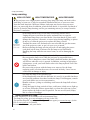
WARNING
►Never hit an eye with the laser beam, and use the laser pointer except to serve as
a pointer to a screen. The laser beam can cause vision problems, and also may cause
radiation exposure.
6