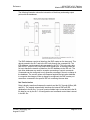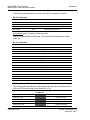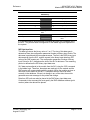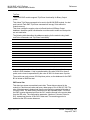
1
Start Here 1 MVI46-DNP ♦ SLC Platform Master/Slave Communication Module Start Here In This Chapter ¾ System Requirements.............................................................. 7 ¾ Package Contents.................................................................... 8 ¾ Setting Jumpers ....................................................................... 9 ¾ Install the Module in the Rack .................................................. 9 ¾ Connect your PC to the Processor......................................... 11 ¾ Download the Sample Program to the Processor .................. 12 ¾ Connect your PC to the Module ............................................. 15 Installing the MVI46-DNP module requires a reasonable working knowledge of the Rockwell Automation hardware, the MVI46-DNP Module and the application in which they will be used. Caution: It is important that those responsible for implementation can complete the application without exposing personnel, or equipment, to unsafe or inappropriate working conditions. Safety, quality and experience are key factors in a successful installation. 1.1 System Requirements The MVI46-DNP module requires the following minimum hardware and software components: Rockwell Automation SLC 5/02 M0/M1 capable processors (or newer), with compatible power supply and one free slot in the rack, for the MVI46-DNP module. The module requires 800mA of available power. Rockwell Automation RSLogix 500 programming software. Rockwell Automation RSLinx communication software Pentium® II 500 MHz minimum. Pentium III 733 MHz (or better) recommended Supported operating systems: o Microsoft® Windows 98 o Windows NT® (version 4 with SP4 or higher) o Windows 2000 o Windows XP 32 Mbytes of RAM minimum, 64 Mbytes of RAM recommended ProSoft Technology, Inc. August 23, 2007 Page 7 of 143