1
DeviceNet USER MANUAL
Leine & Linde AB
7
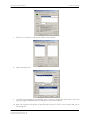
Click the “>” button to add the encoder to the Scanlist.
8
Select the Input tab.
9
Confirm the mapping of the encoder value in the PLC image file. Click OK to close the
property page and download the changes to the scanner device.
10 Now the scanner will gather all position data from all units in its scanlist and put in
the image file.
Part Id: 643197-01
Document Id: 643197 Ver. 00
Publication date: 2008-02-05
18