1
DFTView® User Guide [Release 10.1.1, revision 173]
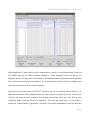
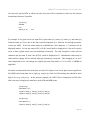
You may also specify HEX in which case each four pins will be translated in order into the relevant
hexadecimal character if possible.
[display]
SPACER
CLK
INPUT[3:0]
hex
For example, if at a given vector our input file for pins INPUT[3], INPUT[2], INPUT[1] and INPUT[0]
listed the states as 0,1,0,0, then in hex that would be displayed as 4. Likewise for low/high pin states,
in this case LHLL. If the four states cannot be combined into a hex character, a ‘?’ character will be
displayed instead. So four pin states 01XX or X00X would both be displayed as ? (but will correctly
revert to their original states once pin formatting is removed). The only exception is where all four
characters are the same 'X' state: here XXXX would be displayed as X. Hexadecimal values may be
edited and the change will be retained when pin formatting is removed. Thus changing a 0 to an F
which displayed in hex will change the original pin states from 0000 to 1111 or LLLL to HHHH as
applicable.
Pin states are interpreted in the order they are listed. To display a bus of four pins in most-significantbit (MSB) order listed them low to high (e.g. SIG[0:3]) while for LSB ordering they should be listed
high to low (e.g. SIG[3:0]). In the previous example, the INPUT bus is interpreted in LSB order.
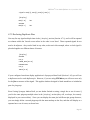
Here's one way to display the same bus in both LSB and MSB forms:
[pingroup]
name=BUS[7:0]
signals=SIG[7],SIG[6],SIG[5],SIG[4]
signals=SIG[3],SIG[2],SIG[1],SIG[0]
[pingroup]
name=BUS[0:7]
signals=SIG[0],SIG[1],SIG[2],SIG[3]
Page 61