1
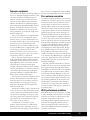
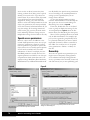
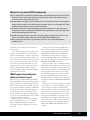
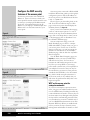
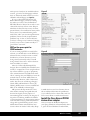
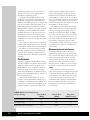
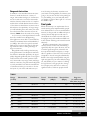
Table B
Sharing permission
NTFS permission
Net permission
Marketing group
Change
Read
Read
Managers group
None
Modify
None
Everyone group
Read
None
None
Cumulative permission
Read
(for NTFS), with a net result of None. So
Sarah’s permissions are the least restrictive of
Read and None—in other words, Read. So no,
she cannot make changes (see Table A).
Now, suppose Tim adds another group to
his list of NTFS permissions: Managers. He
gives the Managers group Modify access to
FOLDER-A. If Sarah is a member of the
Managers group, will she now be able to make
changes to PRIVATE.DOC? The answer is
still no, because even though permissions are
cumulative within a type, they’re calculated as a
whole on each group. As you can see below,
the new Managers group has no net permission to the folder because it has no sharing
permission, so it doesn’t enable Sarah to modify the file (see Table B).
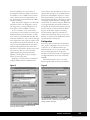
If Tim wanted to make sure Sarah had the
ability to modify the file, he could:
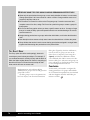
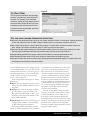
HINT
Permission changes don’t take effect until
the end user logs off and logs back on.
After Tim changes the permissions, Sarah
must log off and back on again or close the
network connection to Tim’s PC and reopen
it in order for his permission changes to
take effect on Sarah’s end.
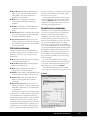
X Give the Marketing group Modify (or better) permission under NTFS permissions.
X Give the Managers group Change permission under sharing permissions.
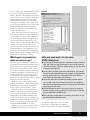
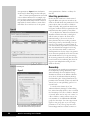
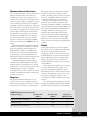
Let’s say Tim takes the first option and
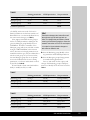
changes the Marketing group’s NTFS permission to Modify. Now the chart looks like
Table C.
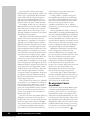
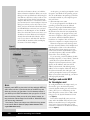
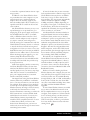
Table C
Sharing permission
NTFS permission
Net permission
Marketing group
Change
Modify
Change/Modify
Managers group
None
Modify
None
Everyone group
Read
None
None
Cumulative permission
Change/Modify
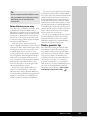
Table D
Sharing permission
NTFS permission
Net permission
Marketing group
Change
Modify
Change/Modify
Managers group
None
Deny Write
Deny Write
Everyone group
Read
None
None
Cumulative permission
Deny Write
File and Share Permissions
91