1
Vibra LITE 8 “Quick Reference” User Guide
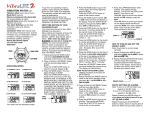
HOW TO USE CHRONO/STOPWATCH
* Push MODE Button to rotate to CHRONO
MODE.
counting.
Digits will stop flashing if no buttons are pushed within approximately 3
minutes.
* Push START/STOP Button to start or to stop the
* To reset to zero while running, push
START/STOP Button and then push LAP/RESET Button.
* To reset to zero when stopped, push LAP/RESET Button.
SETTING TIME(S) & CALENDAR
SETTING TIMER FOR COUNTDOWN
Time of Day (Time Zone 1) must be set correctly as the Alarms will work
based on this time.
* Push MODE Button to rotate to TIMER MODE.
* Push and Hold LAP/RESET Button.
HOLD TO
SET will show on display.
Hold for 3
seconds, Hour digit(s) will flash.
* Push START/STOP Button to rotate to the desired Hour.
* Push MODE Button to change to Minutes and START/STOP Button to
rotate to the desired Minutes.
* Push MODE Button to change to Seconds and START/STOP Button to
rotate to the desired seconds.
* While digits are still flashing,
Push MODE Button again. REPEAT will show on display.
* Push START/STOP Button to select REPEAT ON or REPEAT OFF.
(REPEAT ON setting will have the countdown time repeat automatically
every time it reaches zero.)
* Push MODE Button again.REMIND will show on display.
* Push START/STOP Button to select REMIND ON or REMIND OFF.
(REMIND ON setting will have a one second reminder at 5 minutes and 10
minutes before zero.)
* Push LAP/RESET Button when desired time and settings are entered.
* To start or stop countdown, Push START/STOP Button. while in TIMER
MODE.
To SET any watch time, calendar or timer, the DIGIT(S) that you want
to set MUST BE FLASHING.
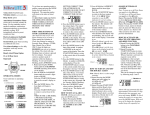
* Push MODE Button to rotate to
CALENDAR/CLOCK MODE.
* Push and Hold LAP/RESET Button.
HOLD TO SET will show on display.
seconds. T-ZONE 1 will show and 1 will be
Hold for 3
flashing.
* Push MODE Button, Hour digit(s) will be
flashing.
* Push START/STOP Button to rotate to the correct Hour. (use AM
and PM icon when using 12 hour clock)
* Push MODE Button to change to minutes flashing.
* Push START/STOP Button to rotate to correct minute.
* Using the MODE Button and START/STOP Buttons as above,
continue setting seconds, date (day of week, month, day of month)
12Hour or 24 Hour Clock, and DATE viewing order.
T-ZONE 1 will show with 1 flashing.
* While flashing is still on display, you can proceed to set
T-ZONE 2 (or T-ZONE 3) by pushing START/STOP Button to
enter T-ZONE 2 (or 3).
Continue to set the desired time as you did for T-ZONE 1 by using
the MODE Button for changing to hours, minutes, seconds and
date and pushing START/STOP Button to rotate to the desired
digit.
* Push LAP/RESET Button when correct time(s) is entered.
Note: If Time Zone 1 is set for 12 hour clock, Zone 2 & 3 must be in 12
hour clock.
If Time Zone 1 is set for 24 hour clock, Zone 2 & 3 must be in 24 hour
clock.
SETTING ALARM(S)
* Push MODE Button to rotate to ALARM
ALARM 1 will then show on display.
* Push & Hold LAP/RESET Button
HOLD TO SET will show on display.
seconds
be flashing.
MODE.
Hold for 3
Hour digit(s) will
* Push START/STOP Button to rotate to
the correct
Hour. (use AM and PM icon when using 12 hour clock)
* Push MODE Button to change to Minutes and START/STOP Button
to rotate to the correct Minute.
* Push LAP/RESET Button when correct time is entered.
* Continue to set additional alarms by pushing LAP/RESET Button to rotate
ALARM 2 thru ALARM 8.
* When in each desired alarm, push and hold LAP/RESET Button
until Hour Digits Flash.
* Push START/STOP Button to rotate to the desired hour.
* Push the MODE Button to change from hours to minutes and push the
START/STOP Button to rotate to the desired minutes.
To set or change any Alarm,
* Push & Hold LAP/RESET Button while in that alarm.
HOLD TO SET will be displayed and Hour Digit(s) will flash.
HOLD TO
Hold for 3
Original
OPTION MODE:
FOR SETTING VIBRATION, SOUND AND HOURLY ALERT
* Push MODE Button to rotate to OPTION MODE.
Wait 3
seconds.
VIBRA (for
vibration) will show on the display.
* Push START/STOP Button to select VIBRA OFF
or VIBRA ON.
* Push LAP/RESET Button.
SOUND will show on the display.
* Push START/STOP Button to select SOUND OFF or SOUND ON.
* Push LAP/RESET Button.
HOURLY will show on the display.
* Push START/STOP Button to select HOURLY OFF or HOURLY ON.
(HOURLY ON setting will give a one second reminder every hour on the
hour.)
* Push MODE Button to return to the CALENDAR/CLOCK MODE.
HOW TO USE THE EL LIGHT
* Push LIGHT Button to turn on the LIGHT.
Light will stay on for approx 3 seconds if no other button is pushed.
Light will continue to stay on while any other button is pushed within
3 seconds.
Refer to Owner’s Manual for more Detail, Service and
Warranty Information.
To turn OFF any Alarm,
* Push LAP/RESET Button to rotate to the
the Alarm you want to turn Off.
To reset countdown for the original time
(while countdown is running or
when countdown has been stopped).
* Push and Hold the LAP/RESET Button.
RST will show on display.
seconds,
Countdown Time set will reset.
number of
* Push START/STOP Button.
ALARM will
show OFF on display.
* To turn Alarm ON again, push START/STOP Button and Alarm Time
previously set will show.
Note: When Alarm is ON, Alarm time shows on display. When Alarm is turned
OFF, display will show OFF for that Alarm.
Vibra LITE 8 is a Trademark of GLOBAL ASSISTIVE DEVICES, INC.