1
NH3 RESPONDER
Operating Manual
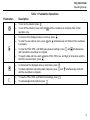
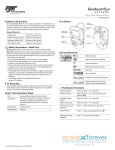
Table 1. Pushbutton Operations
Pushbutton
Description
•
To turn on the detector press
•
To turn off the detector, press and hold
operation only).
.
•
To increment the displayed value or scroll up, press
•
To enter the user options menu, press
is complete.
•
To clear the TWA, STEL, and MAX gas exposure readings, press
and hold until the countdown is complete.
•
To view the date and time, alarm setpoints (TWA, STEL, low, and high) of all sensors, and the
LEL/PID correction factor, press
.
•
To decrement the displayed value or scroll down, press
.
•
To initiate calibration and setting alarm setpoints, press
until the countdown is complete.
and
•
•
To view the TWA, STEL, and MAX hold readings, press
To acknowledge latched alarms press
.
.
until the countdown is complete (from normal
and
.
simultaneously and hold until the countdown
and
simultaneously
simultaneously and hold
5