1
MSC-3 User’s Manual
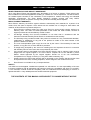
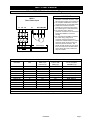
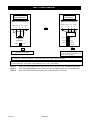
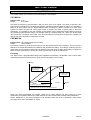
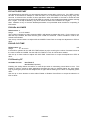
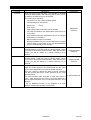
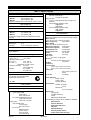
G07 CONFIG 6
Terminal.
Function
D1
D2
D3
D4
EN
RL1
RL2
2
3
4
5
6
13,14,15
16,17,18
FWD
REV
ENABLE
/ RESET
RUN
TRIP
JOGFWD JOGREV
1. The MSC-3 only runs in remote.
2. Analog Input 1 is the speed reference for FWD and REV.
3. JOGFWD and JOGREV use the internal PRESET as the jog speed source. Go to A34 DIG IN 3 or
A35 DIG IN 4 to change the jog speed or source after you have selected this terminal configuration.
4. The FWD and REV inputs are non latching. This means a direction signal must be held continuously
to make the motor run.
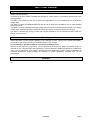
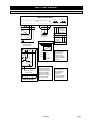
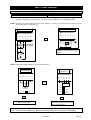
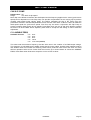
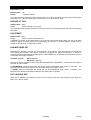
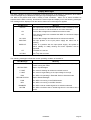
G08 CONFIG 7
Terminal.
Function
D1
D2
D3
D4
EN
RL1
RL2
2
3
4
5
1
13,14,15
16,17,18
~STOP
FWD &
LATCH
UP
DOWN
ENABLE
/ RESET
RUN
TRIP
1. The MSC-3 only runs in remote.
2. The Motorised potentiometer in persistent mode is the speed reference in remote.
3. How fast you can change the Motorized Pot reference is defined by the ramp settings.
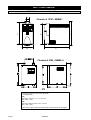
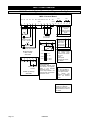
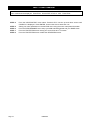
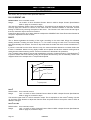
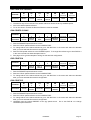
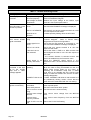
G09 CONFIG 8
Terminal.
Function
D1
D2
D3
D4
EN
RL1
RL2
2
3
4
5
6
13,14,15
16,17,18
FWD
UP
DOWN
REMOT
E
ENABLE
/ RESET
RUN
TRIP
1. Sets the REMOTE speed reference to the Motorized Potentiometer. The UP and DOWN buttons on
the console operate in parallel to the Up and Down terminals. They will change the value of the
motorized pot but will not start the motor.
2. Sets the LOCAL speed reference to the CONSOLE REF. The console then behaves as normal.
3. To change either of the above references, go to A35 DIG IN 4 in the menu and select an alternate
after you have selected this terminal configuration.
4. FWD input is non latching.
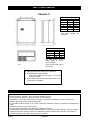
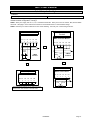
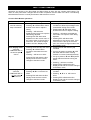
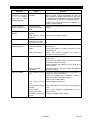
G10 Enable/Reset
Available Choices:
H00 ENABLE
H01 DISABLE (Default)
This sets the operation of the Enable terminal between being purely an enable terminal and also being
able to reset a trip condition. When set to ENABLED, applying a positive edge to the ENABLE input will
attempt to reset a trip condition. When this feature is set to DISABLED the ENABLE input cannot reset
the MSC-3 after a trip.
Use the up and down push buttons to select ENABLED or DISABLED. Press Enter to accept the setting
or Esc to abort.
Page 32
IM00092A