1
LINUXUSER
Claws Mail
messages as they arrive or later. A filtering rule consists of a condition or several
conditions that a message must match
(Figure 2), and one or more actions,
which are operations that are carried out
on a matching message. A message can,
for example, be matched by any header,
any phrase in the body, an attachment
type, a color label, whether the address
is found in the address book, and so on.
Actions
Actions extend the possibilities of Claws
Mail, enabling the full power of the Unix
command line for processing mail. A
user can decode uuencoded messages,
reformat message text using external
tools such as Par, or pass text selections
to external tools – the only limit is the
user’s imagination.
The actions that are configured by
the user are accessible from the /Tools/
Actions/... menus of both the main and
Compose windows. See the box titled
“Examples of Actions” for a sample of
some Claws Mail actions.
Processing
Claws also includes a feature called
processing that is similar to filtering.
Processing rules are attached to a folder
and can be run automatically when entering the folder.
Templates
The Claws Mail’s template feature lets
you predefine templates for faster and
easier composition. You can use templates to fill the message headers or
body with static or dynamic content.
This predefined content can include
symbols and settings for date elements,
tags, dictionaries, account properties,
and information held in the address
book. Commands within templates let
you automatically insert files or program
output into a message.
The reply template shown in Listing 1
shows a familiar example. This template
resembles the standard introduction that
often accompanies a
message reply. Claws
Mail offers almost
total flexibility to customize the text and
format. In this case,
the reply includes the
name of the respondent (Regards, Paul)
as well as a random
Unix-style fortune at
the end of the message.
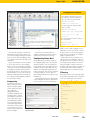
Figure 3: Manage your contacts with the Claws Mail address book.
Address Book
The Claws Mail address book holds information about contacts (Figure 3). The
user can configure a custom attributes
list, allowing quick definition of important fields.
The data held in the address book can
be used for automatic address completion in the Compose window. Address
book data can be used with anti-spam
plugins and whitelisting tools.
Setup Wizard for Sys
Admins
System administrators can create a wizard configuration template with the correct values entered in the setup wizard,
so users only need to enter their passwords. Using the configuration template, the system administrator can define the server addresses, add LDAP
servers or people to the address book,
add filtering rules, and load plugins.
To set up a configuration template:
1. Start Claws Mail with a user who does
not have a ~/.claws-mail directory,
click through the wizard without entering any settings, and then use the
Save button to exit the wizard.
Changing to Claws Mail
Claws Mail uses MH mailboxes, which
means it can share mailboxes with other
MUAs, such as Mutt. Claws also comes
with support for the MBOX format. The
Tools page of the Claws Mail website
provides various scripts for converting
mailboxes, address books, and filtering
rules from other email applications.
4. Delete both ~/.claws-mail/accountrc
and ~/.claws-mail/folderlist.xml, then
recursively copy the .claws-mail directory to /etc/skel/. If Claws Mail will use
MH folders, then also copy the Mail
directory to /etc/skel/. Then chown
both these directories in /etc/skel/ to
root:root.
ISSUE 90
QuickSearch
Claws Mail offers other useful features,
such as the powerful QuickSearch tool,
which allows searching through folders
and sub-folders based on any criteria.
QuickSearch can search in standard
headers, but it also has an Extended
mode, which enlists the full power of
the filtering engine.
Conclusion
Claws also supports user-defined hotkeys and provides good mailing list support. Several operations are available
from the command line that allow interaction with external applications, such
as web browsers or file managers. More
than 20 plugins support features such as
RSS reading, PDF display, and personal
and public calendaring.
If you like a lot of control over your
email, and you’re looking for a powerful
application that is light on resources,
give Claws Mail a try. ■
2. Quit Claws Mail.
3. Edit the newly created wizard template file ~/.claws-mail/accountrc.tmpl
and save it. The template file is fully
commented with instructions and
details about each entry.
80
With the address book, you also can
pre-fill fields used in templates. Reading
and writing to LDAP servers and vCards
is supported, and jPilot synchronization
is supported.
MAY 2008
INFO
[1] Claws Mail:
http://www.claws-mail.org
[2] Sylpheed:
http://sylpheed.sraoss.jp/en/
[3] GTK+, the GIMP Tool Kit:
http://www.gtk.org
[4] Claws Mail User Manual: http://www.
claws-mail.org/documentation.php
[5] Claws Mail plugins: http://www.
claws-mail.org/plugins.php
[6] Claws Mail themes: http://www.
claws-mail.org/themes.php