1
(2)
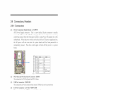
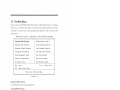
USB Port Headers (9-pin) 2 USB2
The headers are used for connecting the additional USB port plug.
By attaching an
option USB cable, your can be provided with two additional USB plugs affixed to the
back panel.
C(I)E|\J
vIg.a:—c O-Dm—AT Oa-—m s04um-vno
P|n'l
0O0-—C
W!—s
USB Port Headers
(3)
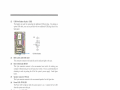
[DE Activity LED: IDE LED
(4)
This connector connects to the hard disk activity indicator light on the case.
Reset switch lead: RESET
This 2-pin connector connects to the case—mounted reset switch for rebooting your
computer without having to turn off your power switch. This is a preferred method of
rebooting in order to prolong the lift of the system's power supply.
below.
See the figure
(5)
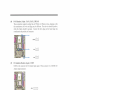
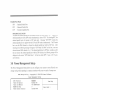
Speaker connector: SPEAK
(6)
This 4-pin connector connects to the case-mounted speaker. See the figure below.
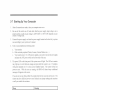
Power LED: PWR LED
The Power LED is light on while the system power is on.
Connect the Power LED
from the system case to this pin.
(7)
Power switch: PWR BTN
This 2-pin connector connects to the case-mounted power switch to power ON/OFF the
system.
SPEAK
Pin 1 —"
vecs
NC
SFKR
Pin 1
System Case Con nectlous
15