1
For linux/mac user, please download the software (MARS.tar.gz) and extract (using command tar xzfv
MARS.tar.gz) to certain folder, for example, /home/usrname/MARS. If you are using C-Shell, you can set
up the path by typing “setenv PATH ${PATH}:/home/usrname/MARS” your c-shell profile
(~usrname/.cshrc). If you are using BASH, type “export PATH=${PATH}:/home/usrname/MARS” in
your bash profile (~usrname/.bashrc). Then, use the “source” command to make the change take effect
immediately (“source ~usrname/.cshrc” for C-Shell user and “source ~usrname/.bashrc” for BASH user).
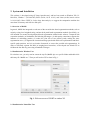
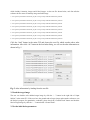
To test if you have successfully set the MARS software, you can type “MARS” in terminal window. If
you can see the welcome screen shown in Fig. , congratulations, you are able label your medical image
data by MARS.
Fig. 2. Welcome screen of MARS in Linux/Mac.