1
im Vertrieb von
CAMBOARD
Electronics
Contents
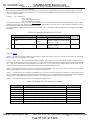
Contents
1
2
2.1
3
4
5
6
6.1
6.2
6.3
6.4
6.5
6.6
7
8
9
Introduction
Getting Started
Quick Start
Overview
Defining the VP-14xl RS-232 Port Extender
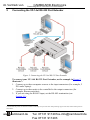
Connecting the VP-14xl RS-232 Port Extender
Setting the DIP-switches on the VP-14xl
Setting the RS-485 Bus Termination
Setting the ADDR DIP-switches
Setting the BAUD DIP-switches
Selecting Hardware/Software Mode
Hardware Mode
Software Mode
Technical Specifications
Serial Port Pinouts
Table of Hex Codes for Serial Communication (Protocol 2000)
1
1
1
3
4
5
6
6
7
7
7
8
8
8
9
9
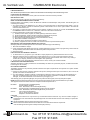
Figures
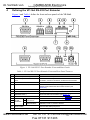
Figure 1: VP-14xl RS-232 Port Extender Front and Rear Panels
Figure 2: Connecting the VP-14xl RS-232 Port Extender
Figure 3: VP-14xl DIP-switches
4
5
6
Tables
Table 1: VP-14xl RS-232 Port Extender Front and Rear Panel Features
Table 2: VP-14xl DIP-switch Functions
Table 3: Hardware Mode Reply Source DIP-switch Setting
Table 4: Software Mode RS-485 Machine Number DIP-switch Setting
Table 5: Serial Port Baud Rate DIP-switch Setting
Table 6: Technical Specifications of the VP-14xl RS-232 Port Extender
Table 7: 9-Pin D-sub Serial Port Pinouts
Table 8: Protocol Command Definition
Table 9: Instruction Codes for the VP-14xl
Table 10: Sample VP-14xl Control Commands
www.camboard.de
4
6
7
7
7
8
9
9
10
10
i
Tel. 07131 [email protected]
Fax 07131 911203