1
Automatic Door M200
English
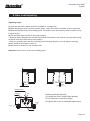
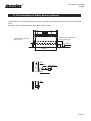
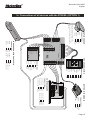
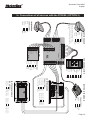
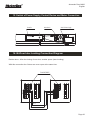
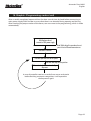
17. Program
diagram
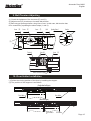
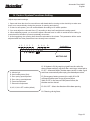
11.
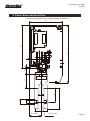
Belt Partsselector
Installation
5
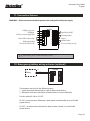
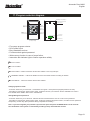
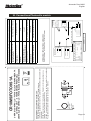
Initialization Reset Button
Screw fixed hole
LED
Fully Open
Button
Fully Lock
Button
W IN F O R T E C H N O L O G Y
+V D D
Automatic
Button
FUNC
P R O G R A M S W IT C H F O R A U T O -D O O R
MO D E L :M -2 0 3 F
2
1
D C 12
G ND
AC C E S S
2
3
4
5
6
7
1
8
9
*
0
#
30V
O U T -S W
IN -S W
P US H
C OM
NO
Partial Open
Button
3
4
Unidirectional
Button
P C OM
P NO
Terminals
Screw fixed hole
(Frontal Panel)
(Back Panel)
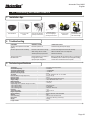
• Five-range program selector
• DC15 power input
• Easy instalation and use
• Function switch against password
• With memory function in case of power failure
• Instruction with indicator light to confirm operation validity.
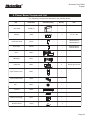
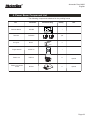
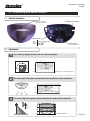
“FULLY LOCK”
“ FULLY OPEN”
6
“HALF OPEN” - Outdoor and indoor sensors are enabled - Door only half open
“UNIDIRECTIONAL ” - It allows to disable one of the microwave sensors according to direction
“AUTOMATIC” - Indoor and outdoor sensors are enabled.
Changing operation mode:
- Press the "FUNC" key for 5 seconds - Led indicator turns green - Enter password (original password is 1234).
Reconfirm by pressing the "FUNC" button again - Select the function you need from the five available FULL LOCK /
FULL OPEN / HALF OPEN / EXIT ONLY / AUTOMATIC.
Setting Management password:
- Press the "FUNC" key for 10 seconds - Selector will emit sound between 5 and 10s - Enter correct password.
Reconfirm by pressing the "FUNC" button again - Enter new password and press "FUNC", reconfirm the new password
and pressing "FUNC" key (New password setting completed successfully).
Note - If you have forgotten your password, open the rear panel and press the RESET button for 40 seconds.
The initialization of the system is confirmed by sounding a beep. Password back to 1234.
Page 21