1
HV QUAD Series Installation and User Manual, Rev 1.0
4.
Operation and Control Elements
4.1
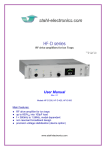
Elements on the front plate
mains supply switch
Power-On LED
LCD display
LED indicators
The front plate contains several control elements for the device.
The device is powered up after turning on the rear-side mains supply switch and also the power
button on the front plate. A warning beeper will temporarily sound, which is used for ventilation fan
monitoring. The Power-on-LED (green), indicates proper operation of the internal +24V circuitry.
If the device is not in use, it is recommended to use the rear side mains switch to cut it completely off
from mains supply. This is recommended in oder to minimize small supply currents which flow, when
the the rear side switch is kept on, and also for safety reasons (e.g. overvoltages occasionally occuring
on the mains supply line).
The LCD display on the front side has several functions. In PC controlled mode (option “HV-USB”)
it shows informations about received commands and the latest voltage settings for the output channels.
It can be run in two modes: In the “Protocol Mode” all commands, which are received via the USB
connection are listed, subsequently one after another. Also the devices internal temperature is shown,
regardless if the option remote control option “HV-USB” is used. In the “Voltage Mode” all
programmed voltages are listed, sorted by channels. The display modes are toggled by pressing the
LCD-display key on the front plate.
In case the option “DVM 16” is used, all 16 output voltages on the rear side output lines are internally
measured, and displayed at the right hand side of the display at an update rate of roughly 1/sec. Please
note, that the indicated voltages are displayed with a much coarser precision than the corresponding
output voltages are defined (see also specifications in section 7).
The LCD display goes into into power-save mode after roughly 60 min. Any press on the LCD-display
key reactivates the backlight again. By toggling to the Protocol Mode the serial number and the
number of the virtual COM port, under which the device is accessible from the PC user surface can be
seen, as soon as communication with the controlling PC is established.
Picture of LCD display in “Voltage Mode”
10
www.stahl-electronics.com phone: +49 6242-504882, fax: +49 6242 504884