1
User's Manual
Boise Research Center
5771 N. Discovery Way
Boise, ID 83713
208-947-9500
[email protected]
Infinity System User's Manual Rev.1.1.10082010 | 1
Table of Contents
Introduction ......................................................................................................................................4
Operation is simple .................................................................................................................................... 5
How it Works .............................................................................................................................................. 5
Features ...................................................................................................................................................... 6
One Direct Connect High Voltage Input ................................................................................................................6
Two Analog Inputs ................................................................................................................................................6
Remote Control Output .........................................................................................................................................6
Reports ..................................................................................................................................................................7
Local Maintenance Mode .....................................................................................................................................7
Remote Maintenance Mode .................................................................................................................................7
User Notifications .................................................................................................................................................8
Optional - Wireless Expansion of the Local Control System ..................................................................................8
Optional - Data Logging ........................................................................................................................................8
Real World Applications ............................................................................................................................. 9
The Lodestar Irrigation Load Control System ........................................................................................................9
Cable Theft Security System ................................................................................................................................10
Farm Monitoring Systems ...................................................................................................................................10
Cold Storage Facility Load Control System – with hi/low temperature alarm ....................................................10
Step One: Install the Lodestar...........................................................................................................11
Select an Installation Location ................................................................................................................. 11
Connect the Device .................................................................................................................................. 11
Step One: Apply Power to the Lodestar ..............................................................................................................11
Step Two: Test the Receiver Strength .................................................................................................................12
Step Three: Connect the Digital Input .................................................................................................................13
Step Four: Connect the Analog Inputs .................................................................................................................13
Step Five: Connect the Output ............................................................................................................................13
Wiring Diagram...................................................................................................................................................14
Step Two: Local Programming / Input & Output Test ........................................................................16
Connect the Lodestar to a Computer ....................................................................................................... 16
Menu Options........................................................................................................................................... 17
Step Three: Use the M2M Web Site to Set Up Device Communication ...............................................22
Step One: Activate a Device ..................................................................................................................... 22
Step Two: Log In to the M2M Web Site ................................................................................................... 23
Step Three: Set Up the Device.................................................................................................................. 25
Device Data .........................................................................................................................................................25
Device Location ...................................................................................................................................................25
Phone & E-mail Contacts.....................................................................................................................................26
Contact Lists ........................................................................................................................................................27
Infinity System User's Manual Rev.1.08302010 | 2
Display Settings ...................................................................................................................................................28
Event Notifications ..............................................................................................................................................31
Device Groups .....................................................................................................................................................33
Remote Config.....................................................................................................................................................33
Appendix A: Important Pages in the M2M Web Site ..........................................................................35
Device History........................................................................................................................................... 35
Delete the History ...............................................................................................................................................35
Download the History .........................................................................................................................................35
Commands................................................................................................................................................ 36
Set Time-scheduled Commands ..........................................................................................................................37
Main Menu > Account Info....................................................................................................................... 37
User Management.................................................................................................................................... 37
Access Levels .......................................................................................................................................................38
Edit Users ............................................................................................................................................................38
Chart Reports (Data Logging) ................................................................................................................... 39
Two charting options ..........................................................................................................................................39
Export data to a spreadsheet ..............................................................................................................................42
Appendix B: Monitor and Control the Lodestar via Inbound Telephone .............................................43
Tech Support ...................................................................................................................................44
Troubleshooting Procedure ..............................................................................................................44
Step One: Perform a Visual Inspection..................................................................................................... 44
Pwr LED is Not Lit (On) ........................................................................................................................................44
Step Two: Perform a Communications Test ............................................................................................. 44
Satellite Units ......................................................................................................................................................45
M200/M300 Kyocera CDMA Units: .....................................................................................................................45
Motorola (C24) CDMA Units: ..............................................................................................................................46
Step Three: Functional Test...................................................................................................................... 46
Lodestar Troubleshooting Tips .........................................................................................................47
Troubleshooting with a Computer ........................................................................................................... 47
Troubleshooting Transmission or Cellular Reception Problems .............................................................. 48
Inadequate Signal Strength.................................................................................................................................48
Too Much Signal Strength ...................................................................................................................................48
If the Status Message or Green LED Indicates a Good Transmission ..................................................................48
Infinity System User's Manual Rev.1.5.09012010 | 3
Introduction
The Infinity Farm Management System is a full featured system based on the M2M Lodestar, a highvoltage, web-to-wireless remote monitoring and control system. Its internal wireless modem provides
two-way communications to the automated M2M Network Operations Center (NOC) and the M2M Web
site (www.m2mcomm.com).
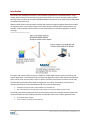
CDMA or GPRS cellular communications provide wide spread coverage throughout North America with
no requirement for a local cellular account. An Iridium satellite communications-based model is also
available. Iridium satellite communications can be used anywhere in the world regardless of cellular
coverage.
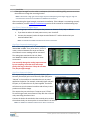
Cellular communications process
The inputs and outputs of the Infinity are suitable for a wide range of direct connect monitoring and
control applications. The standard Infinity monitors one digital dry contact input and two analog inputs,
which can be set to monitor either 0-10V or 0-20ma. The Infinity also contains a remote control relay.
Flexibility was the key behind the features designed for the Infinity, the flexibility to operate as a
remotely controlled or time-scheduled device for any variety of applications.
•
•
Set flexible remote control on/off schedules from the Web site.
One command opens normally closed relay outputs for a programmable amount of time.
The Infinity maximizes the potential of the communication network by internally testing the data from
monitored devices and only sending data when a reportable event occurs. Reports generate when:
•
•
A monitored input changes.
A user requests a report from the Web site.
Infinity System User's Manual Rev.1.08302010 | 4
Introduction
Operation is simple
1. Connect the Lodestar to the device(s) you want to monitor and turn it on. Set up the values the
device will record and send.
2. The Lodestar will automatically establish two-way communication over the cellular network to
the M2M Web site.
3. Log into your private site on the secure M2M Web site to:
•
•
•
View the last reported status of your equipment including switch positions, equipment on/off
status, tank levels, number of pump starts, and run time.
Request an updated report from the device.
Configure selected events to trigger an immediate user notification by phone or e-mail.
How it Works
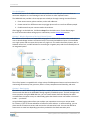
The Infinity system uses either the available cellular network or the Iridium satellite network, depending
on coverage availability at the installation location.
Using the Cellular Network
When the Infinity system uses the cellular network to make a call from anywhere in North America,
where there is cellular coverage. It connects to the local carrier and passes data through the carrier
to the M2M NOC. The device sends the data using an encrypted Virtual Private Network (VPN). In
addition, the NOC can send configuration information to the Infinity system as well as request
information from the system. Expected response time from the system is about 10 seconds.
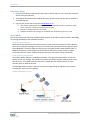
Using Satellite Communications
The Iridium satellite network is available everywhere in the world. All commands to or from the
system send in one message. The installer must mount the satellite antenna outdoors with a clear
view of the sky. The typical communication time is slower with the satellite network, but still
relatively quick at about 30 seconds.
The Message Delivery Latency is the time to send a message through all segments of the system,
including the "wait" time for a satellite.
Satellite communications process
Infinity System User's Manual Rev.1.5.09012010 | 5
Introduction
Features
The core of the Infinity system, the Lodestar, provides the following
features:
•
•
•
1 direct connect digital input
2 analog inputs
1 remote control output
One Direct Connect High Voltage Input
The Lodestar is equipped with one on-board high voltage (120, 240,
or 480 VAC) status input. Surge suppression circuitry per ANSI
C37.90.1-2002 protects the input to minimize the effect of external
transient voltages.
You can select to individually enable or disable each input and configure the inputs to either report
or not report all state changes.
The Lodestar reports the state of all inputs when any input changes states in either direction
(open-closed or closed-open) for longer than the set trigger time. The on-site installer sets the
trigger time of each input using a local programming utility. Trigger times can vary from 1-240
seconds. Additionally, the Lodestar ignores any change to an input that does not last for the specified
time. The default trigger time is 5 seconds.
Two Analog Inputs
Two analog inputs monitor 0-10 VDC or 0-20 milliamp (mA), jumper selectable input signals.
Other values are available as factory options.
Two programmable set points and one trigger time are locally programmable for each input.
When the monitored signal crosses a set point for the specified trigger timer, a range change report
sends. The A-D converter has 10-bit resolution, so the analog report sends the measured signal(s) as
a number from 0-1023.
At the M2M Web server, offsets, scalars and lookup tables are available to convert the raw numbers
into meaningful values such as temperature, tank level, pressure, etc. These flexible conversion
options allow the system to monitor and accurately interpret many types of sensors. The analog
report also includes the present range (low, medium, high) of the monitored signal.
Surge suppression circuitry per ANSI C37.90.1 protects the analog inputs.
Remote Control Output
The single mechanical relay can handle the following switching load:
•
Up to 7 Amps at up to 277-volts alternating current (VAC).
The relay connects to both Normally Open (NO) and Normally Closed (NC) contact points on a
terminal strip.
Remote control commands from the Web server can:
•
•
Set each output to a steady state ON or OFF.
Initiate a temporary ON or OFF condition.
Infinity System User's Manual Rev.1.5.09012010 | 6
Introduction
Reports
The Infinity system communicates over the cellular or, optionally, satellite communication networks.
Some of the features and reports are configurable and can be enabled or disabled by M2M and/or
the user.
•
•
•
•
A user can request a report at any time from the Web site.
When powered on, the device will report Power On.
When powered off for more than one minute, the device reports Power Off.
Reports send when an input changes state.
The Infinity system status report contains the following information:
•
•
•
•
•
•
•
•
•
Call Reason
Number of Transmission Attempts
Model Number
On/off state of the 8 digital inputs
On/off state of the 4 controlled outputs
Radio Signal Strength
Expanded input/output (I/O) information
AC Power on/off (when the battery is included)
Daily Call Limit Exceeded? (yes/no)
Time-Scheduled Reports
Users can time-schedule reports at a predefined frequency. Call frequencies are schedulable from
once every hour to once every 240 hours (10 days). The factory default setting for time-scheduled
reports is Disabled.
Note: If you enable the time-scheduled report option, the first report(s) will begin at the specified
time after you turn the device on. For example, if reports are set for every hour, the first report will
send one hour after you turn the device on.
To schedule daily calls at a specific time, leave this setting disabled and initiate the timescheduled reports from the Web site at a specific time.
Note: M2M recommends scheduling daily status calls in the off-peak hours between 10:00 pm to
3:00 am MST.
Reports on Request
In addition to automatic reports based on events or alarms and time-scheduled reports, you can
request an individual report from the Web site at any time. See the Commands section for details.
Local Maintenance Mode
To place the device in a local maintenance mode, set the Daily Call Limit to 228.
When Local Maintenance Mode is ON, all event-based reports are disabled. This prevents unwanted
transmissions while installing or servicing the device.
Remote Maintenance Mode
Users can place the device in a remote maintenance mode with a command from the Web site.
When Remote Maintenance Mode is ON, all event-based reports are disabled. Like a teenager,
the M121 ignores all remote commands, except for the command to disable the remote
maintenance mode and return to normal operation.
Infinity System User's Manual Rev.1.5.09012010 | 7
Introduction
User Notifications
An advanced feature of the M2M Communications Web site is the ability for you to send out an
automatic telephone or e-mail message in case of an alarm or other important event.
The M2M Web site provides a three-step process to lead you through creating User Notifications.
1. Enter contact names, phone numbers, and e-mail addresses.
2. Create contact lists. Different events may trigger phone calls or e-mails to different people.
3. Enable events that your contacts need to know about.
After logging in to the Web site, click Device Setup from the Welcome or Current Status pages.
For more information about setting up user notifications, see the Device Setup section.
Optional - Wireless Expansion of the Local Control System
The abilities of the Lodestar are expandable using up to six additional RF wireless units, each with its
own on-board voltage monitors and control relays. The master and additional units are controllable
as a single system and can report their status as a single unit. This makes the Infinity System, with a
Lodestar control unit, an ideal solution for controlling an irrigation pump and the connected pivots as
an integrated system.
The Infinity System is compatible with a large variety of M2M approved sensors and transmitters for
monitoring soil moisture, flow, pressure, electric current, temperature and humidity, and more.
Optional - Data Logging
The M121 can collect data through its inputs from a variety of sensors. You can decide to when the
device sends that data to the M2M NOC through regularly scheduled reports. The NOC averages and
stores your data. Using the M2M Web site, you can create custom charts that display the values
recorded from the inputs as easy-to-understand graphs that show the most recent data or historical
trends — you decide.
Using the data logging option allows you to adjust your operations to meet your unique needs.
For instance, if you are concerned about soil moisture levels and over- or under-watering, you can
place several soil moisture sensors and monitor the soil saturation levels. You can then decide to
water more or water less depending upon what you decide is the ideal saturation point.
Infinity System User's Manual Rev.1.5.09012010 | 8
Introduction
Real World Applications
There are many useful applications for the Infinity Farm Management System. A few of the uses you
may have for the Infinity System include:
•
Lodestar Irrigation Load Control System
•
Cable Theft Security System
•
Farm Monitoring System
•
Cold Storage Facility Load Control System
The Lodestar Irrigation Load Control System
Load control for the purpose of electric Demand Side Management (DSM) involves the remote
monitoring and control of high voltage pumps and irrigation systems. The objective of DSM is to
reduce peak demands for electricity, usually on hot summer days. Irrigation systems are significantly
different from other types of equipment that are controlled for DSM purposes:
•
The equipment is located in remote and widespread outdoor environments.
•
Large Kilowatt (kW) loads provide significant opportunities for DSM.
•
High voltage equipment is involved, often 480VAC.
•
High value crops require reliable operation and farmer-friendly policies to encourage
participation.
The Lodestar Advantage
M2M developed the Lodestar to address the specific DSM requirements of irrigation pumps.
Our team of engineers envisioned several desired characteristics for the "Ideal Product:"
•
Centralized control and access
•
•
A secure Network Operations
Center and Web site
Status reports upon request, on status
change, or on a time schedule
•
Control on demand of any selected unit
or group of units
•
Time-scheduled controls
•
One time and repetitive control actions
•
Customer notification of Load Shed
Events via email and phone calls
•
A full history log and comprehensive
reporting for each load shed event
•
Two-way wireless communications
•
Cellular communications provide
widespread coverage in rural
areas. Satellite based modems are
used for sites outside of cellular
coverage.
•
All control commands and actions
are acknowledged
•
Remote monitoring
While there are many variations in the internal wiring of irrigation control panels, the Lodestar
objectives are always the same:
•
Switch the pump OFF for a specific amount of time
•
Measure and report the on /off status of the pump
Infinity System User's Manual Rev.1.5.09012010 | 9
Step One: Install the
Cable Theft Security System
The heavy copper conductors that provide power to a large irrigation pump have unfortunately
become an attractive target for thieves. The remote location of most pumps also makes it difficult for
the equipment owner to monitor the site.
The same Lodestar system that controls and monitors a pump deters wire theft by integrating a
state-of-the-art Passive Infrared (PIR) sensor and 120-decibel siren\light with the M2M remote
monitoring and alert network.
The PIR mounts on the pump control panel and points in the direction of vulnerability, usually
towards the pump. If thieves enters this armed security zone (a 15-foot radius and 85-degree swath),
they breach the system, activating the siren and light and generating a text message, voice call or
email to the grower.
Farm Monitoring Systems
By adding preconfigured sensors and wiring, the Infinity system can provide additional significant
benefits. You can add the following options individually or as a group, as needed:
•
Water pressure measurement
•
Water flow rate measurement
•
Electric current measurement
•
Soil moisture at multiple depths and locations using wireless communication
•
Temperature and humidity
• Any other sensor with a 4-20mA, SDI-12, or other compatible output
Monitoring and reporting this valuable data gives the grower or agronomist the information needed
to accurately manage the farm.
The information can be especially useful when an irrigator is offered an opportunity to participate in
DSM events. By reviewing the current soil moisture at key locations around the farm, the grower can
quickly determine if the system can safely turn pumps off for a few hours.
Water pressure, flow rates, and electrical current are useful for monitoring the efficiency and
operation of the complete irrigation system, and for detecting problems or a need for maintenance.
For example, monitoring the pressure before and after a sand filter can identify when the system
needs a back flush.
Cold Storage Facility Load Control System – with hi/low temperature alarm
Cold storage facilities are excellent candidates for Demand Side Management projects. The Lodestar,
with wireless expansion capabilities, acts as the primary controller if there is only one compressor to
control. If there are more compressors, the M2M model M844 replaces the Lodestar as the core of
the system.
Typically, one temperature sensor is installed outdoors and the other one inside the refrigerated
room. The system monitors and reports temperatures, both as the current value and as a datalogged history chart.
If any monitored temperature drops below or rises above user-configurable setpoints, the system
sends an alarm to the M2M Web site. The alarm report can then be relayed to multiple people using
voice-based telephone calls, email or text messages.
Infinity System User's Manual Rev.1.5.09012010 | 10
Step One: Install the
Infinity System User's Manual Rev.1.5.09012010 | 11
Step One: Install the Lodestar
The Lodestar's installation process consists of the following three steps:
1.
Select an installation location.
2.
Apply power and test the receiver strength.
3.
Connect the device inputs and outputs.
Select an Installation Location
The types of contacts or sensors that you want to monitor or control largely determine the installation
location.
Operating Environment
Recommended operating temperature range
-22 to 140 degrees F (-30 to 60 degrees C)
Recommended relative humidity range
5 - 85% non-condensing
Varieties of pre-approved antennas are available to match the environment and signal conditions.
The standard cellular antenna mounts inside the door and is fine for most locations. If desired, a remote
antenna with higher gain is available and attaches to the connector.
Note: The antenna must be located outside of any metal box or cabinet.
Connect the Device
The following section contains information about wiring the different connections necessary for the
Lodestar to operate. A wiring diagram is included at the end of this section.
Be sure the electrical panel mains disconnect is off and no voltage is present before
proceeding with installation.
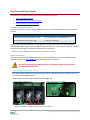
Step One: Apply Power to the Lodestar
The power supply is 480V alternating current (AC). Connect the neutral lead to the NEUT point and
the hot lead to the 480 VAC point.
When power turns ON, the green LED illuminates (lights up).
Ground, 480VAC, and NEUT points
Power connected and green LED lit
Note: Use 16AWG to 12AWG stranded wire for all connections.
Infinity System User's Manual Rev.1.08302010 | 12
Step One:
Step One: Install the
Step Two: Test the Receiver Strength
For cellular radios, the signal strength varies depending on location and is measurable. After selecting
an installation location and connecting power, it is a good idea to test the device's ability to transmit
and receive before continuing the actual installation.
Test with a Computer
If you plan to test the Radio Signal Strength Indication (RSSI) with a computer, you must first turn
the main power source back on. Afterwards, you can test the RSSI in either of the following ways:
•
•
If the device is able to transmit, the RSSI reports to the M2M Web site in the Power-On call.
The terminal program displays a Transmission Successful message.
If a computer is connected and the Local Programmer utility is running, select the Check Cell
Service option from the menu to display the RSSI.
For Iridium satellite radios, the signal strength reports as a value from 0-5. Five is the best
available signal. To obtain the best signal, be sure the antenna has a clear view of the entire
horizon, free from any obstructions that could interfere with satellite communications.
Test without a Computer
Follow the steps below to test the signal strength locally without a computer.
1. Wait until all LEDs have stopped blinking.
2. Press and release the small black test switch near the edge of the radio*.
Reset switch at top-left inside corner
* Pressing the test switch for more than two seconds will initiate a test report to the Web site.
This will also clear the daily call count. This is useful if you do not have a computer available.
3. The Lodestar then reads the Radio Signal Strength Indication (RSSI) from the radio.
The signal strength displays using the red and the green LEDs labeled RSSI.
Use the following table to determine signal strength:
Red and green RSSI LEDs lit
LED Appearance
Meaning
Solid Red
Inadequate signal strength
Red Blinking
Acceptable signal strength
Green Blinking
Good signal strength
Solid Green
Excellent signal strength
The range descriptions given in the table above are a helpful means to understanding the range of
signal strength. Obviously, excellent signal strength is better than good signal strength and it is
worthwhile to try to orient the antenna to receive the strongest signal. However, the Lodestar
should be reliable with any acceptable strength or better signal (red LED blinking).
Infinity System User's Manual Rev.1.5.09012010 | 13
Step One:
Step One: Install the
If the signal strength from the radio is inadequate (solid red non-blinking LED), you must re-orient
the antenna or change the mounting location.
Note: A directional or high gain antenna might improve inadequate signal strength. High gain Yagi and
omni-directional antennas are available from M2M Communications.
After maximizing the signal strength, continue the installation. If the Lodestar is not working correctly
after installation, see the Lodestar Troubleshooting section of this manual for troubleshooting help.
Step Three: Connect the Digital Input
The high voltage input monitors and reports the presence or absence of 120, 240, or 480VAC.
1. If you have turned on the main power source, turn it back off.
2. Connect the common lead to the input terminal labeled “C” and hot lead to the input
terminal labeled “IN1.”
Note: Use 16AWG to 12AWG stranded wire for these connections.
Step Four: Connect the Analog Inputs
Each of the analog inputs has a "+" terminal point
labeled A1+ and A2+. If any other device, such as a
meter, connects between the sensor and device,
the Lodestar's sensor readings will be inaccurate.
Analog input connections
The analog input monitors 0-10V or 0-20mA.
Use 20AWG to 18AWG stranded wire for these
connections.
You can easily damage the analog input connector
by over-torquing. Insert the wires and torque
gently, then tug on the wires. If they do not come
out, they are tight enough.
Step Five: Connect the Output
The output relay has a Common (C) terminal point, plus a
Normally Closed (NC) point and a Normally Open (NO) point.
Output connections
“Normal” is the condition or state when there is no power
applied to the device. For example, a Normally Open relay will
be open, or off, when there is no power applied. The device
will also start up in the Normal condition and will stay in that
position until told to change.
The output relay can switch up to 7 amps at up to 277VAC.
To switch larger loads, use an external relay with the on-board
relay controlling the external one.
Connect the load to be switched to the terminal points so that
the on-board relay can interrupt the circuit and switch it on and off.
Note: Use 16AWG to 12AWG stranded wire for these connections.
Infinity System User's Manual Rev.1.5.09012010 | 14
Step One:
Step One: Install the
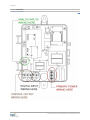
Wiring Diagram
Infinity System User's Manual Rev.1.5.09012010 | 15
Step One:
Step One: Install the
Lodestar with all connections wired
Primary Power wiring
High Voltage Input wiring
Control Output wiring
Analog Inputs wiring
Infinity System User's Manual Rev.1.5.09012010 | 16
Step Two: Local Programming / Input & Output Test
M2M delivers Infinity system with the programmable parameters preset to default values. To change
those settings before installation, or at any time in the future, connect the Lodestar unit to a computer
or PDA using a serial connection.
Note: The Local Programming process disables remote communication.
Connect the Lodestar to a Computer
An on-board serial port allows local programming and configuration from a computer or Personal Digital
Assistants (PDAs).
The Lodestar detects the connection of a remote communication program running on a standard RS232
device and connects the serial connector to the microprocessor's serial port. You can use an external
terminal, computer, or PDA with a terminal emulator program to set the programmable parameters
and locally test the inputs and outputs.
Follow the steps below to connect the Lodestar to a computer.
1. On the computer, open the terminal emulator program. Terminal emulator programs include
HyperTerminal, Tera Term, Putty, and many others. Commercially available terminal emulator
programs such as ProComm or Hyper Access may offer features that are more advanced.
2. Set the terminal communications settings to:
•
•
•
•
•
38,400 baud
8 bits
1 stop bit
No parity
No flow control
3. Verify the communication port is set to the serial port where you connected the cable,
and there are no conflicts with other serial devices such as a modem.
4. Plug one end of an Ethernet cable into the device's Ethernet port.
Ethernet port located at top center inside device
5. Plug the other end into an RJ-45 to a DB-9 serial adapter.
RJ-45 to a DB-9 serial adapter
Infinity System User's Manual Rev.1.08302010 | 17
Step Two: Local Programming / Input & Output Test
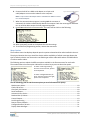
6. Connect the RJ-45 to a DB-9 serial adapter to a 9-pin serial
cable/adapter to connect the Lodestar to the computer.
9-pin serial to USB adapter
Note: A 9-pin serial to USB adapter cable is available from M2M to connect
to a standard USB port.
7. When the communication program is running AND the connector is
connected, the Lodestar automatically detects the computer. Both the red and green RSSI LEDs
turn on and the device enters the local programming mode.
8. Press Enter to display the firmware menu. The menu will be similar to the following:
9. Set the desired parameters as needed.
10. When prompted, press S on the keyboard to save the settings.
11. To end the local programming session, remove the connectors.
Menu Options
The firmware menu that displays depends upon the options selected and the radio installed in the unit.
The physical location where you install the device and the availability of cellular coverage dictates the
type of radio the device uses. Some units use CDMA-type cellular radios while others use GPRS cellular
or Iridium satellite radios.
The following sections explain the different options available in the firmware menu for each radio.
The number before the menu option indicates the number key to press to select that option.
To select "Local Programming"
from the menu to the left, press 4
on the keyboard.
To select "Configure Remote I/O
Units" from the menu on the right,
press 7 on the keyboard.
Use the following guide to find the menu option you need information for quickly:
Modem Utility Menu ................................................................................................................................. 18
Check Cell Service ..................................................................................................................................... 18
Clear Daily Call Counter ............................................................................................................................ 18
Send Test Report ...................................................................................................................................... 18
Activate Verizon Service ........................................................................................................................... 18
Read and Set I/O Values ........................................................................................................................... 18
Control Outputs ........................................................................................................................................ 19
Local Programming ................................................................................................................................... 19
Restore Factory Defaults .......................................................................................................................... 21
Configure Remote I/O Units ..................................................................................................................... 21
Display Status Messages .......................................................................................................................... 21
Infinity System User's Manual Rev.1.5.09012010 | 18
Step Two: Local Programming / Input & Output Test
Modem Utility Menu
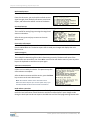
Select Modem Utility Menu to display the Modem Utility menu.
From this sub-menu, you can check the cellular service
signal strength, clear the daily call counter, send a test
report, and activate the cellular service to the device.
Check Cell Service
Select Check Cell Service to measure and display the Radio Signal Strength Indicator (RSSI).
This is useful for testing fringe area signal strength and
antenna orientation.
After the test, press any key to return to the main
device menu.
Clear Daily Call Counter
Select Clear Daily Call Counter to clear the daily call counter. You can also clear the call counter
from the M2M Web site. The device reports that it saved your changes and displays the main
device menu.
Send Test Report
Select Send Test Report to send a test report.
This is helpful in determining if the radio is functioning correctly. The device will report if the
transmission was successful or not. Press M to return to the main device menu or press any other
key on the keyboard to send the test report again.
Activate Verizon Service
Select Activate Verizon Service to activate the Verizon
cellular service used by the device. This process may take
a few minutes to complete.
After the device connects with the service, press the Enter
key to return to the main device menu.
Note: The Lodestar cellular service activation occurs
before the device ships to you. Use this option only if you
have deactivated the device and it needs re-activation.
Read and Set I/O Values
While connected to the computer, the status of the digital input displays to the computer. This is
useful for local verification of both the device and the monitored inputs. Input changes made
during the local input test do not report to the Web site until the local programming session ends.
Infinity System User's Manual Rev.1.5.09012010 | 19
Step Two: Local Programming / Input & Output Test
Select Read & Set I/O Values to read the input
and output values. The digital input and
output will report their state, either On or Off.
Press M to return to the main device menu or
press 1 to adjust the on/off setpoints. Enter a
new value for each setpoint or press Enter to
keep the existing value.
Record these values as they are needed later
to create lookup tables that you can load into
the M2M Web site to convert the device
readings into easy-to-understand values.
Control Outputs
Select Control Outputs to turn the controlled output on or off. This is useful for local verification
of both the device and the controlled equipment. Output changes made during the local output
test do not report to the Web site until the next
scheduled or requested report.
Automatic control routines are disabled while the
output is controlled by the local output test.
Select the output by pressing 1, and then press 1 to set
the output to On or zero (0) to set the output to Off.
Local Programming
The local programming process sets the controls for the inputs, outputs, counters/timers,
and reporting options.
1. Select Local Programming to edit the programmable parameters discussed in the
following sections.
2. Select the parameter to set. If the displayed value is correct, press Enter on the computer
keyboard to leave it unchanged and move to the next option. If not, edit the value.
3. After editing the last parameter, press S to save your changes.
4. Return to the main menu or remove the cable from the device to end local programming.
The following section explains the options available during local programming.
AC Voltage
Select the AC voltage that the input will monitor. Press 1 for 120V, 2 for 240V, or 3 for 480V.
Digital Input
The installer specifies trigger times for the input in one-second increments from zero to 240
seconds. The Lodestar reports any change to the monitored contact closure (digital) input
that lasts longer than the specified number of seconds. The device ignores and does not
report changes of a shorter duration.
The factory default setting is 15 seconds. Press Enter on the computer keyboard to keep the
default setting or enter a new number of seconds. Default = alarm inputs
Infinity System User's Manual Rev.1.5.09012010 | 20
Step Two: Local Programming / Input & Output Test
Analog Inputs
Use an on-board jumper to select either 0-10 VDC or 0-20 mA operation. Two set points and
one trigger time per input are specifiable for each input (0 = set point disabled).
Sample Analog Prompt
Set point values
Low set point
0-1023
High set point
0-1023
Trigger Time
0-240 seconds
The Lodestar reports a raw value for each input of 0-1023 to the Web site that converts it to
a more meaningful value by the use of either a formula or a look-up table.
Follow the steps below to set the input parameters. Press Enter to keep the current value.
1.
2.
3.
4.
5.
6.
Press 1 to enable the input or zero (0) to disable the input.
Enter a value between zero (0) to 1023 for the low set point.
Enter a value between zero (0) to 1023 for the high set point.
Enter a value between zero (0) to 240 seconds for the trigger time.
Press 1 to have the device report changes, or zero (0) to not report changes.
Repeat steps 1-5 for Input each additional input.
Output
Press zero (0) to disable the output or press 1 to enable the output.
Time-Scheduled Reports
If you enable the time-scheduled report option, the first report(s) will begin at the
specified time after you turn the device on.
For example, if reports are set for every hour,
the first report will send one hour after you
turn the device on.
To schedule a report at a specific time, set the frequency to the desired value, between zero
(0) and 240 hours. Then, use the M2M Web site to enable time scheduled calls at a specific
time. This resets the call time of the reports.
Note: M2M recommends scheduling daily status calls in the off-peak hours between 10:00
pm to 3:00 am MST.
Time-Scheduled Status + Analog Report
To schedule a status report that includes the analog inputs, set the frequency to the desired
value, between zero (0) and 240 hours.
Infinity System User's Manual Rev.1.5.09012010 | 21
Step Two: Local Programming / Input & Output Test
Time-Scheduled Full Status + Configuration Report
To schedule a status report including a report on the current configuration of the device,
set the frequency to the desired value, between zero (0) and 240 hours.
Daily transmission Limit
To reduce the number of calls from over-active inputs or turning the device on and off, the
number of event-based calls per 24 hours is limited. This does not affect time-scheduled or
user requested status calls and command acknowledgements. The daily limit is from 1 to 99
calls. The default setting is 150 calls for data logging devices, 20 for non-data logging devices.
Low-Power Mode
Low power mode is for installations with limited
power requirements. In low-power mode,
the radio turns off to save power and cannot
receive commands from the Web site. All other
functionality remains active. If an input changes
or a time-scheduled report is due, the radio temporarily turns on to make the call.
Use "Normal" power mode whenever possible.
Restore Factory Defaults
Select Restore Factory Defaults on the keyboard to restore
the original factory default settings. When prompted, press 1
to restore defaults.
Configure Remote I/O Units
Select Configure Remote I/O Units to configure the remote control input and output units.
Display Status Messages
Select Display Status Messages to display status messages from the device.
With this option enabled, the Lodestar sends informative status messages to the computer as
conditions change or events occur. These messages help you to understand what the system is
doing and are useful for troubleshooting.
If you turn the device on with the computer and terminal emulator already on, the Lodestar
automatically starts sending these messages.
Note: To stop the status messages and return to the menu, press any key.
Some example messages are as follows:
•
•
•
•
•
Power On Successful
Cellular Coverage Found
Checking for Cell Service
Cellular Signal is Too Low
Cellular Signal is Good
•
•
•
•
•
Cellular Signal is Excellent
Transmission Successful
Transmit Error – Retrying
Daily Call Limit Exceeded
Action Request received from NOC
Infinity System User's Manual Rev.1.5.09012010 | 22
Step Three: Use the M2M Web Site to Set Up Device Communication
The M2M data center validates and processes the data from the Lodestar for distribution to the end
user. In addition, the M2M data center sends configuration information to the Lodestar field module.
The M2M Web site (www.m2mcomm.com) records and displays all incoming status messages and
depending on your instructions, will:
•
•
Notify you of the reported event via e-mail or telephone, and/or
Export the data to your designated e-mail address.
After entering your unique user ID and password, you can:
•
•
•
•
View current and historical data for all units as well as customize displays with applicable labels.
Define data exporting options.
Create and maintain reporting options and user notification messages.
Set up time-scheduled reports.
Step One: Activate a Device
Follow the steps below to activate a device and create your user name and password for the Web site.
If you have devices that were pre-activated, skip to Step Two: Login to the M2M Web site.
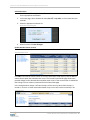
1. Visit the M2M Web site.
2. Click LOGIN in the top, right corner of the screen.
Top of the M2M Web site
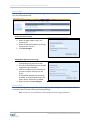
3. The LOGIN page displays. Click ACTIVATE A NEW DEVICE.
Account login page
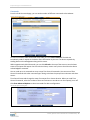
4. The Activation page displays. Enter the Activation Key. You will find the activation key, along
with the device ID, on the inside of the device door.
Infinity System User's Manual Rev.1.08302010 | 23
Step Three: Use the M2M Web Site to Setup Device Communication
Activation page
Inside of product door with device label
5. Select Create New Account. If you have an existing account, select Use Existing Account.
• If you click Create New Account, you must choose an airtime plan, set your billing type
and frequency, accept the terms and conditions, your billing information, and create a
username and password before proceeding with activation.
• If you click Use Existing Account, you must log in on the next page to proceed.
6. The device is now active. To set up scheduled reports or send commands to the device, log in to
the M2M Web site if you are not already.
Step Two: Log In to the M2M Web Site
To log in to your secure account on the M2M Web site, follow the instructions below.
1. Visit the M2M Web site.
2. Click LOGIN in the top, right corner of the screen.
Top of the M2M Web site
3. The LOGIN page displays. Enter your personal user name and password. You create these when
you activate your first device.
4. Click LOGIN. The Device List page displays.
Infinity System User's Manual Rev.1.5.09012010 | 24
Step Three: Use the M2M Web Site to Setup Device Communication
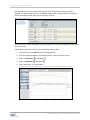
Device List
After clicking the LOGIN button, the Device List displays.
Device List page
This page shows a list of all devices assigned to this account. The Device List gives a quick overview of
the status of each device including the date and time of the last report and any current alarm states.
For more information on a specific device, go to the device's General Status page. To do this, click
one of the Device Names in the Device list. The General Status page for that device displays.
Note: If there is only one device in an account, the Device List might not display. Instead, you might
see the General Status page for the device.
View Monitored Inputs on the General Status Page
Once you install and turn on the device, it immediately begins to monitor its inputs. Within a few
seconds after an input changes state, it reports the change. This data is immediately available on the
device's General Status page.
Note: Click Refresh to update your page.
The General Status page is the primary window for viewing a monitored piece of equipment or
facility. It shows the status of each input and output at the time of the last report. The time and date
on each row shows when that status last changed.
Details page
Click Show More at the bottom of the page to see recent Diagnostics, device Configuration, and the
configuration of Reports.
Infinity System User's Manual Rev.1.5.09012010 | 25
Step Three: Use the M2M Web Site to Setup Device Communication
Step Three: Set Up the Device
To go to the Device Setup page, click Device on the M2M menu bar at the top of the screen and then
Setup.
The Device Setup page is where you begin the setup process where you can create custom labels,
enter your specific information, and create user notifications.
Device Data
Follow the steps below to name your device and enter its location information.
Device Data page
1. Click Edit.
2. Enter descriptive information
that will identify the device and
its location.
3. When finished, click Update.
Device Location
Follow the steps below to set the location of the device.
Device Location page
1. Click Step 2 > Device Location.
2. Do one of the following:
• Enter the latitude and
longitude coordinates of the
device, if you have them.
• If you do not have the exact
coordinates, you can click the
device marker ( )
and drag it to the correct
location on the map.
3. Click Save when finished.
Infinity System User's Manual Rev.1.5.09012010 | 26
Step Three: Use the M2M Web Site to Setup Device Communication
Phone & E-mail Contacts
This step allows you to create a "phone book" list of contact people with their telephone numbers
and e-mail addresses.
Contacts page
Add a Contact
1. On the Contacts page, click Add Phone Contact. To add an e-mail/text message contact
click Add E-mail/Text Message Address.
2. Enter the appropriate information for the contact when the dialog box displays.
New phone contact dialog box
New email/text message contact dialog box
3. For a phone contact, enter a number of Retries. This is the number of times that the
system will call the person unless the system receives an acknowledgement first.
4. To share the contact with others users that you can add, check the Shared Contact box.
5. Click Add Contact when finished.
Edit a Contact
1. To edit a contact, click the Edit button (
) to the right of the contact.
2. In the Edit Contact page, make the desired changes to the contact information.
3. When finished, click Update.
Delete a Contact
1. To delete a contact, click the Delete button (
) to the right of the contact.
2. When prompted to delete the contact, click OK.
Infinity System User's Manual Rev.1.5.09012010 | 27
Step Three: Use the M2M Web Site to Setup Device Communication
Contact Lists
The Contact List is a list of the phone numbers and e-mail addresses you want notified of an event.
You can create multiple lists. For example, you may want to create one list of just e-mail addresses
where you will send notifications of routine maintenance events and another list of phone contacts
for events that need faster responses.
You can add, edit, or delete lists at any time.
Add a Contact List
1. On the Contact List page, click Create New Contact List.
Contact List page
2. In the next page, select the contacts you want in the list. You can only select contacts that
you have previously added to your phone or e-mail/text message contacts.
3. Select a Time Delay for each contact. This is the amount of time after an event that the
contact will receive a notification.
Select contacts dialog box
4. When finished, click Save Changes.
Edit a Contact List
1. To edit a contact list, click the Edit button (
) to the right of the contact list.
2. In the next page, make the desired changes.
3. When finished, click Save Changes.
Delete a Contact List
1. To delete a contact list, click the Delete button (
) to the right of the contact list.
2. When prompted to delete the contact list, click OK.
Infinity System User's Manual Rev.1.5.09012010 | 28
Step Three: Use the M2M Web Site to Setup Device Communication
Display Settings
This page allows you to customize the labels assigned to all values reported by the device.
The assigned labels show anywhere that references the labeled inputs and outputs. It also allows
you to define scaling factors or offsets for the analog inputs.
Each input/output has an optional alarm state. The device's status, shown on the Device List page,
will change from Normal (green) to Alarm (red) when an alarm state occurs.
You can save common label settings as Shared Profiles and reuse them on other, similarly configured,
devices.
Connections tab on the Display Settings page
Custom Labels
Follow the steps below to add custom labels.
1. Click Edit next to the connection you want to label.
2. When the page reloads, type the Custom Label you want and select an alarm state from
the drop-down list. The default states are << Not Set >>, On, or Off.
Edit custom labels page
3. Click Update when finished to return to the previous page.
Infinity System User's Manual Rev.1.5.09012010 | 29
Step Three: Use the M2M Web Site to Setup Device Communication
Alarm State Labels
Follow the steps below to customize the alarm state labels.
1. Click Select next to the appropriate connection.
2. Click the Labels tab for that connection (next to the Connections tab).
Labels tab
3. Click Edit next to the appropriate label you want to change.
4. Type the custom label. When finished, click Update.
5. When the page reloads, click Edit next to the connection.
6. Select the newly labeled alarm state from the drop-down list.
Alarm drop-down
7. Click Update.
Customize Analog Inputs
While setting up the analog inputs, you can customize the analog display values. The analog
inputs report raw values that vary from 0-1023. While great for a machine, a human really wants
to see the final answer, such as temperature in degrees Fahrenheit, relative humidity, etc.
This option allows conversion of the raw values to meaningful data by one of two methods.
First, for linear data, a simple Scalar and Offset is specified. This method creates a linear
translation in the common form of y = mx + b, where m is the Scalar and b is the Offset (x is the
raw reported value and y is the displayed value).
Offsets can range from –10,000 to +10,000 and scalars can vary from 0.0001 to 1000. Offsets are
added to the raw value while scalars are multiplied times the raw value. The result will be the
displayed value.
Infinity System User's Manual Rev.1.5.09012010 | 30
Step Three: Use the M2M Web Site to Setup Device Communication
Second, for non-linear display data, a technician creates a custom Lookup Table with up to 1024
defined points. Each point from 0-1023 is translatable into meaningful values.
Each analog input can have a different Scalar and Offset or Lookup Table. Each analog input uses
only one method. If you specify a Lookup Table for an analog input, then the system ignores the
Scalar and Offset values.
This page also displays the units of measure, such as Degrees F, PSI, or RPM.
Customize Analog Inputs page
1. Click "Click here to customize Analog Inputs."
2. Click Edit next to the analog input you want to customize.
3. Edit the Slope, Offset, Units, Type, and apply a custom range as desired.
4. Click Update when finished.
Upload custom Lookup Table
1. To create a Lookup Table, click the Click here to upload a custom lookup list link on the
Customize Analog Inputs page.
2. A box displays with options allowing you to upload the file.
3. Create the file using Microsoft Excel or any spreadsheet software that creates commaseparate values (.csv) files. The file must contain two columns. The first column has whole
numbers from 0-1023 representing raw reported values. The second column has numbers
in the range of +/- 999999999.9999, representing the corresponding display values.
The file must have 1024 rows, one for each possible raw value in the range 0-1023.
Lookup Table upload dialog box
4. Click Upload File.
Infinity System User's Manual Rev.1.5.09012010 | 31
Step Three: Use the M2M Web Site to Setup Device Communication
Event Notifications
You can decide if you want notified of changes directly via phone message or e-mail. Check the
desired notifications from the list and click Edit to select a previously made Contact List.
Event Notifications page
The M2M Web site sends notification messages to the e-mail addresses or phone numbers you
specify. You can use an Internet e-mail address to send someone a regular e-mail message that
appears in his or her e-mail inbox. You can also use a pager e-mail address to send a text page
directly to a pager. Most modern pagers and cell phones have the ability to receive e-mailed pages.
For phone numbers, a tacky text-to-speech robot voice delivers the message to the lucky person who
answers the phone. The robot voice then asks the recipient to press the star (*) key. Pressing the star
key acknowledges that the system has done its job, that you got the message and are aware of the
problem. It also ends the call out process.
If you are an answering machine or you just do not want to press the button, the system will call the
next person on the list. This will continue until someone acknowledges the call or until everyone on
the list gets a call.
The order of the notification calls comes from the Time Delay specified in the Contact List,
not from the order the contacts are in on the list. The time delay is the number of minutes or hours
since the event occurred. Adding a few minutes between each voice call lets the system call one
person at a time and gives them enough time to acknowledge the event.
Enable/Disable Notifications
Click the checkbox next to the Enable/Disable Notifications icon ( ) to enable or disable
notifications for that device. If the checkbox is checked, notifications are on. If the checkbox is
empty, notifications are off. When checked, the icon changes to (
).
Note: M2M recommends enabling the "Device did not respond" notification. Enabling this
notification will let the contacts you specify know that the device is not responding to sent
commands. This can signal that there might be an issue with the device or power supply.
Infinity System User's Manual Rev.1.5.09012010 | 32
Step Three: Use the M2M Web Site to Setup Device Communication
Edit Notifications
1. Click Edit in the "Enable/Disable Notifications from the Website to a Contact List" column
for the appropriate notification.
2. In the next page, select the desired value (On, Off, * any value, or the custom label you
created).
3. Select the appropriate Contact List.
Notification setup dialog box
4. When finished, click Save Changes.
Enable/Disable Remote Control
The last column shown below allows the Lodestar to control another device in the same account.
Event Notification page
Click Edit in the Control Actions column to set up a command to send directly from the NOC to
another device when the selected event occurs. The Control Events Details page shows each
possible change for the selected value and what action occurs if the control action is enabled for
that change. You can send any command from the Commands page.
In the example below, Output 1 of Power Pump 1 will be set to On when Power Pump 1 is
turned on. There is no action taken when Power Pump 1 turns off, but there could be, if set.
Control Actions
Infinity System User's Manual Rev.1.5.09012010 | 33
Step Three: Use the M2M Web Site to Setup Device Communication
Device Groups
Use this page to move devices between existing groups and create new device groups, naming them
with any description desired.
Device Groups page
Create New Device Group
1. Click Create New Device Group.
2. When the page reloads, type in the
Group Name.
3. Select the appropriate device by clicking
the check box next to it.
4. Click Save Changes.
Create New Device Group dialog box
Add/Remove Devices from a Group
1. Click Add/Remove Devices under the
appropriate group you want to edit.
2. A list of the available devices not already
assigned to a group displays.
3. Click the checkbox next to the device(s)
you want to add or remove from the
group.
A checked box indicates the device will
be added, an unchecked box means the
device will be removed or not added.
4. When finished, click Save Changes.
Remote Config
The Remote Configuration page allows you to change the initial configuration of the inputs and timescheduled reports that was set during local programming.
Note: This option is only available for models equipped with data logging capabilities.
Infinity System User's Manual Rev.1.5.09012010 | 34
Step Three: Use the M2M Web Site to Setup Device Communication
Digital Inputs
The page reflects the
current digital inputs
configuration as
reported by the device.
Remote Configuration page showing Digital Inputs
Click Save All Digital
Config to save your
changes.
Analog Inputs
Click Analog Inputs to
display the configuration
menu. Click Save All
Analog Config to save
your changes.
Remote Configuration page showing Analog Inputs
Time-scheduled data logging report
If you ordered a product with
data logging capabilities, you
can click Time-scheduled data
logging report to display the
configuration menu. If your
device does not include data
logging, the Time-scheduled
data logging report section
does not display.
Remote Configuration page showing time-scheduled data logging report
section
Click Save Report Config to
save your changes.
Note: The device sends the
time-scheduled data logging
reports for all digital inputs
together.
Infinity System User's Manual Rev.1.5.09012010 | 35
Appendix A: Important Pages in the M2M Web Site
The Web site provides access to the data from the device 24-hours a day, seven days a week, from any
computer that has access to the Internet. You can use the site to set up monitoring functions, to request
a report from a device, and to set up automatic event notifications.
This section explains some of the key pages you will find in the Web site. Most of the Web pages are
self-explanatory, so feel free to explore!
Device History
This a complete history log for the unit. The history database includes the time, date, and complete
details for the following:
•
•
•
•
All reports received from the unit
All commands sent to the unit
All user notifications sent from the web server to e-mail address and phone numbers
A record of all acknowledgements of user notifications
From the menu bar, click Device, then History to display the History log.
The history report can display all calls or only the calls from a selected period. The first time you
log in, the device history pulls any available data for the last 30 days. After that, each time you log in,
the system will remember the last time range you previously selected.
Use the options under Display to select a new date range to view, then click Load. Values that have
changed since the last report will be in bold.
History log
Delete the History
History events are saved forever or until you delete them. To delete a date range of old history
events, click Delete.
Download the History
Click Export History to download a .csv formatted file of all history events in the specified date range.
Infinity System User's Manual Rev.1.08302010 | 36
Important Pages in the M2M Web Site
Commands
From the Send Commands page, you can send a number of different commands to the Lodestar.
Control Commands page
To send a command, select the desired command(s) and click Send Command. The Web site
immediately sends a request to the device after confirmation by the user. The device responds by
sending back an acknowledgement along with its status.
Within approximately 90-120 seconds, you can click Refresh at the top of the screen to see the latest
status of the inputs and outputs. Go to the Device History screen at any time to check that the device
acknowledged a command.
You can send up to six commands at once, except Time Control Commands. You cannot send Time
Control Commands with other command types. Doing so violates the space/time continuum and chaos
ensues.
Time Control Commands change the state of an output for a chosen duration. When you send Time
Control Commands, select the number of hours and minutes or seconds to turn the output(s) on or off.
Click Show Advanced Options to select commands for device configuration.
Advanced Options dialog box
Infinity System User's Manual Rev.1.5.09012010 | 37
Important Pages in the M2M Web Site
Set Time-scheduled Commands
You can schedule commands to occur at a specific time or to recur at scheduled intervals.
Scheduled Commands dialog box
1. Select at least one of the commands in the
Timed Control Commands section. Set the
hours, minutes, and seconds as desired.
2. Click Schedule Command and select the
appropriate time and frequency of the desired
command(s).
3. Click Save Schedule when finished.
Main Menu > Account Info
The Account Info page provides access to the account level information. From the main menu,
click Account, and then Account Info.
Account Info page
This information describes the owner of the account, not information about the specific unit.
The five-digit Voice Personal Identification Number (PIN) is your secret code that allows you to
access information over any telephone line. For more information on using your PIN, see the
Monitor and Control the Lodestar via Inbound Telephone section.
Click Billing in the menu to make changes to your personal information. When finished, click Save.
User Management
From the Main Menu, click Account, then Manage Users. From that page, you can create new users and
give them one of the three levels of authorization. The original account name is the Root User.
Infinity System User's Manual Rev.1.5.09012010 | 38
Important Pages in the M2M Web Site
Manage Users page
Access Levels
Four levels of access are available to accounts. There can be as many passwords as necessary.
View Only
View and Report
Administrator
Root Administrator
Allows the user to view the current data and the history log. They
cannot send commands or request reports from the unit.
Allows the user to view all data and send control commands and
requests for data.
Allows the user access to all pages and functions including the setup
pages.
The overall administrator for the entire account.
Edit Users
From this page, the administrator can organize groups that sub-users can control or view.
1.
Click the Edit (
displays
) icon to the right of a user to edit that user's settings. The Edit User's page
Edit Users page
2.
When finished entering the user's information, click Save.
3.
A dialog box displays where you assign the user a password. Type in a password and click Save.
Infinity System User's Manual Rev.1.5.09012010 | 39
Important Pages in the M2M Web Site
Chart Reports (Data Logging)
Eventually you might want to fine-tune your scheduled commands to the device or make an adjustment
here and there. The Data Logger function collects, saves, and displays historical data as well as the most
current readings from the device, allowing you to see trends in how your device and the equipment it
controls operates. If you are over-watering, under-watering, or allowing too much or too little pressure
to build, you can see that at a glance using the data logging device's built-in charting ability.
At predetermined intervals (one-minute for hardwired sensors and 15-minutes for wireless sensors),
the system reads and saves the on/off state of all equipment, plus the measured value of each sensor
value. The device averages and saves the one-minute readings as 15, 30, and 60-minute averages.
This allows you to create custom charts that show the 15, 30 or 60-minute averaged readings.
You can use the data logging function to do the following:
•
•
•
Request data reports from a specific starting date and time.
Schedule periodic report requests from the Web site at various hourly frequencies (1, 12, 24, or 48
hours) with the data reported in intervals of 15, 30, or 60 minutes.
Request reports for specific sensors.
Reported data is stored permanently, or until you delete it, at the M2M Web site. You can display the
data in a chart by the desired date range.
The humidity rate displays above a simple temperature reading
Two charting options
You have two options when creating data charts, to use stored historical data or to request current
data from the device.
Create a chart using historical data
The amount and timeliness of the historical data available for charting depends upon how often
the device is set to send reports to the NOC. When you use the M2M Web site to setup the
device, you set the reporting frequency for the inputs during Remote Config. If you set the device
to report once every 24 hours, you will have less historical data than if the device reports every 12
hours. The data will also be less current since the data you see could be up to
23 hours old.
In the example shown below, the user enabled the three analog inputs that have custom labels
and set the device to send humidity and brightness input reports every 12 hours.
Infinity System User's Manual Rev.1.5.09012010 | 40
Important Pages in the M2M Web Site
The temperature in Celsius report sends every 24 hours. Reporting for analog input four is
disabled. The digital output and any slaved digital outputs send in a single report. The example
below has the digital input report set to send every 12 hours.
Example reporting options
Once the device is setup, recording, and reporting data, you can start charting data as soon as the
first report sends.
Follow these instructions to create a chart displaying historical data.
1. In the menu bar, click Reports. The Chart page displays.
2. From the analog and digital inputs listed to the left, select the inputs to chart.
3. Select the Start Date (
4. Select the End Date (
) and Time (
) and Time (
).
).
5. Click Create Chart. The chart displays.
A light level reading, labeled Brightness, overlays historical humidity and temperature reading
Infinity System User's Manual Rev.1.5.09012010 | 41
Important Pages in the M2M Web Site
Create a chart using current data
To see current data from the device, follow the steps below.
1. In the menu bar, click Reports. The Chart page displays.
2. Click Request Recent Data from the Unit.
3. Select the input you want recent data for from the Channel drop-down list.
4. Select the Start Date (
) and Time (
) that you want data for.
5. Select the timed- average (one minute, 15, 30, or 60-minutes) you want from the Data
Interval drop-down list.
6. Click Request Data From Device.
7. In the upper-left side of the screen, a box displays telling you that the Web site is
requesting your data from the device. This usually takes 20-30 seconds but might take
several minutes depending on how busy the cellular or satellite communications network
is. When the box displays "Finished" or disappears, you can proceed with the next step.
8. From the analog and digital inputs listed to the left, select the input for which you
requested data.
9. Select the Start Date (
) and nearest Time (
) that matches your data request.
10. To request current data for other inputs, repeat steps 3-8, selecting each input you want to
chart in step 8.
11. Click Create Chart. The chart displays with the current data.
Infinity System User's Manual Rev.1.5.09012010 | 42
Important Pages in the M2M Web Site
Sample chart with requested data
Export data to a spreadsheet
If you need to share data with someone else or just want to keep your own data archive, you can
export the values displayed on the chart to a simple .CSV (Excel-compatible) file that contains the
selected data. You can also use Excel, or other spreadsheet programs, to plot the data in your own
choice of format.
Sample .CSV file
To export the data to a .CSV follow the steps below.
1. Once you have created a chart, click Export Data.
2. When prompted by your browser to open or save the file, click the option to save the file.
3. Save the file to an easy-to-remember place in your computer.
4. Once the download is complete, you can open the file.
Infinity System User's Manual Rev.1.5.09012010 | 43
Appendix B: Monitor and Control the Lodestar via Inbound Telephone
In addition to receiving phone calls and user notifications from the M2M system via telephone,
you can dial directly into the M2M Network Operations Center at any time using any telephone in
North America.
The toll-free number is 1-877-747-9500.
Call this number to do the following:
•
•
Listen to the status of all selected inputs and outputs.
Turn any output on or off.
When the system answers your call, it will ask for your Voice Personal Identification Number or PIN.
This number is available on the Account Information page.
PIN Location
After entering your Voice PIN, you will hear a list of options including listening to the status of the
monitored inputs and controlling the outputs.
The voice service provides you with the available options and which keys to press to select each option.
Note: At anytime during the phone session, press the Pound (#) key to return to the previous option.
Infinity System User's Manual Rev.1.08302010 | 44
Tech Support
For assistance, questions, or suggestions, contact us at 208-947-9500. Office hours are 8:00 am 5:00 pm MST, Monday through Friday. For prompt answers by e-mail, submit carefully described
problems to [email protected].
Troubleshooting Procedure
Follow the steps below to troubleshoot the device.
Step One: Perform a Visual Inspection
Follow ALL of the steps below to perform a visual inspection of the device.
1. Turn power off to the device.
2. Visually inspect all wiring to ensure that the connections are tight.
3. If connections are loose, shut off the main panel power to the M2M device, tighten the
connections, and turn the power to the M2M device back on.
4. Visually inspect the circuit assembly for ANY blown or burnt components or circuit board traces.
5. Inspect Relay at OUT1 for burn marks.
6. Inspect the digital input and the smaller transformer for burn or brown marks.
7. Inspect the circuit board around the Main transformer, IN1 and OUT1 for any deformities.
8. REJECT any device to an RMA case that has burns or deformities and replace the field device
with a new unit.
9. Verify the Pwr LED is ON.
Pwr LED is Not Lit (On)
Follow the steps below if the Pwr LED in NOT lit.
1. Shut off the main panel power to the M2M device.
2. Inspect the Main power transformer for burn marks or deformities in the yellow tape wrap
over the coil windings.
3. If the main power transformer shows burns or deformities, reject the device to an RMA case
in the CRM system and replace the device in the field.
4. Using a Digital Volt Meter (DVM), check continuity on the main input fuse(s). Replace
defective fuses with 600V/3A rated parts.
Step Two: Perform a Communications Test
Follow the steps below to test the device’s signal strength and determine if the device is communicating
with the NOC.
1. Connect to the M2M device with a laptop computer and a terminal program.
2. Verify the “Status OK” message is present.
3. Enter into the device menu.
4. Follow the steps below for the appropriate radio type.
You should run the communications several times with a high percentage of successes.
Infinity System User's Manual Rev.1.08302010 | 45
Lodestar Troubleshooting
Satellite Units
1. Verify that the modem has a signal by pressing zero (0) to select “Check Signal Strength.”
2. After checking the signal, the unit returns a number between 0-5. Zero (0) means there is no
signal and 5 means there is a strong signal.
Note: It is possible to see a temporary “window” of no satellite coverage for 5-10 minutes.
During this time, the reading can be zero (0) or low. This is okay.
3. Press 1 to select “Send Test Report.” The device will build a report and send it to the M2M NOC.
It will then wait for the response from the M2M NOC to be successful.
4. Once a successful transmission is completed, press m to return to the main menu. If the
communications test takes a long time (more than three minutes), the unit might need a highgain antenna. Generally, the communications test should pass every time, not just occasionally.
If not, the unit might need a high-gain antenna.
M200/M300 Kyocera CDMA Units:
1. Press zero (0) to select menu option “0-Check Cell Service.” The Device starts sampling cellular
signal strength.
2. The signal should be -96 dB or better. If not, install a high-gain antenna.
•
Decibel (dB) numbers are negative, so lower numbers are stronger signals.
•
RSSI numbers are positive, so larger numbers are stronger.
•
To convert the radio’s RSSI value to dB, simply add it to -114 dB.
Example:
an RSSI of 20 = - 94
20 + -114 = -94
•
No signal at all is RSSI = 0 or -114 dB.
•
If the factory antenna installed inside the housing is resulting in poor signal strength, the
unit might need a high-gain antenna to improve signal quality.
3. Press any key.
4. Once an acceptable signal has been verified, press 1 to select menu option “1-Full
Communications Test.”
This sends a report to the M2M NOC and the device waits for a response from the M2M NOC to
be successful.
5. Once the “Test Passed” message shows, press m to return to the main device menu.
If the communications test takes a long time (more than three minutes), the unit might need a
high-gain antenna. Generally, the communications test should pass every time, not just
occasionally. If not, the unit might need a high-gain antenna.
Infinity System User's Manual Rev.1.5.09012010 | 46
Lodestar Troubleshooting
Motorola (C24) CDMA Units:
1. From the main device menu, press 1 to select menu option “1-Modem Utility Menu.”
This displays the communications menu.
2. Press 1 to select menu option “1-Check Cell Service.” The device starts sampling cellular signal
strength.
3. If the use of the factory antenna is resulting in poor signal strength, the unit might need a highgain antenna to improve signal quality.
4. Press any key.
5. Once an acceptable signal has been reached/verified, press 3 to select menu option “3-Full
Communications Test.” This sends a device report to the M2M NOC. Then the device waits for a
response from the M2M NOC to be successful.
6. Once the “Test Passed” message is shown, press m to return to the main device menu.
If the communications test takes a long time (more than three minutes), the unit might need a
high-gain antenna. Generally, the communications test should pass every time, not just
occasionally. If not, the unit might need a high-gain antenna.
Step Three: Functional Test
Follow the steps below top perform the functional test while in the local program menu within a
terminal program.
Use caution when turning pumps on and off. There are minimum off times required
before restarting a pump. Rapidly cycling a pump off and on can damage the pump.
Verify that the connected equipment can be turned on and off without causing any
equipment damage.
Select Control Outputs.
Press 1 to select output 1 and then zero (0). This turns the pump OFF.
Press m to return to the main menu.
Select Read & Set I/O Values. Verify that the input reading is at, or close to, zero (0).
Press m to return to the main menu
Select Control Outputs.
Press 1 and then 1 again to turn the pump ON.
Press m to return to the main menu
Select Read & Set I/O Values. Depending on the measured input voltage, the reading can range
from 250 up to 1023.
10. Verify that the input reading changes with the input voltage changes.
1.
2.
3.
4.
5.
6.
7.
8.
9.
Infinity System User's Manual Rev.1.5.09012010 | 47
Lodestar Troubleshooting
Lodestar Troubleshooting Tips
Troubleshooting with a Computer
The best way to troubleshoot the device is to allow the unit to display the status messages to the
computer. These messages will tell you what the unit is thinking and doing.
If you do not have a computer with you, the on-board LEDs indicate key operating events and can be
useful in troubleshooting and system testing. More information about troubleshooting using the LEDs
is available in the Troubleshooting Transmission or Cellular Reception Problems section.
1. Verify that the device has power. There is a green “PWR” LED. It should be ON.
2. Verify that the antenna is tightly connected.
3. On the computer, open the terminal emulator program. Terminal emulator programs include
HyperTerminal, Tera Term, Putty, and many others. Commercially available terminal emulator
programs such as ProComm or Hyper Access may offer features that are more advanced.
4. Set the terminal communications settings to:
•
•
•
•
•
38,400 baud
8 bits
1 stop bit
No parity
No flow control
5. Verify the communication port is set to the serial port where you connected the cable,
and there are no conflicts with other serial devices such as a modem.
6. Use a 9-pin serial cable/adapter to connect the Lodestar to the computer's serial port.
9-pin serial to USB adapter
7. When the communication program is running AND the connector is connected, the Lodestar
automatically detects the computer. Both the red and green RSSI LEDs turn on and the device
enters the local programming mode.
8. Press Enter to display the following menu:
9. Press 8 to select Display Status Messages. The Lodestar starts sending status messages to the
computer as conditions change or events occur. These messages help you understand what
the system is doing and are useful for troubleshooting.
Note: If you turn the device on with the computer and terminal emulator already on,
the Lodestar automatically starts sending these messages. If not, press 9 on the main menu.
Infinity System User's Manual Rev.1.5.09012010 | 48
Lodestar Troubleshooting
Watch these messages carefully. If the device appears not to be operating correctly,
these messages should explain the problem. A significant (bad) message might display
and then scroll on by. This does not mean that it was unimportant!
Note: To stop the status messages and return to the menu, press any key.
9. Correct any issues indicated by the status messages.
10. Test the device again. If the device still is not operating correctly, contact M2M technical
support at 208-947-9500. Office hours are 8:00 am - 5:00 pm MST, Monday - Friday.
For prompt answers by e-mail, please submit carefully described problems to
[email protected].
Troubleshooting Transmission or Cellular Reception Problems
The M121 should operate anywhere there is cell coverage and the Iridium version operates anywhere it
can see the sky. Both the Lodestar and the cellular/Internet transport system have proven to be very
reliable and repeatable. In general, once the installation is set up and working, there are no ongoing
problems. There are two categories of installation problems:
•
•
Transmission or reception problems at the device level.
Data lost in the carrier system.
Experience has shown that transmission or reception problems fall into one of two areas:
•
•
Inadequate signal strength.
Too much signal strength.
Inadequate Signal Strength
If you are installing the device in a remote location like Siberia, there may not be adequate signal
strength. In this case, the RSSI will be less than or equal to –105 db. This is actually a rare problem in
most of North America. To fix this, M2M has a variety of pre-tested, higher gain and/or directional
antennas available.
Too Much Signal Strength
This is a more common problem, related to installations that are very close to cell towers and/or
environments with nearby metal structures. Common examples are installations inside metal
buildings or in buildings with internal metal structures or large metal objects nearby.
The problem occurs when the device's transmission echoes from the nearby metal and effectively
sends several simultaneous messages (echoes) to the cell tower. The cell tower gets confused and
rejects the call. The solution to this is to move the antenna to a different location inside or outside of
the building until you find a good transmission point. Happy hunting! Luckily, you usually have to
move the antenna only a few inches.
If the Status Message or Green LED Indicates a Good Transmission
If the device receives a positive acknowledgement from the cell tower and lights the green LED for
one second, it has done its job. The cellular network sent, received, and acknowledged the data.
If the data fails to display at the M2M Web site, the data may be getting lost in the carrier network.
Like winning the lottery, this is uncommon, but does occasionally happen in new installations.
Contact M2M Technical Support and we will track it down for you.
Infinity System User's Manual Rev.1.5.09012010 | 49