1
Date and Time
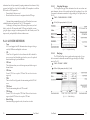
• Distance and Bearing from current vessel's position
Pressing 'ENTER' it is possible, by selecting "DELETE" deletes the DSC
icon from the DSC Log page, otherwise by selecting "DSC LOG" the DSC Log page
is shown.
•
Select your preferred setting among the NMEA available settings NMEA
0183 4800-N81-N, NMEA 0180, NMEA 0180/CDX (the default setting is NMEA
0183 4800-N81-N) and press 'ENTER' to confirm.
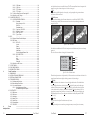
2.5.3 EXTERNAL NMEA CONNECTIONS
Select one of the available Ports and connect the EXTERNAL NMEA wires to
selected port signals. For example to connect the EXTERNAL NMEA to PORT
2 connector (serial Port 3) see the following picture:
5.7 C-STAFF MENU
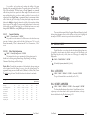
The C-Staff functions are based on STAFF Concept ® (Satellite Tracking Aided
Fleet Fishing). The STAFF Concept ® is designed for professional fishing purpose to
allow monitoring the position of the vessels of a fleet from each vessel (the fleet may have
until 20 vessels max).
'MENU' + 'MENU' +"ADVANCED" + 'ENTER' + "C-STAFF" + 'ENTER'
For more information see the specific User Manual.
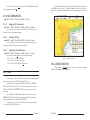
Fig. 2.5.3 - External NMEA Connections on serial Port 3
Then choose your preferred setting for input format following the procedure:
'MENU' + 'MENU' + "ADVANCED" + 'ENTER' + "INPUT/OUTPUT" + 'ENTER'
+ "Port 3 Input" + 'ENTER'
5.8 FISH FINDER MENU
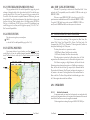
The chart plotter combined with the sonar performance of the Fish Finder is one
of the most advanced marine navigation system available.
To select the Fish Finder menu, first select one of the pages related to the
Fish Finder and then once the Fish Finder page is selected, access the Fish Finder
menu by pressing:
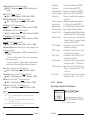
Select your setting among the NMEA available settings NMEA 1200-N81N, NMEA 4800-N81-N, NMEA 4800-N82-N, NMEA 9600-O81-N, NMEA 9600N81-N (the default setting is 4800-N81-N) and press 'ENTER' to confirm.
Now set the output format to the same input format following the procedure:
'MENU' + 'MENU' + "ADVANCED" + 'ENTER' + "INPUT/OUTPUT" +
'ENTER' + "Port 3 Output" + 'ENTER'
'MENU'
For more information see the specific User Manual.
2.5.4 C-COM CONNECTIONS
Note
The Fish Finder display page is available only if the Fish Finder is connected and powered On.
To connect the modem C-COM to the chart plotter follow the procedure:
1. Connect Power & I/O as follows:
5.9 RADAR SETUP MENU
The Radar consists of a scanner unit which illuminates targets with micro- wave
energy and then collects the echoes from those targets. The scanner unit in- cludes the
Radar antenna, transmitter, receiver and necessary electronics. The scan- ner unit is
connected to a chart plotter equipped with software capable of displaying
106
User Manual
Fig. 2.5.4 - C-COM Connection
Note
The connection is valid for the C-COM IR and C-COM RS232 too.
2. Into the Input/Output menu, set the C-COM for Port 1 as follows:
User Manual
23