1
7: BASIC INSTRUCTIONS
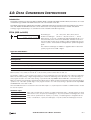
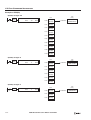
CUDD (Double-Word Up/Down Selection Reversible Counter)
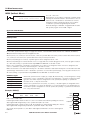
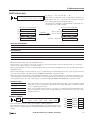
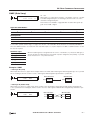
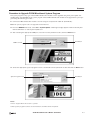
The double-word up/down selection reversible counter CUDD has a selection input to switch the up/down gate, so that
three inputs are required. The circuit for a double-word up/down selection reversible counter must be programmed in the
following order: preset input, pulse input, up/down selection input, the CUDD instruction, and a counter number C0
through C254, followed by a counter preset value from 0 to 4,294,967,295.
The preset value can be designated using a constant or a data register. When a data register is used, the double-word data of
two consecutive data registers becomes the preset value.
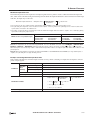
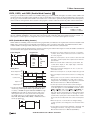
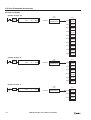
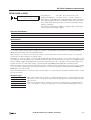
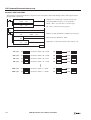
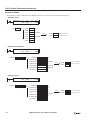
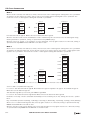
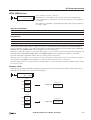
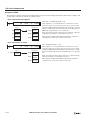
Ladder Diagram
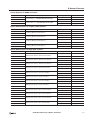
• Double-word counter instructions use two con-
Program List
Preset Input
Instruction
LOD
LOD
LOD
CUDD
CUDD C4
100000
I0
Pulse Input
I1
Data
I0
I1
I2
C4
100000
I3
C4
Q2
U/D Selection
LOD
AND
OUT
I2
I3
C4
secutive counters, and counters cannot be
used more than once in a user program.
• The preset input must be turned on initially so
that the current value returns to the preset
value.
• The preset input must be turned off before
counting may begin.
• The up mode is selected when the up/down
selection input is on.
Q2
• The down mode is selected when the up/down
selection input is off.
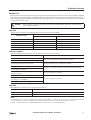
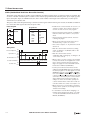
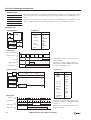
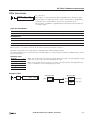
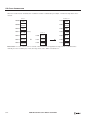
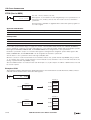
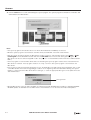
Timing Chart
• The counter output is on only when the current
Preset Input I0
ON
OFF
Up Pulse I1
ON
OFF
Down Pulse I2
ON
OFF
Counter C4 Value
Counter C4
value is 0.
• After the current value reaches 0 (counting
down), it changes to 4,294,967,295 on the
next count down.
•••
• After the current value reaches
100000 100001 100000 99999
•••
0
1 100000 100000
4,294,967,295 (counting up), it changes to 0
on the next count up.
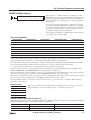
• When power is off, the counter’s current value
ON
OFF
is held, and can also be designated as “clear”
type counters using the Function Area Settings. See page 5-4 of the FC5A MicroSmart
Pentra User’s Manual (FC9Y-B927).
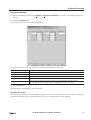
• Counter preset and current values can be
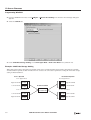
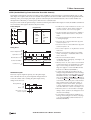
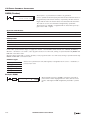
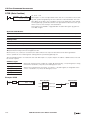
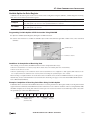
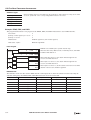
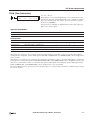
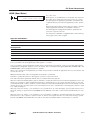
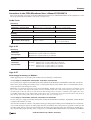
Valid Pulse Inputs
The reset or preset input has priority over the pulse input.
One scan after the reset or preset input has changed from on
to off, the counter starts counting the pulse inputs as they
change from off to on.
Reset/Preset
ON
OFF
Pulse
ON
OFF
Valid
More than one scan
time is required.
Invalid
Valid
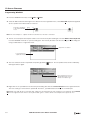
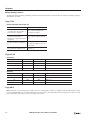
changed using WindLDR without downloading
the entire program to the CPU again. From the
WindLDR menu bar, select Online > Monitor,
then select Online > Point Write. To change a
counter preset value, select DEC(D) in the pulldown list box and specify the counter number
with a capital C and a new preset value. To
change a counter current value, specify the
counter number with a small c and a new current value while the counter reset input is off.
• When the preset or current value is changed
during counter operation, the change becomes
effective immediately.
• For the data movement when changing, confirming, and clearing preset values, see page
7-13 of the FC5A MicroSmart Pentra User’s
Manual (FC9Y-B927).
FC5A MICROSMART USER’S MANUAL SUPPLEMENT
7-5