1
WPL 304 User Manual
5.2 Print Quality
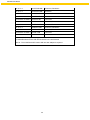
Problem
Possible Cause
Check if interface cable is well
Recovery Procedure
Re-connect cable to interface.
connected to the interface connector.
Not Printing
The serial port cable pin configuration is
Please replace the cable with pin to pin
not pin to pin connected.
connected.
The serial port setting is not consistent
Please reset the serial port setting.
between host and printer.
The port specified in the Windows driver Select the correct printer port in the
No print on the label
is not correct.
driver.
The Ethernet IP, subnet mask, gateway
Configure the IP, subnet mask and
is not configured properly.
gateway.
Label or ribbon loaded not correctly.
Ribbon run out.
Continuous feeding
labels
Follow the instructions in loading the
media or loading the ribbon.
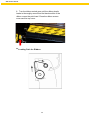
Loading the ribbon.
The printer setting may go wrong.
Gap/black mark sensor sensitivity is not
Please do the initialization and
gap/black mark calibration.
Calibrate the gap/black mark sensor.
set properly (sensor sensitivity is not
enough)
Paper Jam
Make sure label size is set properly.
Set label size exactly as installed paper
in the labeling software or program.
Labels may be stuck inside the printer
Remove the stuck label.
mechanism near the sensor area.
Poor Print Quality Top cover is not closed properly.
Close the top cover completely and
make sure the right side and left side
levers are latched properly
Check if supply is loaded correctly.
Reload the supply.
Ribbon and media are incompatible.
Change the ribbon or label
combination.
Clean the print head.
Check if dust or adhesives are
accumulated on the print head.
Check if print density is set properly.
Check print head test pattern if head
element is damaged.
35
Adjust the print density and print
speed.
Run printer self-test and check the print
head test pattern if there is dot missing
in the pattern.