1
eBOS User Manual
Admin & Payroll Functions
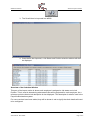
5. Select the General tab. As shown below the employee would have a temporary
Payroll Number
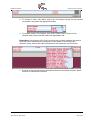
6. Select Edit from the menu, and then enter the 3 digit payroll number. (In this
example the Payroll number will be changed to 123)
7. Once the new payroll number has been entered, select Save.
8. The employee details have now been correctly configured.
9. To make sure that the Payroll system also has the new employee’s details, an
Employee Detail Listing will need to be printed and sent to the Administration
office. This report can be located in the Labour, Reports menu. Please also send
to the Payroll administrator the other required documentation for this employee
(Eg Application Form, Tax declaration etc).
© 2006 McDonald’s Australia Ltd
Author/Owner: Ben Holden
Version: August 2006
Page: 8 of 8