1
The user can now select the desired instrument
components among the ones currently available in the
component database. Since the whole workbench is virtually
simulated, i.e., not only the instruments but also the measured
signals, the user must select also the desired simulators of
virtual signal generators. These components are connected in
the standard framework provided by the system.
Configuration of the virtual bench is now sent to a CGI script
on the server for analysis, dynamic linking of the selected
components, and creation of the file containing the virtual
bench definition for the simulation engine. The file is stored
in a compressed format to limit the network overhead during
downloading. The server holds the workbench files of each
user in a separate directory to allow subsequent reuse of
definitions while avoiding overriding among different users.
A result HTML page is generated and presented to the user: it
contains the link to the files on the server for the simulation
engine. By clicking on such a link, the user can download
such a file (about 100 kBytes) and start the simulation as
discussed above.
The simulation engine executes the virtual instrument
definition created by the user. At first, the engine reads the
configuration file and sets up its internal parameters and
configuration to accommodate the instrument structure for the
simulation. Then, it loads the definition of the instrument
components and creates the data structures supporting
efficient simulation. The instrument simulation is performed
and the connection to the server is verified for periodic
authorization checking. During the first part of each
simulation cycle, the signal generators are executed to create
input signals for the instruments, which are run during the
second part of the cycle. The simulation continues until the
user hits the OFF or the EXIT buttons. In the first case, the
simulation is suspended; in the second one, it is terminated,
the whole environment is cleared, and the server connection
closed.
To support the interconncction of clients to the server,
standard protocols widely adopted in the worldwide
community are used. This allows any perspective user of the
simulation environment for virtual laboratories to simply plug
his client computer to the international network and obtain the
simulation environment and the instrumentation components
directly from the server without any preliminary acquisition
of specific software.
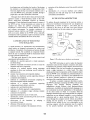
The standard protocols for networking adopted in our
work are at different levels as shown in Figure 4 [2,5,6]:
4
TCP/IP defines the physical interconnection, data
transfer and message routing management. This is the
typical protocol suite adopted in any Unix network as
well as in the standard Internet.
4
FTP specifies the file transfer method between computers
on the TCPAP protocol suite, It is used to move long
messages containing files around the network: in this
case, it is used to transfer the simulation engine and the
components from the server database to the clients.
.
HTTP is the application protocol defining the connection
to the web server and the transfer methods for hypertexts
between client and server by using the TCP/IP protocol
suite as well as the FTP whenever necessary for large
data.
Client
Server
Web Browser
Web Server
Component list
Virtual
Laboratory
Environment
Components
Instruments
I
Laboratory
Simulation
Vutua'
I
Figure 4: The network protocol hierarchy
One of the most critical issues in using a networked
environment over a standard open network is security [ 1,2,6].
This widely studied problem concerns the privacy of data and
programs (in this case, the necessity of guaranteeing the
intellectual property both of the simulation engine and the
instrument components as well as the passwords), the
dissemination of viruses, and the attacks of hackers.
To guarantee privacy, encryption methods can be
adopted to protect the communications between server and
client; this requires that both the server and the clients use the
same secure data encryption mechanism. In the implemented
system, the SHTTP protocol (Secure HTTP, integrated in the
standard HTTP environments) was used, even if it is specific
for hypertexts. Higher security techniques could be
envisioned but their costs and their limited availability
discourage their application.
To protect the copyright on the simulation engine
software and the virtual instruments, the concept of floating
license was adopted. A given number of licenses are
associated to the server and paid by the server owner. When a
connection is authorized, one of the licenses is considered
used by such a connection. No more than the given number of
licenses can be simultaneously running, i.e., no more than
such a number of users can run the simulation environment of
the virtual laboratory. To guarantee that this limit is never
exceeded, the engine running on the client frequently contact
the authorization daemon on the server to verify the user
authorization: if negative or no answer is received from the
server, the simulation engine aborts its operations.
Authorization is validated by encrypted mcssage exchange
between the client and the server, according to a suitable
encoding and checking protocol. This reduces the overall data
transferred between server and client at the beginning of the
simulation, because the engine can be freely distributed and
stored on the clients without breaking copyrights. On the
106