1
3.
3.1
HARDWARE INSTALLATION
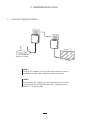
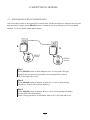
ESTABLISH POWERLINE NETWORK
Smart TV
Modem / Router
Step 1
Plug the PLC adapter into AC outlet and connect to router or
broadband modem with an Ethernet cable (provided)
Step 2
Plug another PLC adapter into AC outlet and connect it with
networked device such as Blu-ray player, Gaming console,
Smart TV, or Set-Top Box.
7