1
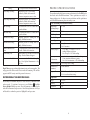
Message
Description and Recommended Action
Probe Temp over range
Temperature is over 50°C or reading
erroneously. Check cable connection
and ensure temperature sensor is clean.
Probe Temp under range
Temperature is under -5°C or reading
erroneously. Check cable connection
and ensure temperature sensor is clean.
P robe S pecifications
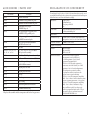
The specifications listed below are system specifications for the ProOBOD probe
when used with a ProODO instrument. These specifications are subject to
change without notice. For the most recent specifications and for specifications
on the ProODO instrument, please visit www.ysi.com.
Probe (ProOBOD probe and cable Assembly)
DO over range
DO% saturation is over 550%. Check sensor
cap and recalibrate.
Temperature
Operating Range
10 - 40°C
DO under range
DO% saturation is under -5%. Check sensor
cap and recalibrate.
Water Resistance
IP-65
Barometer over range
Barometric pressure is reading over 988
mmHg. Calibrate barometer.
Cable Length
2 meters (6.56 feet)
Dissolved Oxygen
Barometer under range
Barometric pressure is reading under 375
mmHg. Calibrate barometer.
ODO Communications
Error
No communication between the instrument
and cable. Check cable connection.
Clock Battery Low
Internal battery for real time clock has low
voltage. Contact Technical Support.
Measurements Locked!
Measurements are held in Manual Sampling
mode. Select Update Measurements or Log
Held Data.
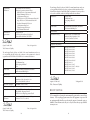
Range
0-50 mg/L
0-500 % Saturation
Accuracy (mg/L)
•
0 to 20 mg/L: ± 0.1 mg/L or ± 1% of
reading, whichever is greater.
20 to 50 mg/L: ± 15% of the reading
Accuracy
(% Saturation)
•
Resolution (mg/L)
0.01 or 0.1 mg/L (auto-scaling)
Resolution (%
Saturation)
0.1% air saturation
Response Time
T95 = 20-25 seconds with stirring;
T95 = 40 seconds without stirring.
•
0 to 200% air saturation: ± 1% of the reading or ±
1% air saturation, whichever is greater.
200 to 500% air saturation: ± 15% of the reading
Temperature
Restore Default Calibration Values
14
Optical, Life-time Luminescent sensor
•
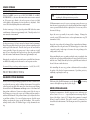
Illegal Value may appear during alpha/numeric entry on the message line. This
only appears if the values entered do not match the formatting. This will also
appear in the GLP security area if the password is incorrect.
Occasionally, the instrument may need to have the factory calibration default
values restored. To perform a factory reset, press Calibrate
, highlight
Restore Default Cal and press enter. Select the parameter you wish to restore,
either DO or Barometer, and press enter. After selecting barometer or DO, you
will be asked to confirm the operation. Highlight Yes and press enter.
Sensor Type
Range
-5 to 50°C
Accuracy
± 0.2°C
Resolution
0.1°C
15