1
User Manual
CANopen / PROFIBUS Slave
Document code: MN67427_ENG
Revision 1.000
Page 18 of 29
Industrial Electronic Devices
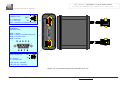
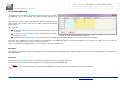
SET NODE GUARDING:
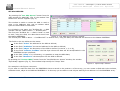
By pressing the “Set Node Guarding” button from the main window
for SW67427 (Fig. 2) the window “Set Node Guarding” appears (Fig.
9).
This window is used to select the CANopen devices checked with the
Node Guard. This function need to be enable in General parameter
section (Fig. 3).
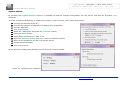
The fields are:
In the field “Node ID” insert the ID of the CANopen device to
be check;
In the field “Guard Time” insert the delay time of Node
Guarding request;
Figure 9: “Set Node Guarding” window
In the field “Life Time Factor” insert the number of attempts without answer before to count the CANopen device offline;
The state of the CANopen devices are saved in the last bytes of the PROFIBUS data. If you have until 8 devices to check it use 1 byte, if you have until 16
devices it use 2 bytes and so on until 4 bytes (32 devices).
Every bit rappresent a CANopen device, if it is present it equal to 1 otherwise 0.
EDS FILE:
By pressing the “EDS File” button it is possible to save the EDS file for the CANopen side. With this feature you can save the configuration of the gateway of
the CANopen side.
GSD FILE:
By pressing the “GSD File” button it is possible to save the GSD file for the PROFIBUS side.
With this feature you can save the configuration of the gateway of the PROFIBUS side.
Note:
When you import the .gsd file on your Master PROFIBUS you have to add all the modules that are present inside it.
ADFweb.com Srl – IT31010 – Mareno – Treviso
INFO: www.adfweb.com
Phone +39.0438.30.91.31